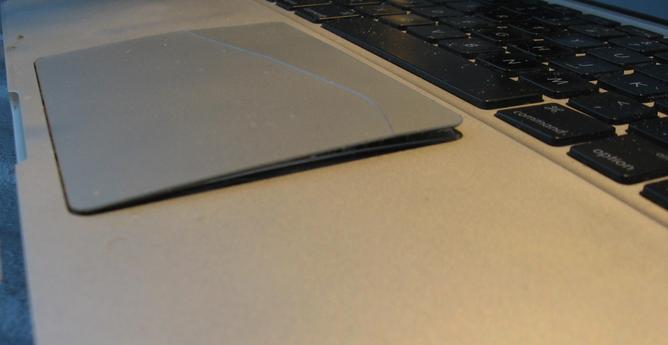
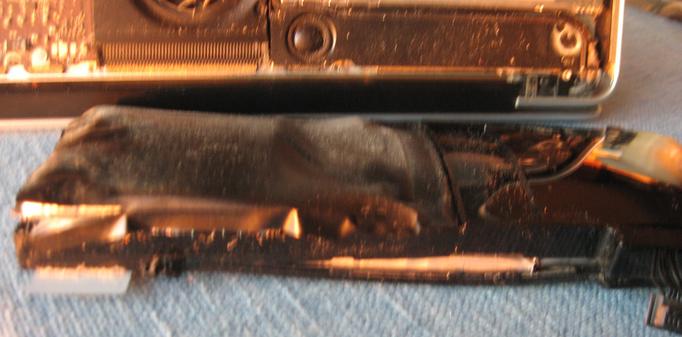
For my second entry in #marchintosh is this #spicyPillow in a 2012 Mac Pro. IIRC I picked this up at #EFM #electronicsFleaMarket on the cheap, fully intended for a project but was packed up from the move. Unpacked the box this weekend, and noted the lid being pushed out – and upon opening noted the touchpad broken in half.

I opened it up & pulled out the spicy pillow, installing a spare battery I had on hand. Connected power, and it booted! The touchpad works, but to click/double click you have to push down to make the touchpad level while clicking/double clicking. Time to find a replacement touchpad, and when I do then also max out the RAM while installing an SSD.

#siliconValley #SillyValley #sanfrancisco #sanfran #sanfranciscocomputers #sanfrancomputers #sanfranciscovintagecomputers #sanfranvintagecomputers #sanfranciscovintagehardware #sanfranvintagehardware
#vintagecomputing #vintagecomputint #vintagecomputer #vintagecomputers #vintagecomputalk
#vintagehardware #computerHistory #VCF #vintageComputerFestival #retro #retrocomputing #retroComputers #WallOfRetro
#retroTech #retroTechnology #nerdsOfVintage #happyNerding
#computer #tech #computerHardware
#apple #VintageApple #VintageMacintosh #macintosh #mac #mac_pro #mac_osx #MacintoshPr0n
#RetroApple #retroMacintosh
#upcycle #restore #TechnologyRepair #WasteNotWantNot #reuse #RepairReuseRecycle
#IT #ITsupport #hardwaresupport #computerrepair
#makeShitMonday #showmewhatyougot
How was the sausage made?
Like any sausage - meat covered with a skin.

Meat: a picture made from ellipses, roughly outlining some face contours. There's a bit of a hack here with 'sunken' eyes and mouth being in front of the face, but the rendering style hides it.

Skin: The image is randomly sampled with some pixels are turned into dots or strokes.

(Video from an earlier version)
#creativeCoding #computerArt #demoscene #TIC80 #halloween #showMeWhatYouGot

Dam, spoke too soon. This #thinkpad #P70 running #Win11 #LTSC decided to shit the bed overnight. I was using it last night to organize #ROMs, closed lid should have hibernated. Tried to start it up today, get #BIOS test screen and then a quick flash of text, then a black screen. Tried booting into advanced recovery mode, unable to get it to work with the holding the power button 3x, so I try to boot with my win11 LTSC install USB and get the same black screen....

I picked this up a few months back. Intel xeon i7 2.66 with 64 GB RAM, primary storage is a Samsung M2 which is showing up in the boot BIOS and as a boot-able device in the BIOS.

As posted previously, I was having some weird USB issues over the weekend when I was moving ROM collection file to external SSDs for archiving, but I had attributed to the #SSD in the external #USB sleds that was/has now failed. Man, it would bite of the controller chips on this #motherboard are failing.
Thankfully I had already moved all my job hunting notes & stuff to a different laptop, but all the ROM and #hakchi2 stuff is on this #laptop

Just in case, I started the #Lenovo diag mode to confirm hardware was ok when the battery died (I swear I had it plugged in). Now this POS will not even go into Diag mode.

Any thoughts on next steps for getting this Thinkpad booting again?

Any chance I can take the storage out of this and put it in a comparable P70 I have? and it will boot & let me log in?

#vintagecomputing #vintagecomputer #vintagecomputers #vintagecomputalk
#vintagehardware
#computerHistory
#retro #retrocomputing #retroComputers
#WallOfRetro #retroTech #retroTechnology
#nerdsOfVintage #happyNerding
#computer #tech #computerHardware
#IBM #thinkpad #thinkpads #VintageThinkPad #X86 #IBMhardware #lenovoHardware #upcycle #restore #TechnologyRepair #ThinkPadRepair #WasteNotWantNot #Thinkpadnium
#makeShitMonday #showmewhatyougot
#reuse #RepairReuseRecycle #IT #ITsupport #hardwaresupport #computerrepair

A random #gaming #console post:

I am a recent convert to a modded #SNES (thank you fellow #veteran and retro gaming community member) passed along to me, and been playing the hell out of the games that he passed along for "offsite #backup /#archival storage". I started looking for other ROMs for other games that I have, found some ROM packs, imported into #Hakchi2. Now I have a ton of ROMs but soooo many duplicates. I looked though the options/capabilities within Hakchi2 but I'm not seeing anything for detecting & purging #duplicates detect which ones do or do not have art, and other characteristics to help filter duplicates.

Am I missing something, or is this a manual process for cultivating your ROMs? Seems my limited understanding & experience with ROM sets created the mess I am trying to get my head wrapped around. As a casual gamer, I was looking to explore the different games that I never got to experience in the heyday; not sure what pre-made sets would be of benefit TBH.

So OMG down the #rathole I went - found the dat-o-matic and am getting the DAT file imported into #ROMcenter... I found a couple of decent vids on youtube that has me on a hopefully good path on getting these sorted, along with using universal ROM Cleaner as well as #ROMcenter. But I ended up spending all my time last night working on this rather than applying for jobs. πŸ€¦β€β™‚οΈ

Also that 1TB SSD in the laptop's data drive is now almost full with #ROMs & #ROM packs, so I have to get things filtered and deleted out.

Anyone else wrangled this challenge to success?
#retroGaming #casualGamer #retro
#WallOfRetro
#retroTech #retroTechnology
#nerdsOfVintage #happyNerding
#computer #tech #retroTech #retroTechnology
#nerdsOfVintage #happyNerding
#makeShitMonday #showmewhatyougot

Talking with the folks in the local #vintage / #retrocomputing community, they clued me in that the #ThinkPad #RAID is a steaming pile of πŸ’© and not worth the trouble.

🀷 Oh well. Thanks for cluing me in

So I swapped out the two testing #NVMe drives I was using and reinstalled the original sticks - to have #windoz10 demanding for the #bitlocker recovery key. πŸ€¦β€β™‚οΈ

Well, time to wipe & install #windoz11 then.

Install went fine, only 4 rando #drivers to find for all #devices to be recognized and working.

Using my #CTT scripts to install the majority of applications, then to remove the #spyware #bloatware and other garbage #micro$oft added to #windows11

Then migrate my #data from my other ThinkPad. Welcome to my #sunday #funday

#siliconValley #SillyValley #sanfrancisco #sanfran #sanfranciscocomputers #sanfrancomputers #sanfranciscovintagecomputers #sanfranvintagecomputers #sanfranciscovintagehardware #sanfranvin-tagehardware
#vintagecomputing #vintagecomputint #vintagecomputer #vintagecomputers #vintagecomputalk
#vintagehardware #computerHistory #retro #VCF #vintageComputerFestival
#retrocomputing #retroComputers #WallOfRetro #retroTech #retroTechnology
#nerdsOfVintage #happyNerding
#computer #tech #computerHardware #laptop #laptops
#IBM #thinkpad #thinkpads #VintageThinkPad #X86 #WindowsVista #IBMhardware #lenovoHard-ware #Thinkpadnium
#upcycle #restore #TechnologyRepair #ThinkPadRepair #WasteNotWantNot #Thinkpadnium
#makeShitMonday #showmewhatyougot

Ok, I spent yesterday afternoon trying to get #RAID configured on my #lenovo #ThinkPad #P70 - to no success.

I found this video https://www.youtube.com/watch?v=AyCC1NGe8a8&t=36s of the similar #p50 and configuring #RAID which shows the #BIOS interface but my P70's only show the "non-raid physical discs" I do not have an option for RAID volumes. Note I have upgraded the BIOS to the most recent version on lenovo's web site. Any thoughts?

I have attached 2 #screenshots of what the BIOS displays - I'm trying to configure the RAID on the two 512GB #NVMe sticks.

#siliconValley #SillyValley #sanfrancisco #sanfran #sanfranciscocomputers #sanfrancomputers #sanfranciscovintagecomputers #sanfranvintagecomputers #sanfranciscovintagehardware #sanfranvin-tagehardware
#vintagecomputing #vintagecomputint #vintagecomputer #vintagecomputers #vintagecomputalk
#vintagehardware #computerHistory #retro #VCF #vintageComputerFestival
#retrocomputing #retroComputers #WallOfRetro #retroTech #retroTechnology
#nerdsOfVintage #happyNerding
#computer #tech #computerHardware #laptop #laptops
#IBM #thinkpad #thinkpads #VintageThinkPad #X86 #WindowsVista #IBMhardware #lenovoHard-ware #Thinkpadnium
#upcycle #restore #TechnologyRepair #ThinkPadRepair #WasteNotWantNot #Thinkpadnium
#makeShitMonday #showmewhatyougot

Lenovo ThinkPad P50: RAID Setup

YouTube

I scored 2 #Thinkpad #X260 laptops at #EFM #electronicsfleamarket in March with a handful of batteries for really cheap.
a i7 2.6Ghz and an i5 2.4Ghz

The i7 is immaculate, and is running great.
The i5 has some issues. Opening it up it was missing the SSD and SODIMM RAM, and I noted some corrosion on the aluminum frame around the SSD slot.

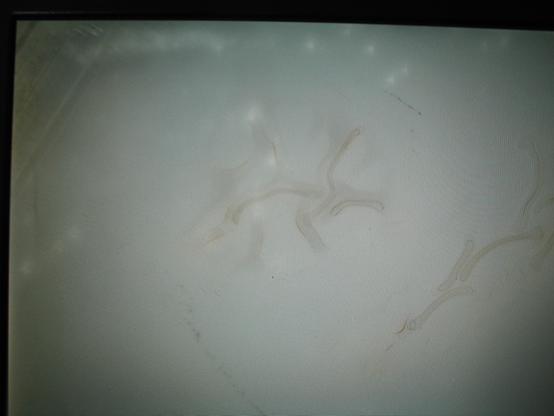
Getting it to moot up, there is this really weird spotting and "worms" with the #LCD that is really distracting. Not sure how this happened - and would love any insights as to the what & why this happened.
I suspect just easier to swap out the 12.5" 1366x768 for something with better resolution?

I did order two 32 GB DDR4 2666 SODIMMs from #aliexpress - the unofficial max #RAM for these X260's - and they work great. Both the i7 & the i5 detect the SODIMMs in the BIOS and in Win11. I initially had some spare 16GB SODIMMs in them, but why not max out the RAM when most apps and browsers are memory hogs lately?

#siliconValley #SillyValley #sanfrancisco #sanfran #sanfranciscocomputers #sanfrancomputers #sanfranciscovintagecomputers #sanfranvintagecomputers #sanfranciscovintagehardware #sanfranvin-tagehardware
#vintagecomputing #vintagecomputint #vintagecomputer #vintagecomputers #vintagecomputalk
#vintagehardware #computerHistory #retro #VCF #vintageComputerFestival
#retrocomputing #retroComputers #WallOfRetro #retroTech #retroTechnology
#nerdsOfVintage #happyNerding
#computer #tech #computerHardware #laptop #laptops
#upcycle #restore #TechnologyRepair #WasteNotWantNot #reuse #RepairReuseRecycle
#makeShitMonday #showmewhatyougot

The next #thinkpad on my #workbench is an #E450 – I grabbed this from #ewaste to provide a family member a better laptop. It has a #i5-5200U at 2.2Ghz, and a max 16GB of #DDR3L #RAM so it can/should run #Win11, #linux, or #BSD with ease. The IO is ok, with multiple #USB3 ports, #HDMI, #ethernet and a memory card reader. This is a decent form factor, weight, and would make a decent laptop for someone. Though no docking station capabilities, they removed the port underneath.

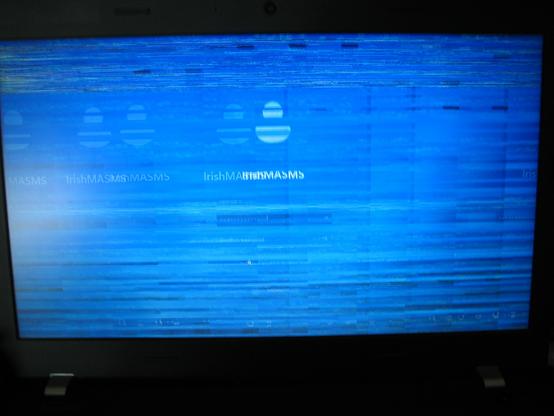
There is a big BUT with this laptop though: it keeps freezing, and the video is glitching. Which may be why it went to ewaste…

I upgraded the DDR3L RAM to 16GB, and wiped the 500GB SSD that came with it.
Starting installing #Win11, and I let it install and reboot so I could refill my tea – to come back and the laptop was frozen with a black screen.
I rebooted, and it froze on the initial Win11 change password screen.
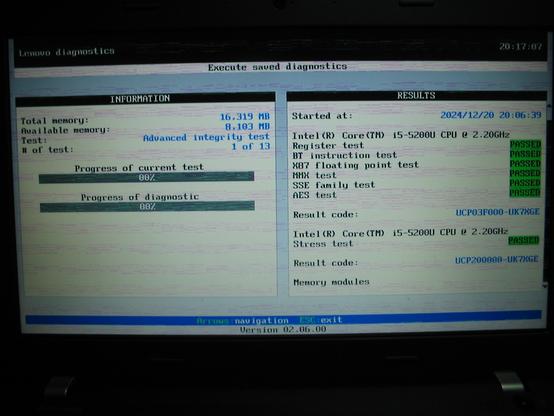
I rebooted again, went into the #Lenovo #BIOS #diagnostic tool, and started the full tests. As the test were running, I touched the nub and the video started glitching. Letting the test continue, the laptop froze while testing.

So, is this beyond time & effort to get working – or pull the spare parts and move on from?

(images attached)

#siliconValley #SillyValley #sanfrancisco #sanfran #sanfranciscocomputers #sanfrancomputers #sanfranciscovintagecomputers #sanfranvintagecomputers #sanfranciscovintagehardware #sanfranvintagehardware
#vintagecomputing #vintagecomputint #vintagecomputer #vintagecomputers #vintagecomputalk
#vintagehardware #computerHistory #retro #VCF #vintageComputerFestival
#retrocomputing #retroComputers #WallOfRetro #retroTech #retroTechnology
#nerdsOfVintage #happyNerding
#computer #tech #computerHardware #laptop #laptops
#IBM #thinkpad #thinkpads #VintageThinkPad #X86 #WindowsVista #IBMhardware #lenovoHardware #Thinkpadnium
#upcycle #restore #TechnologyRepair #ThinkPadRepair #WasteNotWantNot
#makeShitMonday #showmewhatyougot

See the lyrics for the song β€œShow Me What You Got” by JAY-Z
#JayZ #ShowMeWhatYouGot
https://daletra.com/jay-z/lyrics/show-me-what-you-got.html
Show Me What You Got - JAY-Z

This is a state of emergency. What you want me to do I'm sorry. I'm back. Lets go get em just! Hey hey hey hey hey hey hey. Show me what you got, lil' mama.

DaLetra