 Jon Sullivan
 Data Science
Say goodbye to the frustrations of copying and pasting data to and from R with Datapasta from @milesmcbain! Get the package now: https://milesmcbain.github.io/datapasta/ #DataWrangling #Rstats
I've been starting to add my scripts onto #codeberg for processing my wildcounts biodiversity monitoring data. I've added an R script I just finished that adds the recording date and time to audio recordings made with an Apple Watch.
I needed this for a survey I had to do last month using my Apple Watch when my phone was malfunctioning. I started my GPS track (with my Garmin GPS) then spoke each of my observations into the voice recorder app on my watch, one recording per observation.
To geotag all those observations, I needed to know exactly when each recording was made, to match it with my GPS track. This was a good deal more complicated than I expected (because a lot of modern Apple software is too dumb to be really useful).
(Since my watch couldn't connect to my phone, it stored up the recordings then synced them to iCloud later. I was surprised to discover that all the file creation dates and media creation dates in the audio files were the times they synced to iCloud, not when they were recorded. That required an unexpected journey into the innards of the VoiceMemos app sqlite database using Terminal to extract the real recording times.)
Anyway, I now have an R script that automates all this.
 💧🌏 Greg Cocks
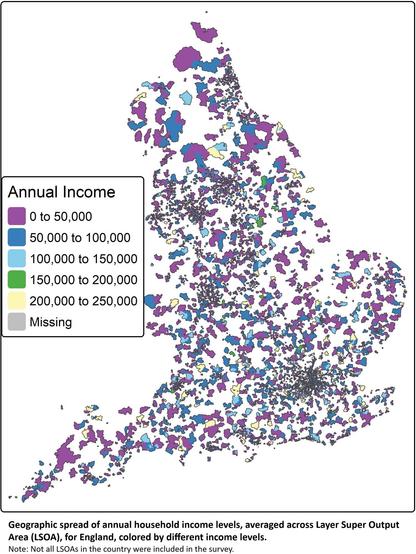
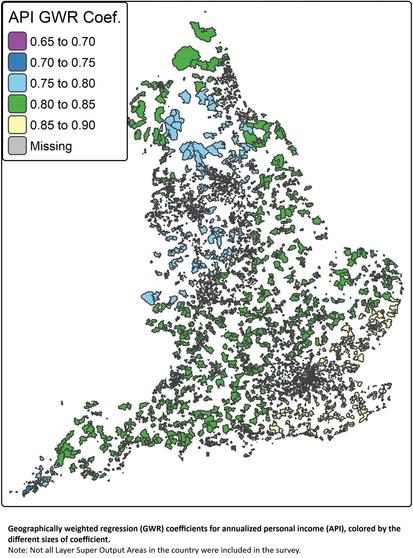
 Ricardo Segurado
 Annika Schiefner
 Ebokify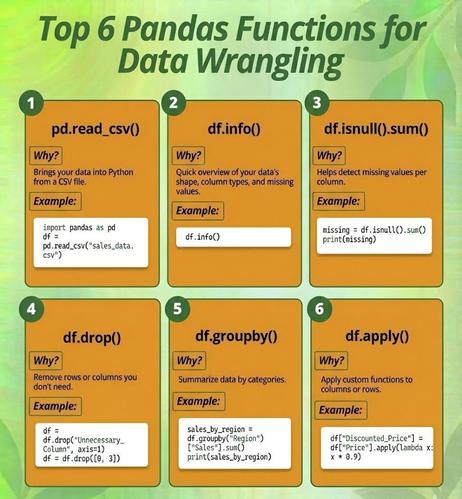
 Jesus Castagnetto 🇵🇪