Really excited I found a good usecase for #LMDE #linuxmintdebianedition after reviewing the basics a while back.

After a weekend of felixing about with the media service machines, #LMDE6 came out as a fast and cozystable main OS on the little testbox.

The unexpected reward was a working jellyfin install after a rollback to #MintVirginia on the driveshost tower.

You know. By The Power of Three Tutorials Combined...
I infuse this subfork... with hopefully the right dependencies...

Pacjent: #ThinkPad T490, śmiga z #LinuxMint #LMDE6 - brak zastrzeżeń.

Wariant 1: Aktualizacja do #LMDE7 i prawdopodobnie dalszy spokój.

Wariant 2: Zmiana na #MXLinux25 w wersji KDE - obecnie testowany na dysku zewnętrznym. Póki co nie zauważyłem problemów, ale stosowany tylko z doskoku.

Może testowaliście podobne warianty?
Albo ma ktoś doświadczenie ze zmianą przyzwyczajeń w #Cinammon na #KDE ?

@Micha_Silver
I remember that I had to add a repository to #lmde6 in order to get a kernel which supports the WLAN chip in my #lenovo laptop.
The current line for the #linuxmint part of #lmde7 in /etc/apt/official-package-repositories.list
contains:

deb https://mirror.init7.net/linuxmint gigi main upstream import backport

Could the large number of updates be a result of that line, e.g., "backport" or "upstream" ?
I didn't check the contents prior to the update to #lmde7 .

Index of /linuxmint/

Anleitung #LMDE6 Upgrade auf #LMDE7 durchführen - #fosstopia:

Mit dem Erscheinen von #LMDE_7 wird nun zum Jahresende der Unterstützung für LMDE 6 eingestellt. Wer derzeit LMDE 6 verwendet, sollte langsam das #Upgrade auf den Nachfolger mit Debian 13 Trixie Basis planen und in einem geeigneten Moment durchführen.

Der Vorteil bei #Linux #Mint und #LMDE ist, dass es eine grafische Möglichkeit gibt das #Upgrade durchzuführen.

https://fosstopia.de/lmde-6-upgrade-lmde-7/

Anleitung LMDE 6 Upgrade auf LMDE 7 durchführen - fosstopia

Technik-Blog für Linux, Unix, Open Source, Cloud Computing, Nachhaltigkeit und Co.

fosstopia

#Pardus25 ile oyun oynamak ile ilgili bir şeyden daha bahsetmek istiyorum

Aşağıdaki çöp sistemimde

MSI H110M PRO-VD
MSI GeForce GT 1030 2GH OC
Intel® Pentium® Processor G4400 (3M Cache, 3.30 GHz)

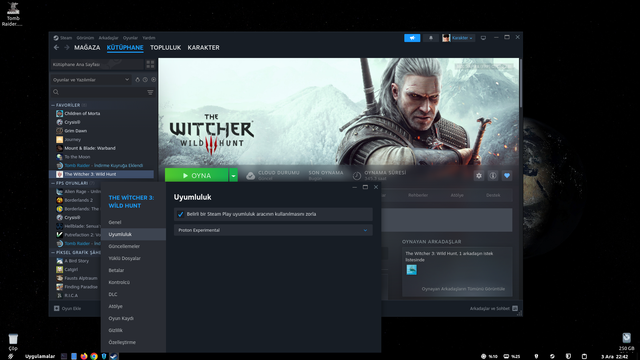
#LMDE6 "Faye" ve #LMDE7 "Gigi" ile #Gnome üzerine #Cinnamon Masaüstünde #Steam'de #Linux Uyumluluk #Proton sürücülerinden "Experimental" olanını hiç kullanamamıştım

Pardus 25 Gnome ile daha ilk seferde en son proton sürümünü kullanabiliyorum!

Yada sebebi #Nvidia 580 sürücüsü olabilir mi?

#gaming

Linux Mint Debian Edition 7'yi Ana Bilgisayarımda Deniyoruz!

#LMDE6 Faye de Debian 13 "Trixie" li #LMDE7 Gigi'ye yükseltilmiş!

Fakat bu adam neden bu kadar zor kurdu?

Benim PC'de de Nvidia kartı var!
Yükseltme prosedürünü başlatacağım bunun yüzünden çekiniyorum!

Aylar sonra PC'me yeni kavuştum!

Aylardır sağlam parlak bir ekranda görmüyordum!

Her şey bozulursa!?

Azıcık oyun oynayıp öyle mi yükseltmeli?

https://www.youtube.com/watch?v=F9hkjYO1QL4
_______
• LMDE 7'ye nasıl yükseltilir?: https://blog.linuxmint.com/?p=4923

Linux Mint Debian Edition 7'yi Ana Bilgisayarımda Deniyoruz!

YouTube
Noticed today after the upgrade from #lmde6 to #lmde7
#lmde7 does not automatically mount ext4 (and ext2 and ext3) filesystems. The issue was reported
https://github.com/linuxmint/lmde7-beta/issues/20
but closed because of the new udev rules from #trixie (debian 13) on which #lmde7 is based.
I'll remove the rule from udev and see what happens. I guess it will work as reportedly other (virusfree?🤔) filesystems like exfat, fat32 etc. will be automatically mounted. No, it is not just the settings in #nemo
Of course, virtualbox was removed during the upgrade and the kernel was downgraded from 6.12 to 6.1 prior to the real upgrade and later installed, again.
I had to use the 6.12 kernel version for support of my #wlan chipset.
usb-stick mount: no automatic mount of usb-device formatted with ext4 · Issue #20 · linuxmint/lmde7-beta

usb memory device with ext4: after inserting, the usb device will not be mounted and nemo file manager does not open automatically. I have to go manually to nemo and "device" section. There I will ...

GitHub

#RIP my faithful old #Seagate 2 TB #HDD in my Tower. You dun did good... 2015 - 2025.

It's had failing sectors for many months, but til today my Tower has still run ok, with its #SSD holding my #ArchLinux #KDEPlasma + #SparkyLinux #Cinnamon #dualboot systems, + all my "important" data, & the HDD used for the #Timeshift OS snapshots for each penguin, + all my #QEMU #KVM VMs. It's the latter i shall miss, coz i really did like to play with myriad penguins there, via my plethora of VMs.

Today the next giveaway that the HDD was getting worse was an unexpected failure of #BackInTime to run [for my weekly Sparky data b/u], & upon investigation i realised that the HDD filesystem had gone "read-only", which is never happy news. I finagled BiT to run after all, by excluding the few HDD directories that were borking it, then ran updates for Sparky, then rebooted.

This time i booted into #Arch... or at least tried to, but after stalling for yonks trying to mount the HDD, it gave up & took me to the rescue screen. Ah, so the HDD really is now piston broke, pity. In this tty I edited Arch's /etc/fstab to comment-out the lines mounting the two partitions of the HDD, rebooted, & this time successfully into Arch. As i'd been in Sparky for a couple of weeks, i wanted to run Arch's overdue updates... oh nice; ~2.5 GB, zowie.

Rebooted again, this time choosing Sparky, but just like Arch, & this time as expected, the circus repeated re the rescue screen, where i then ofc also edited Sparky's fstab, rebooted, & Sparky now also ok. Wanna use Arch again for a while, so yet another reboot back to there... i've missed my fabbo #Plasma!!

Tangential Thoughts:

  • For a couple of years i have been getting increasingly interested in the #immutable #atomic Plasma distros, eg, #Kalpa, #Kinoite, & most recently of all, #KDELinux. In fact, a week ago i converted my Lappy from #LMDE6 to Kinoite, & have been planning/researching the eventual possibility of also bunging an atomic onto Tower.
  • If Tower had been already running one such, & today's scenario had unfolded, wouldn't i have been entirely stuffed? Is /etc/fstab also immutable in Kalpa, #Kinoite, & #KDELinux? How would i have been able to boot, today, if not for the comparatively trivial fstab edit?
  • #DropbearPooterising