OK, foot cannot split, and that's a deal breaker for me.

Here's a wild thought: What if the answer was konsole all along?

I guess I should explain what my requirements are.... in the form of a markdown file!

Essentially I need:

  • open source
  • cross platform (at least debian + macOS for now)
  • transparency
  • image support
  • splitting
  • tabs
  • does not eat all my CPU/memory
  • is not slopware

So, let's see if we can make konsole do our bidding. cracks knuckles

#terminal #terminalEmulator

foot

A fast, lightweight and minimalistic Wayland terminal emulator

Codeberg.org
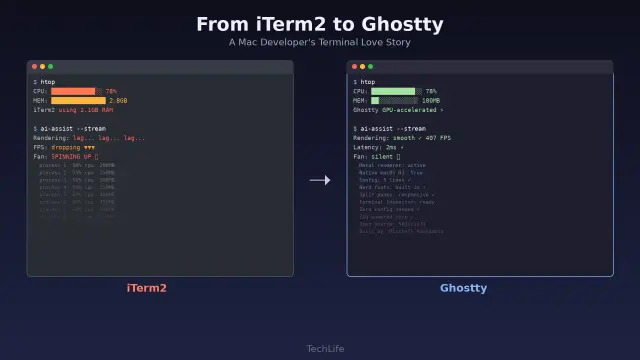
Why I finally traded iTerm2’s features for Ghostty’s GPU renderer

After years of loyalty to iTerm2, the AI revolution forced me to rethink my terminal. Here's how I migrated to Ghostty — and why I'm never going back.

TechLife

“I do recall Emacs ^S and ^Q being problematic due to terminal mode occasionally getting set badly (and then the underlying hardware would wake up, “Oh, flow control! I know how to do that!”, ^S would freeze everything and you had to Just Know to do ^Q…)”

@wrog this is still a problem in modern terminal emulators. On Linux, nearly all terminal emulator software emulates the DEC VT-220 hardware pretty closely, so it does actually send the ASCII DC1 and DC3 characters for C-q and C-s, and the virtual TTY device responds accordingly by blocking all further characters except for DC1 and DC3. You have to execute the command stty -ixon to disable soft flow control for a given TTY device after it has been initialized by the operating system.

I think there is a way configure the pseudoterminal manager system control to create virtual TTY devices that ignore DC1 and DC3 characters, but I don’t know how, and for whatever reason (probably for backward compatibility with older Unix systems) Debian-based Linux doesn’t configure it this way by default. I think most people just put the stty -ixon in their ~/.profile file.

@kentpitman @dougmerritt @screwlisp @cdegroot

#tech #software #Linux #TerminalEmulator #CLI #LinuxTips

Currently trying out #ghostty terminal emulator - it's pretty nice out-of-the-box and has font ligatures support. What puts me a bit off is the RAM usage, it uses more than #kitty (65 vs 50) which is the terminal I've been using for years now.

But maybe the extra RAM usage is justified, I need to try it out for a few weeks 🤔

#TerminalEmulator #cli

(more Linux and FOSS news in previous posts of thread)

Ghostty terminal is finally adding scrollbar support:
https://www.omgubuntu.co.uk/2026/02/ghostty-linux-scrollbars-coming

Split diffs are now available in Zed as the new default, replacing unified diffs:
https://alternativeto.net/news/2026/2/split-diffs-are-now-available-in-zed-as-the-new-default-replacing-unified-diffs/

Weblate 5.16 introduces billing permission update and resolves SSH security issue:
https://alternativeto.net/news/2026/2/weblate-5-16-introduces-billing-permission-update-and-resolves-ssh-security-issue/

WordPress.com launches an AI assistant that can edit site content, create media, and more:
https://alternativeto.net/news/2026/2/wordpress-com-launches-an-ai-assistant-that-can-edit-site-content-create-media-and-more/

Godot Engine suffering from lots of "AI slop" code submissions:
https://www.gamingonlinux.com/2026/02/godot-engine-suffering-from-lots-of-ai-slop-code-submissions/

Notepad++ v8.9.2 enforces double signature checks for update security:
https://alternativeto.net/news/2026/2/notepad--v8-9-2-enforces-double-signature-checks-for-update-security/

Vulkan 1.4.344 Released With New Extension From Valve:
https://www.phoronix.com/news/Vulkan-1.4.344-Released

FreeBSD's KDE Desktop Install Option Ready For Testing:
https://www.phoronix.com/news/FreeBSD-Desktop-Option-Testing

GhostBSD To Use XLibre Server, MATE vs. Gershwin Desktop Decision In Future:
https://www.phoronix.com/news/GhostBSD-Eyes-XLibre

FosseryWeb page-builders progress report:
Cheatsheet pages can now be fully generated (except some edge cases in the main content), plus there's now an extra line in the generated code to credit the author(s) of the cheatsheet below the title (since starting from the next update of FosseryWeb, everyone will be able to submit cheatsheets, or modify existing ones (in latter case, the script will automatically handle crediting multiple authors). And soon, FosseryWeb Min support will also be added, the script will generate the cheatsheet page for both sites in one go.
https://codeberg.org/fosseryweb/page-builders

#WeeklyNews #OpenSource #FOSSNews #FOSS #News #Ghostty #Zed #Weblate #WordPress #GodotEngine #Godot #NotepadPlusPlus #Notepadpp #Vulkan #FreeBSD #GhostBSD #XLibre #BSD #CodeEditor #IDE #GameEngine #Terminal #TerminalEmulator #PageBuilder #FosseryWeb #OperatingSystem #OS #Graphics #FosseryTech

Ghostty 1.3 wil bring Adds Scrollbar Support

Ghostty's most-thumbed feature request is finally being answered. Yup, scrollbar support is finally coming in Ghostty 1.3 for Linux and macOS.

OMG! Ubuntu

First #blog of 2026 on #BurgeonLab

➡️ https://burgeonlab.com/blog/hugo-on-android-with-termux/

Been only publishing weeknotes lately; but the wait is over, new tech guide is out! 👩🏻‍💻 It's about how I am using #termux on #android with #hugo.

This is #6 of #100DaysToOffload. See my progress: https://burgeonlab.com/tags/100daystooffload/

#blogging #blogs #newpost #blogpost #smolweb #guides #techblog #techguides #webdev #cli #terminalemulator #indieweb

How I Blog with Hugo on Android with Termux (CLI Emulator)

Learn how to blog with Hugo locally on Android with Termux. Fix Hugo's image processing error and use Termux Git (not Git client) for syncing with remote repo.

Burgeon Lab

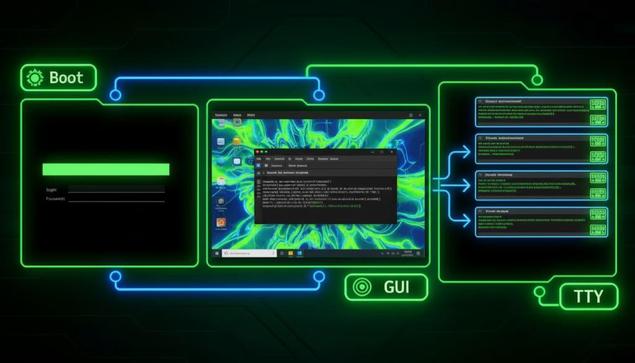
Unterschiede: Shell-Zugriffe in Linux

Warum du Shell-Zugriffe unterscheiden solltest Als Systemadministrator triffst du oft auf Situationen, in denen du eine Shell brauchst, aber der Weg dorthin variiert je nach Systemzustand und Anforderung. Du kannst direkt ohne Desktop in eine Shell booten, einen Terminal-Emulator in einer grafischen Umgebung nutzen oder auf virtuelle Terminals (TTYs) wechseln. Jeder Ansatz hat spezifische Einsatzbereiche: Direkter Boot ohne GUI eignet sich für Server oder Troubleshooting ohne […]

https://andreas-moor.de/unterschiede-shell-zugriffe-in-linux/

Zashterm è un nuovo terminale moderno basato su GTK4 e Adwaita, progettato per offrire sessioni avanzate, integrazione SSH e funzioni di sicurezza pensate per gli utenti Linux più esigenti. #Linux #GTK4 #TerminalEmulator #OpenSource

https://www.linuxeasy.org/zashterm-un-terminale-moderno-con-gestione-avanzata-delle-sessioni/?utm_source=mastodon&utm_medium=jetpack_social

Zashterm un Terminale Moderno con Gestione Avanzata delle Sessioni

Zashterm è un nuovo terminale moderno basato su GTK4 e Adwaita, progettato per offrire sessioni avanzate, integrazione SSH e funzioni di sicurezza pensate per gli utenti Linux più esigenti.

Linux Easy - News da Mondo Linux
🤯 Wow, a terminal emulator for your terminal! 🚀 Because clearly, what we needed was more terminals inside our terminals, powered by the revolutionary Turbo Vision. 🦄 Next up: a browser that lets you browse browsers, because who doesn't love a good recursive loop? 🙃
https://github.com/magiblot/tvterm #terminalemulator #TurboVision #recursiveinnovation #techhumor #futureoftech #HackerNews #ngated
GitHub - magiblot/tvterm: A terminal emulator that runs in your terminal. Powered by Turbo Vision.

A terminal emulator that runs in your terminal. Powered by Turbo Vision. - magiblot/tvterm

GitHub

A terminal emulator that runs in your terminal. Powered by Turbo Vision

https://github.com/magiblot/tvterm

#HackerNews #terminalemulator #TurboVision #commandline #development #open-source #technews

GitHub - magiblot/tvterm: A terminal emulator that runs in your terminal. Powered by Turbo Vision.

A terminal emulator that runs in your terminal. Powered by Turbo Vision. - magiblot/tvterm

GitHub