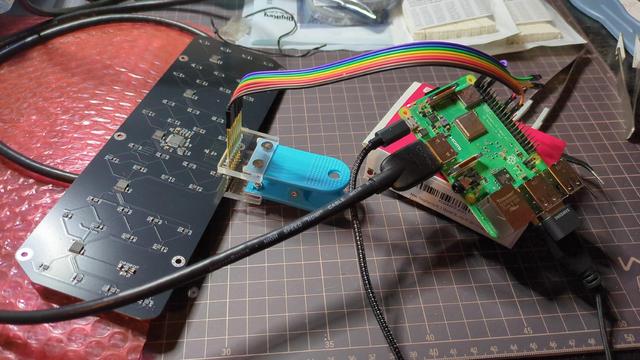
Finally found some time to bring my #NeoPixel Heart PCBs into a usable state and add some documentation. The #sourcecode is hosted on @Codeberg at https://codeberg.org/rommudoh/NoisyMcHeart and works for both variants (big and small).
I think I'll publish the #KiCad files soon, too.
Thanks to #platformio I can use the same code for both hardware variants.
#led #rgbled #ws2812b #diyelectronics #pcbdesign #codeberg #programming

Very interesting section about 1970s PCB design on this video; drawn by hand, yes, but the use of pre-printed transfer symbols and *VELLUM GRAPH PAPER!* :O https://www.youtube.com/watch?v=_YfN3LBaGkE&t=543s

#pcb #pcbdesign #retrocomputing

Raising the Digital Dead Episode 4 - Recreating the SOL Prototype PCB

YouTube

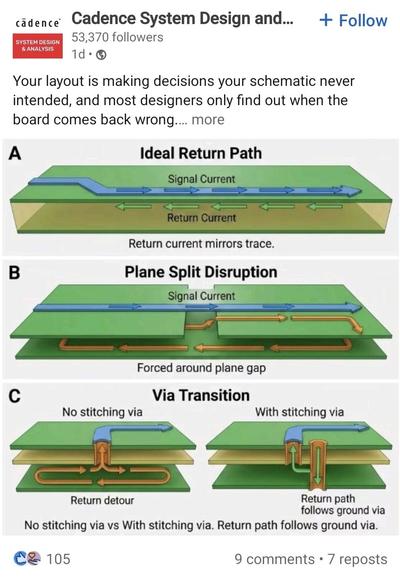
Your BMS measurement error is probably a layout problem

Even with a good IC, poor PCB design ruins everything.

Top mistakes:

Shared ground paths for power and sensing
No Kelvin connection for shunt resistor
High-current traces too close to signal lines

📉 Result:
Offset errors, noise injection, unstable protection behavior.

👉 Fix:
Treat current sensing like analog precision design, not power routing.

#PCBDesign #Electronics #BMS #PGYBMS

Yeah, PCBs (with a delightful Easter egg..) and stencils are here, always a big emotion... Made with #KiCAD and #FreeCAD (+KiCADstep-up addon) #PCB #PCBdesign #NextPCB #design #brushu #TUI #uidesign #art #soundart #electronics #esp32 @nextpcb_official @hkustgz_cma @hkustguangzhou
Deep dive! PCB Review part 3 from Redero Tech breaks down layout, signal integrity tips, and design fixes—perfect for makers and pros. Clear, practical, and full of actionable takeaways to improve your boards. Tune in and level up your hardware skills! #PCB #PCBDesign #Electronics #Hardware #Engineering #Tech #DIY #English
https://video.mugoreve.fr/videos/watch/19b8d372-7e18-4234-9c1a-ab82f1cbe4dd
PCB Review part 3

PeerTube
I’m working on the most unhinged board I’ve ever made. The squiggles are functional traces that pass DRC. Major shout-outs to @LaserMistress for giving me the itch to pick this project back up, @chipperdoodles for showing us all what’s possible with hand-drawn traces, and @ArchiteuthisFlux for diving into polygons and net connections with me, and of course, for always egging on my 10-year-old sense of humor. #kicad #pcbdesign #futerus
And the biggest shout-out: It is absolutely WILD that this is possible with @kicad and I hope everyone who works on it knows that their hard work has culminated in crazy shit like this. The fact that I just dropped a group of those spaghetti polygons over the design and they auto-connected and assigned nets based on the pads they were touching was 👩‍🍳💋. The fact that the DRC even runs on this is nothing short of a miracle. #kicad #pcbdesign #futerus
Version 10.0.0 Released

It’s the turning of the seasons today, and to celebrate, the KiCad project is proud to announce the release of Version 10! This release is packed with new features, improvements, and hundreds of bug fixes. We hope you enjoy it! Head to the KiCad download page to get your copy (note that some packages may still be in the process of being released at the time this announcement is published). Our thanks go out to everyone who contributed to KiCad this past year. Whether your contribution was large or small, writing code, submitting bug reports, improving our libraries and documentation, or just supporting us financially: your help made a difference. Read on to see some of the highlights of the new version!

KiCad 9.0.8 Release

The KiCad project is proud to announce the version 9.0.8 bug fix release. The 9.0.8 stable version contains critical bug fixes and other minor improvements since the previous release.