 🔒 Security Cyber
HARDENING UI — Localhost Linux Endpoint Security Control Panel
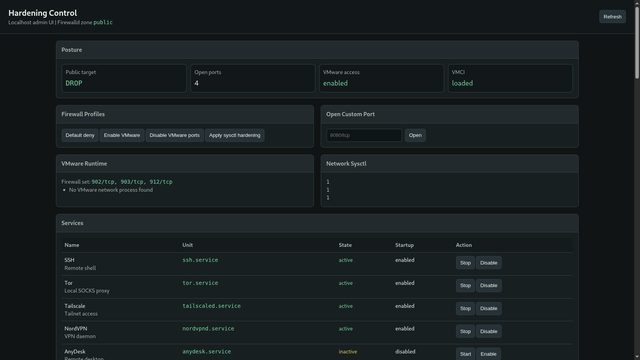
Running as a single, lightweight .py file (no heavy SaaS, no npm/pip sprawling dependencies), Hardening UI bridges the gap between low-level kernel security and operational firewalld management.
Why it’s more than just a firewall utility:
• SYN Flood & DoS Mitigation: One-click injection of hardened sysctl profiles—enabling net.ipv4.tcp_syncookies and tuning network queues directly in the kernel.
• Spoofing & Route Protection: Automatically drops ICMP and secure redirects, and forces net.ipv4.conf.all.log_martians=1 to flag impossible or spoofed source routing.
• Real-Time Socket Triage: Leverages elevated socket diagnostics (ss) to pull absolute ground-truth network state. It maps listening sockets and established connections, explicitly flagging what is unblocked vs. dropped.
• Hypervisor Profiling: Built-in VMware orchestration profiles. Instantly locks down or exposes ports 902, 903, and 912 based on the hypervisor modules (vmnet, vmmon) detected on your host machine.
• Privacy Service Toggles: Direct systemctl state control for core privacy tunnels and remote shells (SSH, Tor, Tailscale, NordVPN, AnyDesk, Cloudflared).
THE SYNERGY: How it links with GODSEYE
When you are using GODSEYE to crawl the deep web, route traceroutes, or probe exposed targets, your intelligence platform is staring outward. Hardening UI acts as the shield facing inward.
By running both on your collection host:
1. Hardening UI sets your firewalld profile to a strict target=DROP policy and disables default public-facing vectors.
2. The sysctl layer protects your machine from retaliatory SYN floods, network mapping amplifier tricks, or spoofed boundary traps.
3. Your host is locked down while GODSEYE safely pipes threat telemetry over Tor SOCKS5h routing behind the perimeter.
Access is free but rigorously vetted via a signed Acceptable Use Agreement. Vetted operators will be manually added to the private repository. Unauthorized redistribution is treated as software theft.
DM me or head to securitycyber.uk to request access.
#LinuxHardening #CyberSecurity #Firewalld #Sysctl #SecOps #ThreatIntelligence #Infosec #DevSecOps
Running as a single, lightweight .py file (no heavy SaaS, no npm/pip sprawling dependencies), Hardening UI bridges the gap between low-level kernel security and operational firewalld management.
Why it’s more than just a firewall utility:
• SYN Flood & DoS Mitigation: One-click injection of hardened sysctl profiles—enabling net.ipv4.tcp_syncookies and tuning network queues directly in the kernel.
• Spoofing & Route Protection: Automatically drops ICMP and secure redirects, and forces net.ipv4.conf.all.log_martians=1 to flag impossible or spoofed source routing.
• Real-Time Socket Triage: Leverages elevated socket diagnostics (ss) to pull absolute ground-truth network state. It maps listening sockets and established connections, explicitly flagging what is unblocked vs. dropped.
• Hypervisor Profiling: Built-in VMware orchestration profiles. Instantly locks down or exposes ports 902, 903, and 912 based on the hypervisor modules (vmnet, vmmon) detected on your host machine.
• Privacy Service Toggles: Direct systemctl state control for core privacy tunnels and remote shells (SSH, Tor, Tailscale, NordVPN, AnyDesk, Cloudflared).
THE SYNERGY: How it links with GODSEYE
When you are using GODSEYE to crawl the deep web, route traceroutes, or probe exposed targets, your intelligence platform is staring outward. Hardening UI acts as the shield facing inward.
By running both on your collection host:
1. Hardening UI sets your firewalld profile to a strict target=DROP policy and disables default public-facing vectors.
2. The sysctl layer protects your machine from retaliatory SYN floods, network mapping amplifier tricks, or spoofed boundary traps.
3. Your host is locked down while GODSEYE safely pipes threat telemetry over Tor SOCKS5h routing behind the perimeter.
Access is free but rigorously vetted via a signed Acceptable Use Agreement. Vetted operators will be manually added to the private repository. Unauthorized redistribution is treated as software theft.
DM me or head to securitycyber.uk to request access.
#LinuxHardening #CyberSecurity #Firewalld #Sysctl #SecOps #ThreatIntelligence #Infosec #DevSecOps
 TECC
TECC 


 VM
VM CiotBSD
 Peter N. M. Hansteen
 Julien Riou
 N-gated Hacker News
 steve
steve
 Alfonso Siciliano