 Dennis
Pro tip: It's much easier to go back and change a rectangular pattern on a body than it is to change it in a sketch.
 dylanparry
Today I used Autodesk Fusion for the first time. I managed to design a new 120mm fan module for my 3D printer's air filtration system, and although there's a steep learning curve, I figured out how to do it. Very pleased with myself 😁 #autodeskfusion #fusion360 #CAD #functional3dprint
Oh good, #AutodeskFusion now has an AI chatbot window that expands anytime I get too close to the side of the screen.
You really get me Autodesk, you really do.
 Stephen Cross
Needed some new ceiling vents for the basement to replace some old bulky and discoloured ones I installed years ago (after one fell out!). New store bought ones are $20+ a piece and still look bulky and ugly, so designed and printed some custom flush mount vents instead for <$1and they look awesome.
#3dprinting #functional3DPrint #functionalprint #homedecor #diy
#autodeskfusion #orcaslicer
 The Oasis BBS
Sidekick64 Custom Case: Retronaut’s Full Build Journey From PCB to Polished Cartridge
#Sidekick64 #Commodore64 #Retronaut #RetroComputing #C64 #3DPrinting #AutodeskFusion #DIYElectronics #PCBAssembly #MakerProjects #RaspberryPi
https://theoasisbbs.com/sidekick64-custom-case-retronauts-full-build-journey-from-pcb-to-polished-cartridge/?fsp_sid=3392
#Sidekick64 #Commodore64 #Retronaut #RetroComputing #C64 #3DPrinting #AutodeskFusion #DIYElectronics #PCBAssembly #MakerProjects #RaspberryPi
https://theoasisbbs.com/sidekick64-custom-case-retronauts-full-build-journey-from-pcb-to-polished-cartridge/?fsp_sid=3392

If you are muddling through the latest #AutodeskFusion update... "Hybrid Design" when you create a new project is closest to how things used to function. #3DPrinting #CAD
 JulianCalaby
So I'm modelling a fan duct for a SAS card (see the last #cursedhomelab update for details) and was originally going to do it in OpenSCAD like I did for the last one, however this one needs some very specific geometry that I can't quite wrap my head around, so I'm trying Autodesk Fusion instead.
Those specific bits of geometry are:
- some bits to clip it to the SAS card's PCB
- 2 turns in the duct to accommodate the connectors on the PCB and a small offset on the fan
- and some geometry to screw it to the support bracket
I learned PRO/Engineer at university and it uses the "standard" structure of defining planes, drawing sketches on those planes, then extruding solid objects, one way or another, from those sketches.
Autodesk Fusion is very familiar with a very similar flow, but it's been a while and I've forgotten a lot of the details of how to take the structure I can see in my head and turn it into CAD structures. That said, it's all coming back to me.
Lofting is currently causing me the most problems as the tools I have to hand look like they should do what I want, but I keep producing lumpy messes rather than the rounded cornered boxes I'm wanting for this, so I'm having to draw a lot of geometry to make this work.
But I'm getting there. Then to print it paper thin, attach a 80mm fan and clip it to the card when I install it.
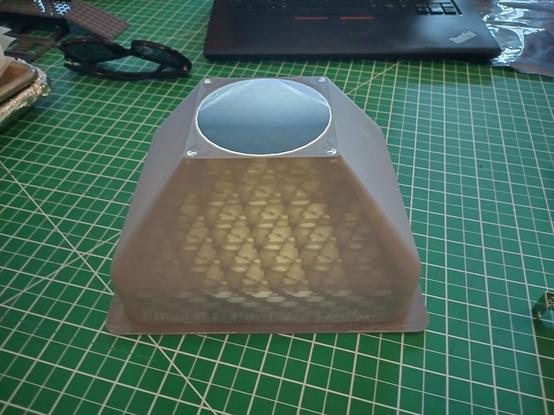
(Photo is the first duct I made to have a fan blow over the 4x HDDs protruding ~3cm from the 3x 5.25" bays in server #2's former case. It is illuminated from inside to demonstrate how thinly it was printed)
#3dprinting #make #tech #homelab #CursedHomelab #autodeskfusion #fusion360 #cad
I love how Fusion snaps to things mostly when I don't want that.
Like yeah, I want a line 0.2 degrees from square. So helpful.
 Justin D Kruger (he/him)
Streaming soon on Twitch: #Maker Stuff, #FunctionalPrint,
👉Fixing a 🫖 kettle with 3D modeling, and 3D printing.
📢Noon PST, 3/28/2025
#HelloWorld #Introduction
#LiveStream #AMA
#Fellow #ElectricKettle
#Fusion360 #AutodeskFusion

 Micah Ilbery
My audio player broke and I had an idea for not only a way to fix it but also make it better and more repairable in the future. However it will require the most complex custom parts I've sketched yet and I just lost access to the CAD software I'm most used too.
I was an absolute novice at Autodesk Fusion anyway, but I was getting by and getting better. However, I just switched from macOS back to Linux where Fusion is unavailable and now I'm back to square one. I don't really know where to go from here. I figure it will either be FreeCAD or Blender but I'm not exactly having a fun or successful time with either.
#CAD #AutodeskFusion #FreeCAD #Blender3D #Linux #3DPrinting #electronics
I was an absolute novice at Autodesk Fusion anyway, but I was getting by and getting better. However, I just switched from macOS back to Linux where Fusion is unavailable and now I'm back to square one. I don't really know where to go from here. I figure it will either be FreeCAD or Blender but I'm not exactly having a fun or successful time with either.
#CAD #AutodeskFusion #FreeCAD #Blender3D #Linux #3DPrinting #electronics