#MASTODONTIPS HUGE THREAD!

For those that joined #Mastodon and grabbed the first server they could find but would prefer to #migrate to a different one, I created a short guide on how to do this quickly and easily.
It also allows you to easily move any followers across to your new profile and leaves a redirection on your old profile for those that find it. πŸ˜πŸ‘

And be sure to check out the threaded replies for more tips. I will continue to add more. πŸ‘πŸΌ
#feditips
https://youtu.be/BpI-SplOXVE

How To Easily Migrate your Mastodon Account to Another Server without losing your Followers

YouTube

Following on from this Initial Mastodon Guide, I have been seeing a lot of people asking for tips on how to find people and content to fill in their Home Timeline.
I decided to make a follow up video on how to best use search and also cover why sometimes you don't get the results you expect.

https://youtu.be/9cIbSPPszIE

Any boosts will be appreciated to help others improve their Mastodon experience.
#TwitterExodus #TwitterMigration #Search #feditips

How to Find and Follow People and Content on Mastodon

YouTube

OK, well this is getting far more interesting for me! 😎
Given the open nature of the #ActivityPub protocol, it is possible to pull in the Instagram alternative, Pixelfed, into your Mastodon Home Timeline.
This is great for those looking for an alternative to Instagram, but not wanting to use yet another app.

Here is another short video on how this works and how you can use it yourself!
#twittermigration #twitterexodus #Instagram #Pixelfed #feditips

https://youtu.be/iPq-NqtTEqU

How To Add Pixelfed Feeds to your Mastodon Timeline - Instagram Replacement

YouTube

This seems to be becoming a habit of mine now as I begin to use Mastodon more and continue to learn more about it each day.

This one covers the options available to you when posting content such as Alt Text and Content Warnings but also talks about language settings and using filters to tidy up your timelines.

Any boosts will be greatly appreciated so we can help everyone get the most out of Mastodon.
#twittermigration #MastodonTips #accessibility #language #feditips

https://youtu.be/Pg0rtrUOoJY

How to Compose a Post on Mastodon (all the options)

YouTube

Yet another short video to add to the list of guides.
This one covers how to make use of the Advanced Web Interface to really tailor your web experience for #Mastodon.

For those that are used to things like #tweetdeck or the app #tweeten on Windows, this will be very familiar to you. And best of all, it is built right into Mastodon natively.

As always, boosts are appreciated to get the message out to all the newcomers.
#NewHere #MastodonTips #FediTips
https://youtu.be/I4l9FjzGywc

How to Use the Advanced Web Interface for Mastodon - Tweetdeck Style

YouTube
Another day, another video.
A lot of us already have a large #Twitter #Network and would love to be able to easily search #Mastodon for them to fill out our network here.
The #Fedifinder site helps make this a reality and it recently got some updates.
This video walks through the steps to #Migrate your network across in minutes.
As always, any #boost are appreciated to spread the word... And a sub would be lovely. 😜 #twittermigration #twitterexodus #youtube #feditips

https://youtu.be/37S246Wr_JE
Easily Find Your Twitter/𝕏 Network on Mastodon - CONFIRMED WORKING (2023)

YouTube

Seeing a little too much #Caturday in your feed? Want to hide #spoilers for a TV Show until you see the episode?
#Filters are easy to set up and customise on #Mastodon. This short video walks through how to use them step by step to make it as easy as possible for you to manage your feeds.

As always, thanks in advance for the boosts, and a sub to my channel would mean a lot, I am aiming for 1000 subs. πŸ˜œπŸ‘
#twittermigration #twitterexodus #Youtube #feditips

https://youtu.be/2yt5JvFoGrw

Take Control of Your Mastodon Feed with Filter Features

YouTube

I shared a video earlier in this thread about how to #migrate your account to another server and ensure your followers come along for the ride, but how do you move other data such as the people you #follow, #mute or #block?
This video walks through this process step by step to make it as seamless for you as possible.

Yet again, thanks for the #boost and extra thanks to those that subbed to my channel.  
https://youtu.be/bjzetO-zl3Q

#twittermigration #MastodonTips #Feditips #youtube

How to Move Data Between Mastodon Accounts

YouTube

I still haven't run out of tips to share...  
Lists are a feature many are used to from the Bird Site, but they function differently here. They are a great tool for you to make your own custom timelines.

Check out this short guide video on what lists are as well as how to set them up for yourself.

Yet again, thanks for the #boosts and subs. I love the culture of sharing here.  

#lists #feditips #twittermigration #youtube

https://youtu.be/YpEQmc9W3zc

Organize Your Mastodon Feed with the Power of Lists

YouTube

Direct Messages on Mastodon are probably one of the most confusing things for new users as they aren't really like messages on other platforms.

I have done my best to explain what they are in a few minutes for you all here. Check it out and let me know if it helps.
More tips still to come so stay tuned.

Please give it a #boost if you can to help spread the knowledge around the Fediverse.  

https://youtu.be/XWiaQAmHvys

#FediTips #twittermigration #youtube #DirectMessages #DMs

How To Create and View Direct Messages on Mastodon

YouTube

I love seeing all the new members joining the platform, but this does mean that with more people, you may feel the need to #mute or #block an account on #Mastodon. That is fine, your experience on this platform should be dictated by you and you alone.
So, I made this short guide to help you better navigate how to use this feature.

Please give it a #boost if you can to help spread the knowledge around the Fediverse. 

#FediTips #MastodonTips #YouTube
https://youtu.be/X3L4FxyTZYc

Take Control of Your Feed with Muting and Blocking on Mastodon

YouTube

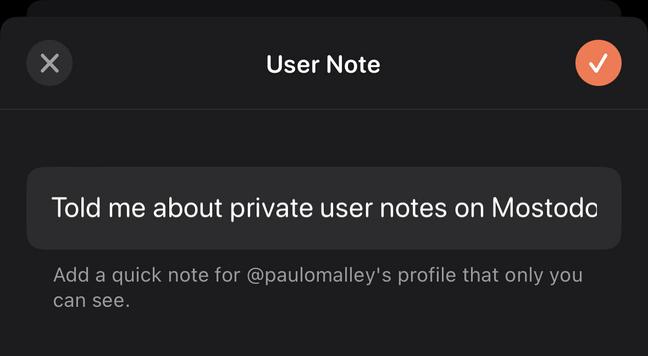
A little known feature of #Mastodon is the ability to create your own personal notes about an account.
This is a great way to potentially remind yourself why you follow particular accounts (or just about any other reason you can think of).

Also, these notes are private. The account does not know what you have written down, nor the fact that you have even made these notes.

Please #boost to help spread the knowledge around your networks. ☺️
#MastodonTips #Feditips #Notes
https://youtu.be/npoBM9Ev2CQ

Maximize Your Mastodon Experience with the Power of Notes

YouTube
@paulomalley
The notes are semi-private. The admins of your instance can see them.
@moliver Yeah, that's a good callout. But then again, technically everything on the instance "can" be seen by the admins.
So it's about as private as anything else is on the platform.
@paulomalley
Agreed. The notes are super useful, but it's something to keep in mind, depending on the note, lol

@paulomalley @moliver I think it's worth emphasizing that they're really not private. It's not just that the admins can see them, but you're also relying on their overall security posture.

Are the admins using 2FA? How secure do they keep the devices they access their accounts from? How up-to-date is the infrastructure the instance is hosted on? How easy would it be for a new admin to join the team?

Etc.

@paulomalley I had no idea about this feature. Thanks for sharing!

@doaas No problem.
I saw a couple of people asking about it the other day and so thought it might be worth creating a guide on it.

I'm glad you found it useful. πŸ˜„πŸ‘

@paulomalley only available on browser? I don’t seem to have in app.

@ManicBookkeeper That will likely depend on the mobile app you are using. Some do support it but others at the moment are waiting to be updated.

I don't believe the official apps have support yet but I know that Tusky Nightly on Android does (but it's a beta build currently).

@paulomalley I’m cool waiting. Just wondered if maybe it was on a different spot on app.
@ManicBookkeeper @paulomalley Same here. On default web client, but not on #Pinafore.

@martinvermeer
@ManicBookkeeper
I believe it may depend on the app you choose to use. Not all apps support the Notes feature just yet, but many do.
I personally use Fedilab on Android, but I know that Tusky also supports it. The official mobile app doesn't have support for this yet.

I can't speak for Pinafore as I haven't really used it much myself, I tend to use the advanced web interface on my PC.

@paulomalley I may use it to remind myself if a already asked someone to allow my following.
@vincentius thats not a bad idea actually. Nice suggestion.
@paulomalley We had that in Second Life since the beginning (at least 2004). We used them at first avidly. Then stopped. I wonder why. Interesting to ponder.
@paulomalley Oh, you have answered my great curiousity! Thank you for that.
@SharonBergAuthor Not a problem at all. I am glad that you found the content useful. πŸ˜πŸ‘
@paulomalley I tried this but I could see the notes that I wrote about myself, and I cannot believe what my other personality says about me when she is drunk.
Can I block her?
@SmarteristGeenyas
I wish. lol
Unfortunately, the struggle will need to continue for the time being... πŸ˜‰πŸ‘Œ
@paulomalley An unethical instance admim can read them, though.
@dalias this is true, but then again, the same could be said for literally everything on Mastodon.

@paulomalley

thanks for that. I had seen the notes feature but wasn't sure of it's purpose

@paulomalley
Thanks so much for this! I'd wondered what that feature was, but was too nervous to mess around with it without knowing.
@paulomalley I've seen that feature, but haven't made use of it yet. Thanks for the reminder, since I've forgotten why I've followed folks elsewhere.
@paulomalley all these wonderful features assume using desktop version. Useless for those mobile users like me who have forgotten their password and receive NULL support from the presumably overwhelmed helpdesk @mastodonsocial

@bahar
That's not entirely true though. I am currently using a mobile app (Fedilab) that supports all of these features, and the official mobile apps are being updated to support all the new Mastodon 4.0 features that have only recently been rolled out.

As for you not being able to reset your password, unfortunately I can't help there as it's not something I have any visibility over. Hopefully @mastodonsocial will be able to find you a solution soon enough.

@bahar @paulomalley There is no β€œhelpdesk” for all of Mastodon. That would be like having a helpdesk for all of the world-wide web.
You need to look at the β€œAbout” page for your specific server to see who runs it. Bahar, in your case that is https://mstdn.social/about which has your administrator’s contact information. I don’t know who that mastodonsocial account is but they aren’t going to be able to help you with your password on a different instance!
Mastodon 🐘

A general-purpose Mastodon server with a 500 character limit. All languages are welcome.

Mastodon hosted on mstdn.social
@bhawthorne @paulomalley I have sent at least two password updates request to exactly that person with no help. I know this sounds like childish ranting and the owner doesn’t have the bandwidth, but I also know things can be automated….
@bhawthorne @paulomalley
@stux i post here as you don’t seem to have seen my email request. I need you to help me reset my password

@paulomalley sometimes I see a post on my timeline that I wouldn't like to see.

The truth is - people I follow something turn out not to be the type of person I thought they are when I started following them.

So I've build a system, in which I give people yellow cards for content that doesn't fit my taste using the "None" feature. Every time one of my followers posts something that I really don't like seeing, I put one asterisk (*) in the "Note" section. If they get 3, I unfollow them.

@harmag That's honestly a great way to use this feature. I hope you don't mind, but I am stealing that... πŸ˜„πŸ‘
@paulomalley please do, I will be honoured.
@harmag @paulomalley Another great feature is the Mute feature. You can mute someone for an hour or a day or a week or forever. Sometimes I just need a break from what they are posting at the moment.

@bhawthorne I never used a Mute feature as a solution to cut myself off from a particular type of content/user temporarily πŸ€” That's an interesting idea.

So far I used it to permanently mute users that were purely abusive actors.

@harmag 1-hr time outs are my most common, when someone is on a retoot spree
@paulomalley but you can't write to note if you use mastodon app.

@MysticSkywolf
Well that really just depends on the app you choose to use.
I know both Fedilab and Tusky have support already for notes and the official mobile app is due for an update shortly to support it also.

There are quite a few features that have only recently rolled out with Mastodon 4.0 and the mobile apps all need to be updated for it. With the massive influx of users lately, I expect the updates will come sooner rather than later.

@paulomalley thanks for this explanation,I feel more comfortable using it now.
@Cathybug
The pleasure is all mine. πŸ˜„πŸ‘
I have a bunch of other tips in the thread also that might be useful for you.
@paulomalley Thanks! I've been wondering what 'notes' were meant to be...

@galand2dogs
No worries. I was in the same boat merely a few days ago.
One of the benefits of all us #NewHere people is that we can share what we learn with others.

I've got a bunch of other tips earlier in this thread that you might find useful also.

@paulomalley In the EU aren't notes about a person on a computer system the property of that person, and if required need to be disclosed
@redfernmike
I'm not an expert on EU law, so I personally couldn't say. That might be something to discuss with the admins of your instance though.
@paulomalley Can I keep notes on blocked accounts? That's one feature I've wished was available on Blue Bird.
@faktoider
You sure can! πŸ˜„πŸ‘
I have been using the notes so that I can remember exactly why I blocked the account.
@paulomalley That is so useful!

@abracanabra
Right! πŸ˜„
I've been using it for accounts I block so that I can remember exactly why I blocked them.
I saw another user that uses it for a "3 strike system".

There's a lot of room to use there, so you can put basically anything.

@paulomalley

I was actually gearing up to build myself a FireFox extension for the birdsite when the exodus happened. Happy to see it's baked-in on Mastodon.

Very useful to make sure the Internet Never Forgets.

"Why am I following this person?"

"Why did I block this person?"

"What horrible thing did this person post that they should never be allowed to forget?"

@Pxtl
Yeah, it's honestly an amazing feature for people like me that are notorious for forgetting stuff like that.
I've been nothing down why I blocked certain accounts.
@paulomalley Ah, good that's what that Note thing is about. Excellent!
@paulomalley I wondered.. now I know. Thanks

@paulomalley

Thanks! I just used this feature for a note to myself to remind me that a Mastodonian I recently encountered deliberately does not add alt-text to images β€” so the absence of alt text in one of their posts is not an accident or oversight, it's a choice.

(Their profile notes how spiritual and wise they are, but omits mention of being mean-spirited. Go figure.)