 Mohamed
I wrote an article on how to auto-dub a video to replace your voice with an AI voice using OBS Studio, SpeechNote and FFmpeg
Quite easy to achieve this with OSS software (and offline models).
I wrote an article on how to auto-dub a video to replace your voice with an AI voice using OBS Studio, SpeechNote and FFmpeg
Quite easy to achieve this with OSS software (and offline models).
Today's (kinda late) #FreesoftwareAdvent is #SpeechNote!
https://github.com/mkiol/dsnote
Speech Note is for speech-to-text note taking, but I use it mostly for text-to-speech.
I can drop something I've written into it and it'll produce an audio file read-out. This is invaluable for self-editing. Simple mistakes that I've overlooked a dozen times while proofreading become instantly obvious when read back this way.
I've also begun trying it out to produce English subtitles for films that lack them.
Speech Note Linux app. Note taking, reading and translating with offline Speech to Text, Text to Speech and Machine translation. - mkiol/dsnote
🗣️🎤📝  Speech to Text and Text to Speech on GNU/Linux
  📝🔊💻
📝🔊💻
Why This Matters to Me (and Maybe You Too)
If you’re anything like me—a Linux user who counts on voice typing and TTS because of visual impairment—you know that accessibility is not a luxury, it’s a necessity. Speaking from experience as someone who depends on voice typing (and TTS) , the quest for a seamless, local, FLOSS speech-to-text (STT) setup on Linux can be frustrating.
Here’s how you can succeed with modern tools using Linux. FLOSS means freedom and privacy; working locally means real control.
Let’s dive in! I’ll tell you what I’ve learned and what I use—and hope you’ll share your favorite tools or tips!
System-Wide Voice Keyboard: Speak Directly in Any App
Want to speak and have your words typed wherever your cursor is—be it a terminal, browser, chat, or IDE? Here’s what actually works and how it feels day-to-day:
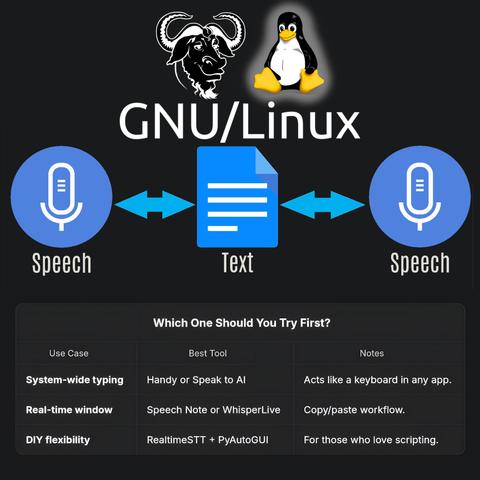
- Speak to AI (Offline, Whisper-based, global hotkeys)
This tool is my current go-to. It uses Whisper locally, lets you use global hotkeys (configurable) to type into any focused window, and doesn’t need internet. Runs smoothly on X11 and Wayland; just takes a bit of setup (AppImage available!).
GitHub Repo https://github.com/AshBuk/speak-to-ai) | Dev.to Post https://dev.to/ashbuk/i-built-an-offline-voice-typing-app-for-linux-speak-to-ai-3ab5)
- DIY: RealtimeSTT + PyAutoGUI
For the true tinkerers, RealtimeSTT plus a Python script lets you simulate keystrokes. You control every step, can lower latency with your tweaks, but you’ll need to be comfortable with scripting.
RealtimeSTT Guide https://github.com/KoljaB/RealtimeSTT#readme)
- Handy (Free/Libre, offline, Whisper-based, acts as a keyboard)
I’ve read lots of positive feedback on Handy—even though I haven’t tried it myself. The workflow is simple: press a hotkey, speak, and Handy pastes your text in the active app. It’s fully offline, works on X11 and Wayland, and gets strong accuracy thanks to Whisper.
Heads up: Handy lets you pick your own shortcut key, but it actually overrides the keyboard shortcut for start/stop recording. That means it can clash with other tools that depend on major shortcut combos—including Orca’s custom keybindings if you use a screen reader. If your workflow relies on certain shortcuts, this might need adjustment or careful planning before you commit.
GitHub Repo https://github.com/cjpais/Handy) | Demo https://handy.computer)
Real-Time Transcription in a Window (Copy/Paste Workflow)
If you’re okay with speaking into a dedicated app, then copying, these options offer great GUIs and power features:
- Speech Note by @mkiol https://mastodon.social/@mkiol
FLOSS, offline, multi-language GUI app—perfect for quick notes and batch transcription. Not a system-wide keyboard, but super easy to use and works on both desktops and Linux phones.
Flathub https://flathub.org/apps/net.mkiol.SpeechNote | LinuxPhoneApps https://linuxphoneapps.org/apps/net.mkiol.speechnote/)
- WhisperLive (by Collabora)
Real-time transcription in a terminal or window—great for meetings, lectures, and captions. Manual copy/paste required to get the text to other apps.
GitHub Repo https://github.com/collabora/WhisperLive)
More Tools for Tinkerers
If you like building your own or want extra control, check out:
- Vosk: Lightweight, lots of language support. GitHub https://alphacephei.com/vosk/)
- Kaldi: Powerful, best for custom setups. Website https://kaldi-asr.org/)
- Simon: Voice control automation. Website https://simon-listens.org/)
- voice2json: Phrase-level and command recognition. GitHub https://github.com/synesthesiam/voice2json)
Pro Tips
- Desktop Environment: X11 vs. Wayland affects how keyboard hooks and app focus actually operate.
- Ready-Made vs. DIY: If you want plug-and-play, try Speech Note or Handy first. Into automation or customization? RealtimeSTT is perfect.
- Follow the Community: @thorstenvoice offers tons of open-source voice tech insights.
Screen Reader Integration
Looking for robust screen reader support? Linux has you covered:
- Orca (GNOME/MATE): The most customizable GUI screen reader out there. The default voice (eSpeak) is robotic, but you can swap it for something better and fine-tune verbosity so it reads only what matters.
- Speakup: Console-based, ideal for terminal.
- Emacspeak: The solution for Emacs fans.
💡 Orca is part of my daily toolkit. It took time to get the settings just right (especially verbosity!) but it’s absolutely worth it. If you use a screen reader—what setup makes it bearable or even enjoyable for you?
Final Thoughts
If you’re starting from scratch, try Handy for direct typing (just watch those shortcuts if you use a screen reader!) or Speech Note for GUI-based transcription. Both are privacy-friendly, local, and accessible—ideal for everyday Linux use.
Is there a FLOSS gem missing here?
Sharing what works (and what doesn’t!) helps the entire community.
Resources:
Speech Note on Flathub https://flathub.org/apps/net.mkiol.SpeechNote
Handy GitHub https://github.com/cjpais/Handy
Speak to AI Guide https://dev.to/ashbuk/i-built-an-offline-voice-typing-app-for-linux-speak-to-ai-3ab5
RealtimeSTT https://github.com/KoljaB/RealtimeSTT
#Linux #SpeechToText #FLOSS #Accessibility #VoiceKeyboard #ScreenReader #Whisper #Handy #SpeechNote #OpenSource #Community #voicetyping #LocalSTT #TTStools #SpeechRecognition #A11y #Linuxtools #Voicekeyboard #Whisper #Handy #speech-to-text #SpeechNote #review #ScreenReaders #ORCA #FOSS
Speech Note. Linux desktop and #Sailfish OS app for note taking, reading and translating with offline Speech to Text, Text to Speech and Machine Translation https://github.com/mkiol/dsnote
Está disponible en los repositorios de Packman para openSUSE. En GitHub tiene paquetes RPM, DEB y FlatPak. Permite usar GPUs tanto de AMD (ROCm) como NVIDIA (CUDA).
Funciona bastante bien. Ha transcrito diálogos con bastante precisión (inglés, WhisperCppLarge-V3 acelerado con #ROCm). Siempre hay que revisar el texto transcrito. Se come e inventa palabras.
Speech Note Linux app. Note taking, reading and translating with offline Speech to Text, Text to Speech and Machine translation. - mkiol/dsnote
Y'a des gens qui utilisent Speech Note sous #Linux ici ? Vous utilisez quel modèle pour la dictée vocale en français ?
#LibreOffice #Texte unter #Linux #diktieren mit #SpeechNote:
Die #TTS und #STT Anwendung #Speech_Note liefert gute Ergebnisse, auch auf mittelstarker Hardware. Die verschiedenen #KI- Modelle werden alle lokal ausgeführt.
Speech Note als #Flatpak installiert. Nach der Installation belegt das Programm knapp 4 GB auf der SSD. Wer knappen Massenspeicher hat, sollte sich dessen bewusst sein. Doch damit nicht genug; beim ersten Starten der Anwendung darf man eine Sprache...
https://gnulinux.ch/libre-office-texte-unter-linux-diktieren-mit-speech-note
#SpeechNote has just reached 1K stars on GitHub. I know that doesn't mean anything, but this is a good opportunity to sum something up.
Right now you can install it via Flathub, Arch Linux AUR, OpenSUSE Pacman repo and OpenRepos if you use Sailfish OS. According to Flathub stats only, Speech Note is downloaded 300 times per day. The last update was installed on about 20K computers! This is much more than I could have ever foreseen. This is amazing and very rewarding. Thank you, dear users!
Speech Note Linux app. Note taking, reading and translating with offline Speech to Text, Text to Speech and Machine translation. - mkiol/dsnote
@thelinuxEXP I really like Speech Note! It's a fantastic tool for quick and local voice transcription in multiple languages, created by @mkiol
It's incredibly handy for capturing thoughts on the go, conducting interviews, or making voice memos without worrying about language barriers. The app uses strictly locally running LLMs, and its ease of use makes it a standout choice for anyone needing offline transcription services.
I primarily use #WhisperAI for transcription and Piper for voice, but many other models are available as well.
It is available as flatpak and https://github.com/mkiol/dsnote
#TTS #transcription #TextToSpeech #translator translation #offline #machinetranslation #sailfishos #SpeechSynthesis #SpeechRecognition #speechtotext #nmt #linux-desktop #stt #asr #flatpak-applications #SpeechNote
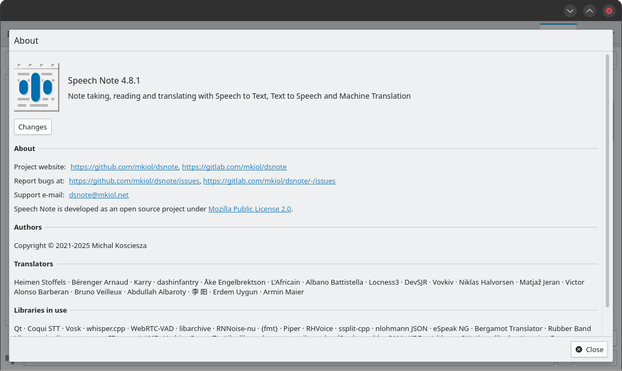
 Joe Wells
 Debby ⁂📎🐧
 Hacker
 dot ·
dot · Kai Rüsberg


 mkiol
mkiol