 vkc via PeerTube
My iPod is better than my phone: repair, new SSD, and managing songs with Linux

My iPod is better than my phone: repair, new SSD, and managing songs with Linux
RE: https://mastodon.social/@geekland/116404272206986703
I tried it from AUR and it's functional for what it is... I liked it, it looks like #Rhythmbox should continue 👇🎧
Euhh... C'est quoi ce phoque ?
Dans une installation #Fedora 44 / #Gnome 50, on n'a plus d'application de musique par défaut ?
Plus de #Rhythmbox ?
Pas de #GnomeMusic ?
On a un machin de lecture audio à la place ?!
🤔 😠 🤪
Rhythmbox is a multimedia application that supports ripping a audio CD to FLAC, Opus, and Vorbis formats.
FLAC: https://mastodon.online/@blueghost/112290839593673304
Opus: https://mastodon.online/@blueghost/115298082186792263
Vorbis: https://mastodon.online/@blueghost/115298106978513801
Rhythmbox is included in Debian and Fedora software package repositories, a convenient and secure method of installation.
Website: https://github.com/GNOME/rhythmbox
#Rhythmbox #Linux #Multimedia #Audio #AudioCD #FLAC #CD #Music #FreeSoftware #OpenSource #FOSS #FLOSS #GNOME #Opus #MP3 #Vorbis #Debian #Fedora

RE: https://mastodon.social/@ouij/116298894618592246
Boosting my own stuff from last night because I want to know if anyone out there knows about something more modern than Rhythmbox where I can put all my internet radio streams and local music files in one app
@Blumi147 OK - Notbetrieb mit #rhythmbox aktivieren. Es läuft Zufallsauswahl: #accept - we're bound to fail.
Schlechtes Omen ? 🤔
#LinuxMint kommt ja schon mit einer Auswahl an Programmen, mit denen man im Prinzip direkt anfangen kann zu arbeiten. Na ja, ein bisschen Einrichtung gehört wie immer schon dazu, will man die Programme nach seinen Vorlieben einrichten. Wer mehr will, muss manchmal aber auch suchen. Daher habe ich einmal eine Liste der Programme zusammengestellt, die ich auf meinem #iMac unter LinuxMint 22.3 installiert habe. Vielleicht hilft es ja jemandem.
Kann aber keine Garantie geben, dass die Programme alle funktionieren. Installation und Benutzung der Programme erfolgt auf eigene Verantwortung und Gefahr!
#LinuxMint comes with a selection of programs that you can basically start using right away. Of course, as always, a little setup is required if you want to configure the programs to your liking. Those who want more sometimes have to search. Therefore, I have compiled a list of the programs I've installed on my #iMac running Linux Mint 22.3. Maybe it will be helpful to someone.
However, I can't guarantee that all the programs will work. Installation and use of the programs is at your own risk!
#LinuxMint est fourni avec une sélection de programmes que vous pouvez utiliser immédiatement. Bien sûr, comme toujours, une petite configuration est nécessaire si vous souhaitez les personnaliser. Ceux qui veulent plus doivent parfois chercher. C'est pourquoi j'ai listé des programmes que j'ai installés sur mon #iMac sous Linux Mint 22.3. Cela pourrait être utile à certains.
Cependant, je ne peux garantir le bon fonctionnement de tous les programmes. L'installation et l'utilisation de ces programmes se font à vos propres risques !
NB: Der Post besteht aus zwei Teilen, wegen der Zeichenbeschränkung
Remarque : Ce message est divisé en deux parties en raison de la limite de caractères.
Note: This post consists of two parts due to character limitations.
Teil 2 / Part 2 / Partie 2
Hugin – Panorama-Ersteller – Erzeugt Panoramabildern aus mehreren Einzelbildern.
Image Scan! for Linux (iscan-plugin-gt-f670) – Scan documents and images with your Epson scanner
Inkscape – Skalierbare Vektorgrafiken erstellen und bearbeiten
Kate – Erweiterter Texteditor
KBlocks – Ein Tetris-Spiel
KDiamond – Ein Drei-Gewinnt-Spiel
KeePassXC – Plattformunabhängiger Passwortmanager; Community-driven port of the Windows application “KeePass Password Safe”
Kid3 – Metadaten von Audio-Dateien bearbeiten
KReversi – Reversi-Brettspiel
Kwrite – Texteditor
LibreOffice – Textdokumente, Tabellendokumente, Präsentationen, Zeichnungen, Formeln und Datenbanken
LibreWolf – Web-Browser
LosslessCut – The swiss army knife of lossless video/audio editing
Mahjongg – Einen Haufen Steine durch Entfernen der zusammengehörenden Paare auseinandernehmen
mpv Media Player – Filme und Musik abspielen
Nextcloud Desktop – Nextcloud Desktop-Synchronisationsclient
Okular – Universeller Dokumentenbetrachter
OpenShot Video Editor – Create and edit amazing videos and movies
Pale Moon – Web-Browser
PDF Arranger – PDFs zusammenfügen, umsortieren, trennen, rotieren und zuschneiden
PDF4QT LaunchPad – Launch PDF applications: Editor, Viewer, PageMaster, Diff
PDFsam Basic – Ein Werkzeug zum Trennen, Zusammenführen, Rotieren und Mischen von PDF-Dokumenten
Pix – Ihre Bilder ansehen und organisieren
Psensor – Psensor is a graphical temperature monitor for Linux
Qalculate! – Leistungsstarker und einfach zu bedienender Taschenrechner
Remmina – Zu entfernten Arbeitsflächen verbinden
Rhythmbox – Ihre Musiksammlung wiedergeben und organisieren
Rpi Imager – Raspberry Pi Imager
Schriften-Betrachter – Voll funktionsfähige Anwendung zur Vorschau von Schriftdateien
Shotwell – Ihre Fotos organisieren
Shutter – Bildschirmfotos aufnehmen, bearbeiten und mit Anderen teilen
Simple-Scan – Eine digitale Kopie Ihrer Fotos und Dokumente erstellen
Skanlite – Bilder scannen und abspeichern
System Profiler and Benchmark (Hardinfo) – Displays system information
Tenacity – Audio-Dateien aufnehmen und bearbeiten
Thunderbird – E-Mails und Nachrichten lesen und schreiben
Timeshift – Backup and System Restore Utility
Tor Browser– The privacy-focused browser
Vivaldi – Web-Browser
VLC Media Player – Media-Player, spielt quasi alles; Wiedergabe, Aufnahme und Verbreitung Ihrer Multimedia-Streams
WaterFox – Web-Broser; The privacy-focused browser
Windscribe – VPN-Servive
Xfburn – Brennprogramm für CDs und DVDs
XnView Multi Platform – Graphic viewer, browser, converter
Xsane – A program to work with scanners. Can be used as a scanning, copier, OCR, fax tool.
YouTube to MP3 – Saves audio tracks from YouTube
ZenBrowser – Web-Browser; for „A calmer internet“
#linux #linuxmint #imac #macbook #matedesktop #LinuxSoftware #linuxmac
#Audacity #VLC #Rhythmbox #Kid3 #Freac #Firefox #firefoxdevelopperedition #Kate #Kwrite #Geany #libreoffice #webbrowser
#minetosh
 🏁⚡Omar Two Tone⚡🏁
 Patrick $8
 Rui Nibau (rnb)
 Blue Ghost
 Geekland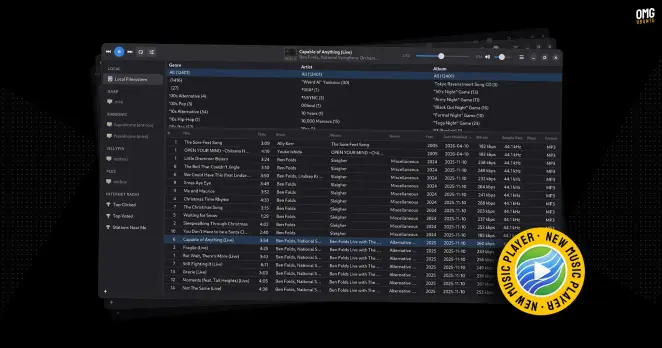
 Luigi de Guzman
 DasMammut
 Minetosh 🇪🇺 🇩🇪 🇨🇵 🐧 🎶 🤘