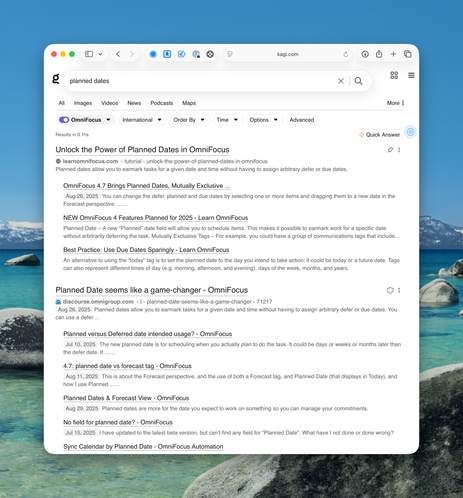
I'm experimenting with Custom Lenses in @kagihq after watching @leegarrett's excellent Kagi Search video on #ScreenCastsOnline (https://www.screencastsonline.com/tutorials/utilities/kagi-search).

For example, I created an "OmniFocus" lens that searches top sources of information on #OmniFocus (including @learnomnifocus :). Another great reason to use Kagi!

It’s rare to get a ScreenCasts ONLINE-like video without being a member, but owner @leegarrett has created a couple of videos of his first impressions of iPad OS and macOS 26. Here’s a link to the one he did on iPad OS 26. It’s not a big whine piece like so many others; rather it’s “here’s what I think is cool and how it works”.

https://myproductivemac.com/blog/ipados-26-my-first-thoughts2962025

#iPadOS26 #SCreenCastsONLINE

iPadOS 26 - My First Thoughts — MyProductiveMac

Get an early look at iPadOS 26 in this mini hands-on review. Discover the new multitasking features, improved window management, and honest impressions of Apple’s latest beta. Includes a video walkthrough of key changes.

MyProductiveMac

No, I’m NOT (just) sucking up to my new boss @leegarrett at ScreenCastsONLINE…

Are You Baffled by iStat Menus 7's Interface? Lee Garrett's ScreenCastsONLINE Tutorial Can Help
https://www.podfeet.com/blog/2024/11/sco-video-istat-menus/

#iStatMenus #Tutorial #Apple #ScreenCastsONLINE

Are You Baffled by iStat Menus 7's Interface? Lee Garrett's ScreenCastsONLINE Tutorial Can Help - Podfeet Podcasts

Whenever I do a ScreenCastsONLINE tutorial video, I always tell you about it. I tell you how much fun I had creating the tutorial and what you’ll learn from it. I do this because I’m very proud of the work I do for ScreenCastsONLINE. What I rarely mention is that there are other terrific tutors […]

Podfeet Podcasts
We are grateful to #Lee Garrett 🙏 for producing an informative video on @getseasonsapp, available on his YouTube channel #ScreenCastsOnline. The video's high quality and skillful execution were truly impressive. We recommend visiting his channel and possibly subscribing to it. 🚀
#apple #ios #saveyourmoney #Streaming companion

#ScreenCastsOnline has an awesome tutorial up for my Mac, iPhone and iPad app #Transloader , which lets you manage downloads on your Macs, remotely from your other devices!

https://www.screencastsonline.com/tutorials/utilities/tip-transloader

Free Video Tutorial: Tip - Transloader - Apple Mac, iPad & iPhone Tutorials from ScreenCastsOnline

This is an Apple Mac, iPad or iPhone Video Tutorial from ScreenCastsOnline: Transloader is a well made and simple app allowing you to initiate downloads on your Mac from your iPhone or iPad. We spend a lot of time on mobile devices, including researching apps or investigating other downloads that are Mac-specific. Instead of using your carrier data, transferring from your device to Mac or using iCloud to sync, Transloader allows you to share the download link with your Mac and have it download at home, ready for your return. Join Darcy as he shows you around the app with some real world examples. - Transloader requires macOS 10.4 or later; iOS 14 or later. - The Mac version costs $9.99 USD. - It is available as part of your Setapp subscription at no additional cost.

The free Google Forms is a great way to get feedback from people. I’m wild about it so I created a video tutorial all about it for ScreenCastsONLINE. Watch the teaser video here.

Google Forms Tutorial on ScreenCastsONLINE https://www.podfeet.com/blog/2023/10/google-forms-sco/

#CideoTutorial #Tutorial #Google #GoogleForms #ScreenCastsONLINE

Google Forms Tutorial on ScreenCastsONLINE - Podfeet Podcasts

If you’ve ever needed to get feedback from a group of people, using the free Google Forms is a great way to do it. You can create surveys, get feedback on a class you’ve taught, help organize a family reunion, or even create quizzes. I’ve used it to organize the party we used to throw […]

Podfeet Podcasts
@ivory @Donmcallister @icecubesapp Great idea! 😁☀️
Perhaps people imagine they already know all there is to know about social media, but I for one always learn a lot from your screencasts. Had to keep pausing the one on #Mastodon to try everything out!
#ScreenCastsOnline #SCO