Ổn định homelab! ✔️ Hiện tại đang dùng Proxmox + Nginx Proxy Manager trên cổng 80/443. Dự định nâng cấp: Sử dụng FQDN nội bộ, tắt SSH trên LXCs, chuyển sang SSH-key. ✅ Cần tư vấn nên dùng NPM hiện có hay thiết lập NPM riêng cho FQDN? Xin chia sẻ kinh nghiệm thực tế về cấu hình FQDN & bảo mật proxy! #NginxProxyManager #HomelabSecurity #FQDN #MạngMáyTinh #HomeLab

https://www.reddit.com/r/selfhosted/comments/1pxml3n/security_nignx_proxy_manager_for_fqdn/

#FOSSinAction:

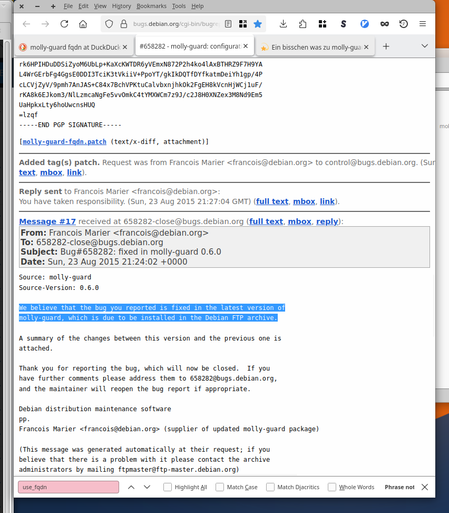
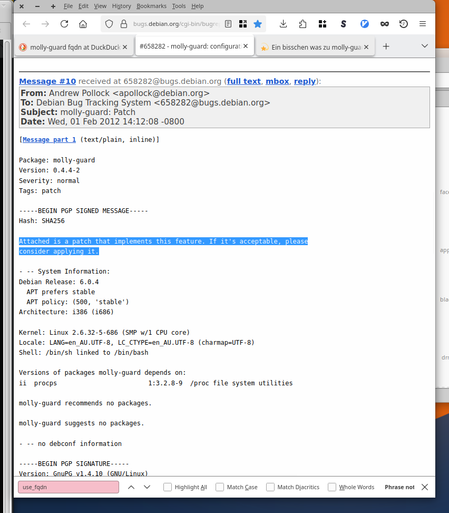
"A. Pollock" (debian.org), had an idea for a very useful feature (thx, btw! 🌻️) for molly-guard: Prevent accidential shutdown of distributed and virtual #GNU #Linux PCs by #FQDN.

"F. Marier" (debian.org), confirmed merging it back upstream.

Meaning: **From /then on/ that use-case is solved. for all IT.**
For good. #NoNeedToUpdate ☮️ 🗿

> I'd love to see stories and best-practices like that at schools and unis.
> Real people, no bullshit.

#WhyLinuxDestressesMe #StableIT #n0bit

Filerun hoạt động nhưngrouting ngược/FQDN khó cấu hình ở trường double NAT. Người dùng dùng entirely server Unraid, lounge travel router (không tiếp cận router chủ nhà). Cần giải pháp giúp FQDN/reactivities effectively. #SelfHosting #Networking #Unraid #Filerun #Help #ReverseProxy #FQDN #Hosting tự do #Cách giải double NAT

https://www.reddit.com/r/selfhosted/comments/1o9a6oc/help_setting_up_filerun_with_double_nat_situation/

Academic research finds economic, technical and operational harms from Italy’s Piracy Shield

Walled Culture first wrote about Piracy Shield, Italy’s automated system for tackling alleged copyright infringement in the streaming sector, two years ago. Since then, we have written about the serious problems that soon emerged. But instead of fixing those issues, the government body that runs the scheme, Italy’s AGCOM (the Italian Authority for Communications Guarantees), has extended […]

#agcom #albania #cdn #dnsBlocking #eu #fqdn #google #ipBlocking #ipv4 #italy #leasing #nunnery #overblocking #piracyShield #streaming #telecomItalia #tv

https://walledculture.org/academic-research-finds-economic-technical-and-operational-harms-from-italys-piracy-shield/

Internet is a service that you do not need 24 hours a day. In fact you should be able to turn on and turn off your Connection when you need it just like in the PPP days

In the past couple of days, when I was without an active internet connection, I was able to deduct the reason why sudo asks for a connection to the internet when my Gateway, one of my gateways, has none.

It turns out that for some reason sudo is looking for a FQDN {fully qualified domain name} on the Internet.

I wonder why, because on my SBC the name of the Server ends with .local

In order not to get this extremely annoying error, which slows down everything that you need to do with sudo, with a delay of Sixty to One Hundred Twenty seconds, you just need to turn off any network connection on the machine.

It was extremely annoying on the SBC, because I was making a duplicate of a USB stick, which constantly needed to invoke the sudo command, in order to write the data, with commands that needs root access to the device.

To give you an indication of the scope of the delay; a task which normally needs thirty minutes, took twelve hours and still failed, simply because it took way too long.

I am however a Bèta Tester. I love these interesting levels of troubleshooting with things that seem to be totally unrelated.

TLDR:

Disconnect your network when you need to use sudo if your gateways has no internet heartbeat

#SUDO #SBC #RaspberryPi #FQDN #Debian #internet #permission #troubleshooting #programming #OpenSource #POSIX

@namedbird @drscriptt personally, I think #CPE / #Router manufacturers should've standardized upon *.router.local (i.e. fritzbox.router.local) since .local has been reserved for such purposeS... per #IETF via #IANA & #ICANN...

  • Espechally since the average "#normie #consoomer" isn't gonna own their own domain or even setup an internal #DNS resolver to manage their #LAN at home under *.local.domain.example to make it work.

In fact most corporate users don't even enroll #FQDN|s on their network (#Universities do based off my observation!)…

.local - Wikipedia

@drscriptt Naive question: WHEN does the average #Internet #user ever open up a webpage with an #IP address instead of a #domain or even #FQDN?

  • Seriously, the only cases I saw were either some old, non-public - facing server in some B2B/API setting or a test that #httpd / #ngnix / #ssh / … function properly on like a #VPS and that the #DNS hasn't been updated (yet!) to include said host / FQDN in the records, and even then it's bad cuz you'd rather want to use it's FQDN instead because with #IPv4 shortages on one hand and tools like #Portainer on the other, one should not use an #IPaddress as addressing method because #WAF / #Proxies used to "#MUX" / "#NAT" services under one IP address or #IPv6 block may need that distinction by being queried for a specific FQDN...

The Idea if !SSL / #TLD for #IPaddresses makes me feel like Jeff Goldblum!

Jurassic Park - They didn't stop to see if they should

YouTube
@ryanc @kajer @cR0w this sounds like some #TechIlliterate demanded something because an intern can't do #DNS and just give you an #FQDN instead...
kajer (@[email protected])

today's first ticket: > We need this RFC4193 IPv6 address to use a certificate from the company's openssl CA You want openssl to give us a trusted cert for a non-routed IPv6 address?! lol, what a week

Infosec Exchange

I can't seem to get the #Palworld dedicated server that I'm hosting to sit nicely behind #cloudflare and a #FQDN.

I'm wondering if the #Fediverse has any suggestions?

Interesting little issue on the way: I didn't find a way to convince #guacamole to connect to a #guacd bound to ::1, but using the local #fqdn, so #x509 certificate validation is successful. OTOH, guacd configured to listen on "localhost" only binds on ::1 (no #IPv4!) as soon as #IPv6 is available. Weird.

As this is only on the local loopback interface, I'm fine for now forcing IPv4 here by configuring guacd to listen on 127.0.0.1 🙄