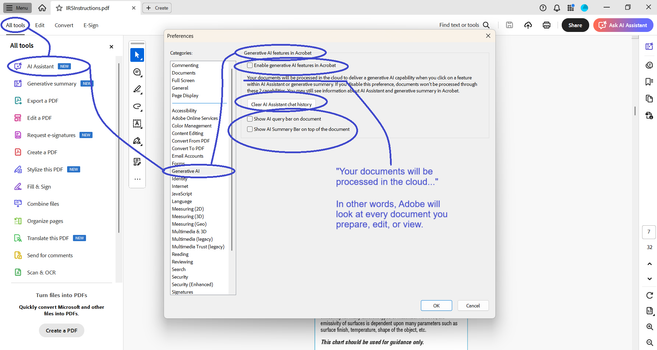
Adobe is now processing all your PDFs in the cloud, by default. The setting to “Enable generative AI features in Acrobat” was on, and I didn’t know it until I opened a document and Adobe asked me if I wanted a document summary. It’s annoying to have to click “No,” so I opened settings to disable the prompt.

THE PROBLEM
I sign Non-Disclosure Agreements for many of my clients. Adobe is a potential leak of protected information. I don’t know what Adobe does with this information. I don’t know what they store, or for how long. I don’t know what country (or countries) the data is stored in. I don’t know what LLMs are trained with this data. And I don’t need to know. What I need to know is that they won’t use default opt-in as a legal excuse to wiretap my information.

I recommend that you check your Adobe settings on all devices, for all Adobe accounts.
#CallMeIfYouNeedMe #FIFONetworks

#cybersecurity

@fifonetworks I didn't see the option in Adobe reader because I reverted to the classic UI the day they first introduced the AI assistant. Maybe it's also because I don't sign in to Adobe

@fifonetworks But there is something you now know, that you didn't before...

Adobe is yet another data-felching rat bastard corp.

This is why, as you may recall, I take issue with the lack of clear local-remote boundaries in how IT products are presented. A FOSS app store like F-Droid will make the distinction clear, but that appears to be the exception.

@fifonetworks IIRC, #Adobe was considered the no. 3 adtech platform circa late-2010s, and their magic vehicle for tracking ad exposure was #Acrobat.

AI is a new justification to turbo-charge the process of grabbing users' private information.

@tasket @fifonetworks
Wasn't it Flash on half of the web pages?
@tasket @fifonetworks One approach is to just bring down your Internet connection while working. If that doesn't work, you know that that is not software you should be using.
@martinvermeer @tasket @fifonetworks Abolutely insufficient protection. That only weeds out the poorly coded things that assume synchronous always on connections, not the much more robust and insidious ones that have background asynchronous attempts to make connections, gracfully degrade features when unavailable, and may queue up telemetry or data exfiltration for when the network comes up.

@fifonetworks

It's too bad Adobe is alienating some of their most influential customers like this. What do they gain? A reputation for stupidity (failure to understand customers, customer needs; treating all the same, 'one size fits all" & all that) & evil (do the worst that will offend the most by default). It's not as if there's that much 'customer loyalty' left in the bag... & equivalent or better s/w exists In many cases (hello Affinity!). You have to hope Adobe will get better advice/ advisors at some stage. But don't hold your breath. 😐

> What do they gain?

One possibility is a feeling they have jumped on the right bandwagon, illusory though it may be.

@Su_G @fifonetworks

@Su_G @fifonetworks
Nah, they'll just introduce "Secure Mode" for $19.99 additional per month.
@fifonetworks I recommend to use other software. Ditch Adobe.
@roman78 @fifonetworks And in addition to simply saying 'ditch Adobe', check out https://m.youtube.com/watch?v=lm51xZHZI6g James Lee did a great video on switching to a different work flow! And for a simple and dumb (Windows based) PDF Reader: Sumatra PDF Viewer
How I Broke up with Adobe

YouTube
@electron_wizard @roman78 @fifonetworks or just your your web browser, they all read PDFs by default and most of them can annotate and modify documents now.

@electron_wizard @roman78 @fifonetworks

I forgot about Sumatra. It was my go to in my Windows days. There's even a portable app version. Throw it on a USB drive or a dropbox account and take it wherever.

@MyWoolyMastadon @roman78 @fifonetworks It's used a lot by the professors at the university I work at, since it can open up 1000 page PDFs with ease!

@electron_wizard

Thank you. I just switched out the Adobe PDF Reader for Sumatra, because of your post.

One less big tech program on my computer.

@roman78 @fifonetworks

@Firlefanz @roman78 @fifonetworks Glad to hear. Although forms can't be filled out, it can open up 1000 page PDFs without any issues. It has some simple annotation stuff, although the user experience is a bit rocky in that regards.

@electron_wizard

Truth is, I mostly need something to look at my receipts and stuff when I do bookkeeping. Can't remember the last time I filled in a form.

I'm sure there are other options if I ever have to.

@Firlefanz @electron_wizard Foxit is okay-ish if you need to fill out form or want to use a lot annotations. most browsers can deal with pdf forms, too.

But Sumatra is really really good for reading.

@roman78 @fifonetworks I use PDFGear and got rid of all Adobe things.

@fifonetworks

Adobe is a trash company. I'm surprised there's an option to disable the AI feature.

Years ago I wanted Acrobat Reader to stop putting a shortcut on my desktop every time it updated (roughly monthly). AdobeCare told me to install another Adobe software (an administrative policy editor, basically) to make the change as I couldn't do it in Acrobat Reader itself. I couldn't make heads or tails of that program.

I'm on Linux now though, so I should be safe. No Adobe here.

(Edit! I thought Adobe bought Figma a few years ago, but apparently the merger failed. My bad…)

@fifonetworks They’ve also been training AI on user documents for Figma for almost a year now. It’s opt out! https://help.figma.com/hc/en-us/articles/17725942479127-Control-AI-features-and-content-training-settings

Honestly it’s merely a matter of time before they do it with Creative Cloud too. Too few seems to care… :-/

Control AI features and content training settings

Who can use this feature Available on all paid plans  Note: Figma’s AI features are currently free while in beta, but usage limits may apply. When made generally available, Figma AI will be...

Figma Learn - Help Center
@slembcke
Figma is not Adobe.
@Arnstein @slembcke I thought Adobe bought them, but I looked it up and apparently the deal was cancelled. (posting this for other people having the same thought)
@fifonetworks Use pdf x-change editor. It's faster and without AI crap.
@Eglaf @fifonetworks Jumping in to second this. If you're using Windows, PDF exchange is a perfect replacement.
@Eglaf @fifonetworks To add, I too have a lot of cybersecurity concerns, including NDAs that I have with my clients. PDF X-change does everything I need without the AI and surveillance BS.
@fifonetworks But this is only happening when you log in?
@K4mpfie @fifonetworks
I don't think so.
NB: logged in to what? My own PC, that is?
Never knew reading a PDF required an account somewhere...
@bertkoor @fifonetworks No 🙈 I meant logged into an Adobe Account. The question really is: Does Adobe use your files to train it's AI even if you just use the PDF Viewer without an Adobe account
Edit: I know it's not required to have an Adobe Account to open Adobe PDF Viewer, but this vulnerability gets way worse if Adobe scan every PDF that you open it in their program
@fifonetworks I stopped using Adobe products many years ago. For Pdfs I use LibreOffice Draw and i am quite satisfied with it. May the Foss be with you.

I don't need advanced PDF editing options so I'm quite happy with using Skim instead of Acrobat Reader.

https://skim-app.sourceforge.io

I switched from Adobe Creative Suite to Affinity (one-time purchase instead of monthly subscription). Occasional Photoshop users could even try this free web app: https://www.photopea.com

Skim | Home

Skim project web page

@fifonetworks Thank you for highlighting this. Have to check those settings!

@fifonetworks

Yikes.

Although all three Generative AI boxes were unchecked (set to off) when I looked in my settings, so apparently not on by default in the case of my account. Whew. But thanks, will look again every so often.

@fifonetworks the solution is to not use any Adobe products at all. I have uninstalled all from Adobe once they moved to rental. And my adobe account was leaked as well (I only used it once when installing Photoshop because there was no other option). Adobe is not trustworthy. Period!
@fifonetworks @inthehands I used Adobe since Illustrator 4.0. Leaved now.
@fifonetworks The unfortunate thing is that you can assume that they will use whatever data they can get and/or infer about you, and then sell it under the guise of anonimization to a company/companies that will later use it in a way that's impossible the predict now, but which for sure will coax you into buying a future product/service that you most likely don't really need 
@fifonetworks PDF was a bad idea since a veryyyy long time. Maybe people can stop using it now?
@fifonetworks and the idea that it's a default setting is outrageous in and of itself. Just think about it: a corporation that only purpose is to make more money to stakeholders, gets access to your data (and everyone else) because they decided that they have the right to it. And it's not only Adobe, but all of them: Google, Meta, Apple and the lot.
@fifonetworks The "your documents will be processed in the cloud" sentence you have that line pointing at says that happens *when you use generative AI features on them*. It doesn't say they'll preemptively process things before you've done so.

Still worth turning off to prevent misclicks, but "every document you view" is a mischaracterization of what's described in that text.

@fifonetworks What will this mean to Adobes business with European customers, which currently seeking a independence and sovereign place for their processing and data?
At least AWS and Microsoft have reacted by announcing a more independent data-center in the EU. Now Adobe is constructing a short cut for (sensible) data? For AI Learning?

WTF Adobe 😡.
We should advise not to use their products anymore!
This kind of hidden feature is just impudence.
Trusting Adobe? 🤪 A joke

@fifonetworks Just a second aspect for everyone.

Have you implemented it (data loss prevention tool) and you using it effectively and company-wide for data loss prevention?
May you have to think again, thanks to the Adobe short circuit.
Ultimately, if you read AI in the product description, you should proceed as you would with medication: Ask your doctor or pharmacist about risks and side effects.
(Security doctor and Professor privacy)😉

AI does not forget!

@Tom_Huth I'm so old that I still remember the Adobe Flash Player. When it comes to "trust", Adobe isn't exactly the first company that springs to my mind. 😆 @fifonetworks
@shred @fifonetworks Exactly, and yes I remember Adobe Flash as well.
@fifonetworks Given such practices from Adobe, there's no expectation that they'll respect the setting, or come up with a new way to undermine the user's choice in the future. The only sensible path forward is to stop using Adobe products altogether. There are plenty of alternatives.

@albertcardona @fifonetworks ...what's a good Adobe alternative for reading and signing PDFs? 🥹

Edit: on windows

@elduvelle @albertcardona @fifonetworks Firefox is pretty good. Probably can't do digital signing but you can draw a signature with it.
@neuralreckoning @elduvelle @albertcardona @fifonetworks I love Xodo for all things pdf. I use it for annotation on ipad and it's supported across mac, windows, linux and android as well.
@elduvelle @neuralreckoning @iris @albertcardona @fifonetworks
"pdf24.org is a project of geek software GmbH, a German company based in Berlin, that was founded in 2006. PDF24 offers free and easy to use PDF solutions for many PDF problems, online and as software for download. Solutions include the well-known PDF24 Creator and PDF24 Online Tools."
https://www.pdf24.org/en/
Solutions for all PDF problems - 100% free - PDF24

Free solutions for all PDF problems. Online and offline. Merge PDF, Compress PDF, Edit PDF, Convert PDF, ...

@iris @elduvelle @albertcardona @fifonetworks just tried it on my Surface and worked very nicely. Might try switching over to this for a while. Thanks for the recommendation!

@elduvelle @fifonetworks

xournal, okular, and LibreOffice writer all can sign documents digitally. Okular perhaps the easiest for PDF files, followed by Xournal.

@albertcardona @fifonetworks
Thanks! I had tried okular before but had to go back to adobe for some reason that I don't remember. So I'll give it another go :)

@elduvelle @albertcardona @fifonetworks it depends on what you use: Linux, Mac, Windows…

But all of them have alternatives.