 Bob Young
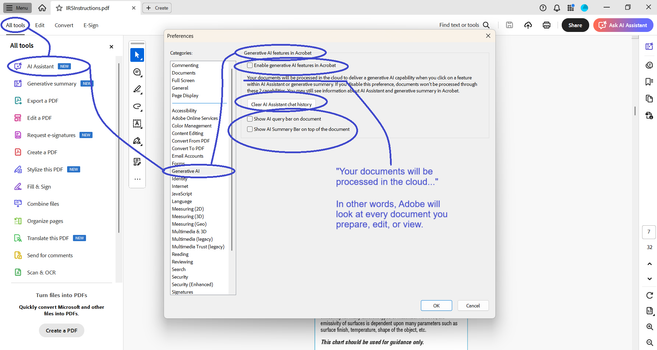
Adobe is now processing all your PDFs in the cloud, by default. The setting to “Enable generative AI features in Acrobat” was on, and I didn’t know it until I opened a document and Adobe asked me if I wanted a document summary. It’s annoying to have to click “No,” so I opened settings to disable the prompt.
THE PROBLEM
I sign Non-Disclosure Agreements for many of my clients. Adobe is a potential leak of protected information. I don’t know what Adobe does with this information. I don’t know what they store, or for how long. I don’t know what country (or countries) the data is stored in. I don’t know what LLMs are trained with this data. And I don’t need to know. What I need to know is that they won’t use default opt-in as a legal excuse to wiretap my information.
I recommend that you check your Adobe settings on all devices, for all Adobe accounts.
 Albert Cardona
 El Duvelle
 Eric Ireland