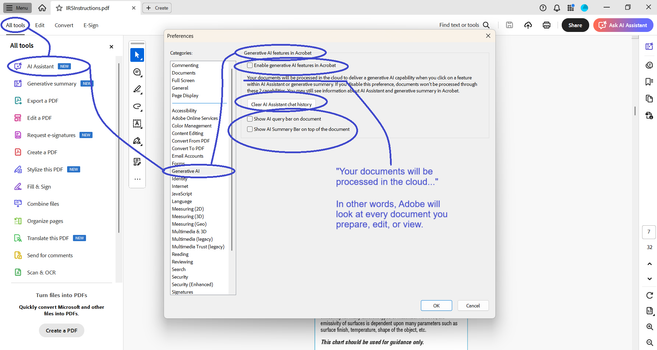
Adobe is now processing all your PDFs in the cloud, by default. The setting to “Enable generative AI features in Acrobat” was on, and I didn’t know it until I opened a document and Adobe asked me if I wanted a document summary. It’s annoying to have to click “No,” so I opened settings to disable the prompt.

THE PROBLEM
I sign Non-Disclosure Agreements for many of my clients. Adobe is a potential leak of protected information. I don’t know what Adobe does with this information. I don’t know what they store, or for how long. I don’t know what country (or countries) the data is stored in. I don’t know what LLMs are trained with this data. And I don’t need to know. What I need to know is that they won’t use default opt-in as a legal excuse to wiretap my information.

I recommend that you check your Adobe settings on all devices, for all Adobe accounts.
#CallMeIfYouNeedMe #FIFONetworks

#cybersecurity

@fifonetworks I recommend to use other software. Ditch Adobe.
@roman78 @fifonetworks And in addition to simply saying 'ditch Adobe', check out https://m.youtube.com/watch?v=lm51xZHZI6g James Lee did a great video on switching to a different work flow! And for a simple and dumb (Windows based) PDF Reader: Sumatra PDF Viewer
How I Broke up with Adobe

YouTube
@electron_wizard @roman78 @fifonetworks or just your your web browser, they all read PDFs by default and most of them can annotate and modify documents now.

@electron_wizard @roman78 @fifonetworks

I forgot about Sumatra. It was my go to in my Windows days. There's even a portable app version. Throw it on a USB drive or a dropbox account and take it wherever.

@MyWoolyMastadon @roman78 @fifonetworks It's used a lot by the professors at the university I work at, since it can open up 1000 page PDFs with ease!

@electron_wizard

Thank you. I just switched out the Adobe PDF Reader for Sumatra, because of your post.

One less big tech program on my computer.

@roman78 @fifonetworks

@Firlefanz @roman78 @fifonetworks Glad to hear. Although forms can't be filled out, it can open up 1000 page PDFs without any issues. It has some simple annotation stuff, although the user experience is a bit rocky in that regards.

@electron_wizard

Truth is, I mostly need something to look at my receipts and stuff when I do bookkeeping. Can't remember the last time I filled in a form.

I'm sure there are other options if I ever have to.

@Firlefanz @electron_wizard Foxit is okay-ish if you need to fill out form or want to use a lot annotations. most browsers can deal with pdf forms, too.

But Sumatra is really really good for reading.

@roman78 @fifonetworks I use PDFGear and got rid of all Adobe things.