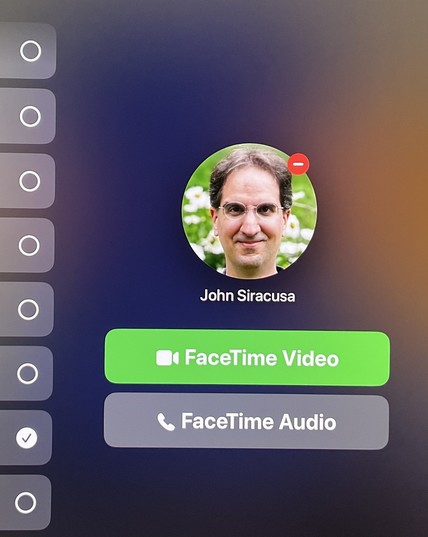
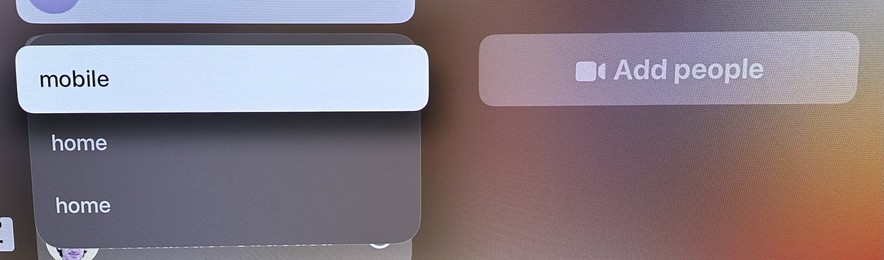
The team responsible for the FaceTime app on tvOS needs a VERY stern talking-to. Just for starters, take a look at the menu that appears when trying to start a call with a person.

Now imagine if it actually showed the emails or phone numbers for any of these choices. But no, you just have to guess! It’s on a giant TV screen! There’s plenty of room! It is MADDENING!
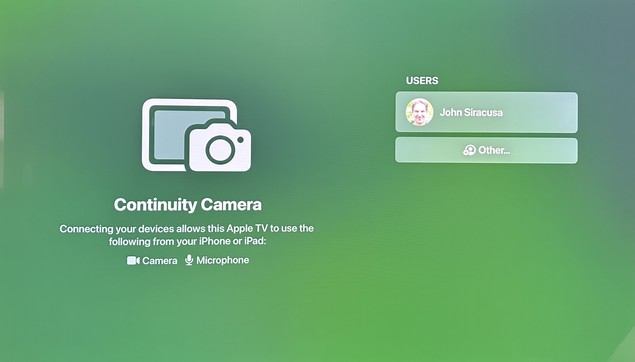
Launching the app often shows this screen, in which no button presses or swipes on the remote will do ANYTHING. Like, nothing. No item changes appearance. No actions can be triggered. Force-quitting the app and re-launching it usually “fixes” it.

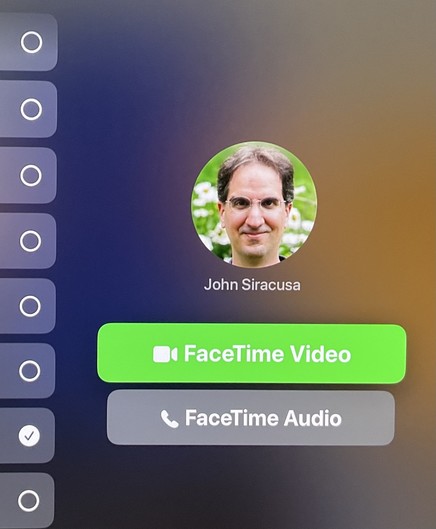
Once you pick from one of the mystery “home” or “mobile” or whatever contact methods for a person, you often get this screen, which makes it seem like you can press the main (touchpad) button on the remote to press the green button and initiate a FaceTime Video call. That is NOT the case.

Pressing the button on the remote actually moves the selection focus back to the user list! (You can figure out why if you look closely.)

Here’s what the screen has to look like in order for a button press on the remote to actually click the “FaceTime Videol button. No, this is not the same screenshot as before.

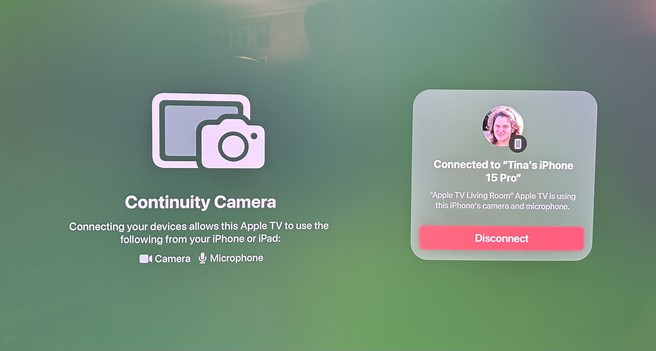
If you actually manage to start a FaceTime call, it will periodically (every few minutes) be stopped entirely, displaying this baffling screen. The only possible action is to click the red “Disconnect” button.

After that, you have to reconnect Continuity Camera, which means getting up from the couch and picking up the phone to manually accept the connection, even though the phone and the Apple TV are both signed into the same Apple ID and the phone was already being used as a camera earlier.

The interface for trying to add one or more people to an existing call is even more byzantine and full of UI dead ends and traps, but I don’t have the energy to set up a test call to screenshot it all. Please, Apple, do better.
@siracusa @Malik This is something for you. ;-)
@siracusa felt your pain yesterday. Once in worked perfectly. It’s a great idea and once it’s working is quite neat but the process of enabling CC and then initiating a call is so brittle this is a feature I can never sell to my family (great shame given surely the target audience).
@siracusa It is hard to know if they have just lost design leaders or if they’re focused elsewhere. So many basic design principles are missing across their platforms.
@siracusa I would pay a subscription fee for being able to hook up a plain old webcam to the Apple TV.
@siracusa I’ve never had continuity drop during a call. My Apple TV is hooked up to Ethernet, maybe that’s a factor.
@shac Mine is too. Also, DID it drop? Look at the text on that screen! It says “Connected to Tina’s iPhone”!

@siracusa I honestly think

‘hold selfie cam in palm’
is going to end up winning out over

‘mount your perfectly good phone out of reach on a monitor or several feet across the room just so you can have a decent camera’

@siracusa wow never seen this on any of my continuity calls. Also on Ethernet aTV, WiFi 6 for iPhone with router just the room over ¯\_(ツ)_/¯
@siracusa Everything else is UI; This is a bug. I’ve managed to never see that screen across many long tvOS calls.
@siracusa my wife experiences this all the time but with Zoom on our Apple TV. It won’t disconnect the call but her audio is suddenly “disconnected” and she can’t speak until she chooses a continuity device again.
@siracusa We got my parents an Apple TV for Christmas with the sole purpose of having grandchild FaceTime calls. This bug is so annoying we've reverted to using the iPhone.
@siracusa you might make this easier to see by enabling Settings → Accessibility → Display → Focus Style → High Contrast, which will draw a white box around the focused ui element, not only here, but also throughout tvOS. why this isn’t the default is beyond me
@siracusa this is a problem throughout tvOS. The fix, as others have mentioned and you prob already know is to turn on focus outlines. Without them, it feels like navigating a desktop without a cursor. It’s wild that folks (not just Apple) still make this mistake. Focus outlines everywhere (in TV app and game UIs) please.
@siracusa why in gods green earth is it apparently asking you to edit an avatars on the Apple TV? (That minus sign)?
@Chancerubbage Guess what happens if you click the button. It removes the image! But when you select the same contact again, the image reappears! So it didn’t actually remove it! Or something!

@siracusa It’s like whoever had that job left for lunch and never came back. I simply don’t understand a company that large having no continuity or Quality Assurance and project maintenance. It’s like musical chairs.

Was someone suddenly reassigned to change the tires on Project Titan?

@siracusa it obviously a ‘Wrong choice? Go back!’ minus sign. Not like minus signs have ever been used to denote removing things completely and forever into the void.
@siracusa the real crime is that there’s still no way to take screenshots on tvOS
@BenRiceM @siracusa you can screen record your Apple TV using QuickTime on your Mac. Both devices need to be on the same WiFi network and you need to not have an AirPlay speaker as the default sound output on your Apple TV. You can then screenshot your video 😅.
@8johnr8 @siracusa I use HomePods as the output but I do appreciate that there’s *some* solution
@BenRiceM @siracusa I do to. I just deactivate the option when I need to screen record then put it back on. A bit finicky but it works lol.
@siracusa I had this happen on my Apple TV yesterday. Seemed to be because I had started a FaceTime, then canceled it, then tried to reconnect. I double-clicked the TV icon on my remote, closed the FaceTime app, restarted and it worked fine.
@siracusa it's frustrating because the actual call experience is pretty great