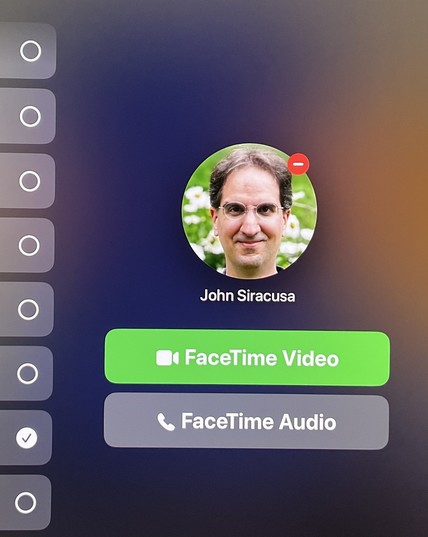
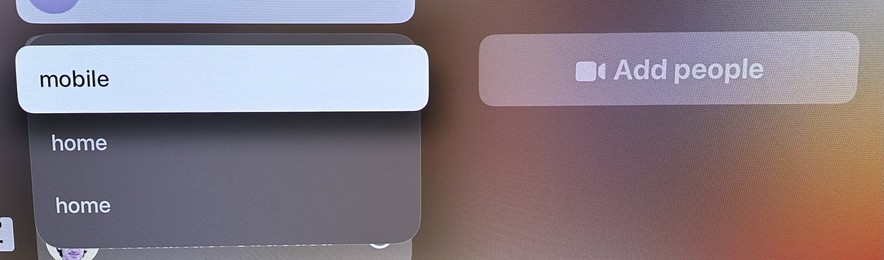
The team responsible for the FaceTime app on tvOS needs a VERY stern talking-to. Just for starters, take a look at the menu that appears when trying to start a call with a person.

Now imagine if it actually showed the emails or phone numbers for any of these choices. But no, you just have to guess! It’s on a giant TV screen! There’s plenty of room! It is MADDENING!
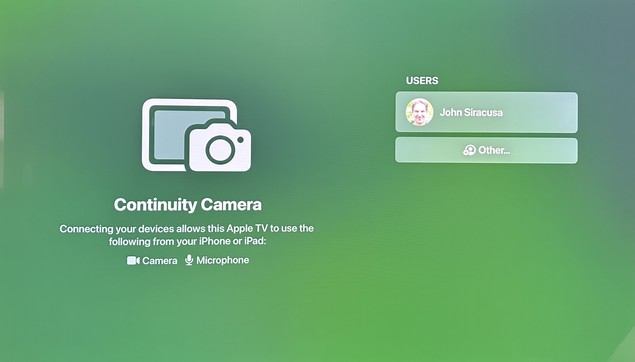
Launching the app often shows this screen, in which no button presses or swipes on the remote will do ANYTHING. Like, nothing. No item changes appearance. No actions can be triggered. Force-quitting the app and re-launching it usually “fixes” it.

Once you pick from one of the mystery “home” or “mobile” or whatever contact methods for a person, you often get this screen, which makes it seem like you can press the main (touchpad) button on the remote to press the green button and initiate a FaceTime Video call. That is NOT the case.

Pressing the button on the remote actually moves the selection focus back to the user list! (You can figure out why if you look closely.)

@siracusa why in gods green earth is it apparently asking you to edit an avatars on the Apple TV? (That minus sign)?
@Chancerubbage Guess what happens if you click the button. It removes the image! But when you select the same contact again, the image reappears! So it didn’t actually remove it! Or something!

@siracusa It’s like whoever had that job left for lunch and never came back. I simply don’t understand a company that large having no continuity or Quality Assurance and project maintenance. It’s like musical chairs.

Was someone suddenly reassigned to change the tires on Project Titan?

@siracusa it obviously a ‘Wrong choice? Go back!’ minus sign. Not like minus signs have ever been used to denote removing things completely and forever into the void.