 Bryan King
The Flashforge AD5X: Why I’m Done With Their Walled Garden
1,110 words, 6 minutes read time.
I wish I had known that the Flashforge AD5X was an afterthought—a machine clearly built with cost-cutting as the primary driver rather than user experience.
I was actually looking at QIDI printers when I stumbled upon the AD5X, a decision I now regret.
Don’t get me wrong; I appreciate the machine for what it is because I realize the price point dictates certain trade-offs. It feds my maker mentality, and I was willing to work within its limitations.
However, the recent “walled garden” attempts, implemented well after the sale, have completely soured my opinion of Flashforge.
Had I realized the company was planning to force this closed ecosystem on its users, I would have moved on; in fact, avoiding that exact dynamic is precisely why I didn’t choose a Bambu printer in the first place. From the underwhelming, sluggish touchscreen to the persistent technical flaws that have fueled thousands of online complaints, it is far from the well-engineered tool it was marketed to be. I have reached a point where my needs and the manufacturer’s roadmap are fundamentally incompatible, leading me to make a clean break from their ecosystem.
The Firmware Lockdown
My decision to stay frozen on Firmware 3.0.9 is a calculated move to preserve the utility of my equipment. This version is the last to offer a degree of functional independence before the manufacturer began implementing restrictive lockdown measures. By staying on this specific release, I avoid the firmware updates that effectively block direct local printing.
These updates have transformed the AD5X from a standalone tool into a cloud-dependent terminal. By mandating that the printer be online and tethered through their proprietary servers, the company has prioritized their own oversight over the user’s ability to operate their machine independently.
I should be free to print whatever I choose without their inspection or approval. I bought the machine — it should remain my machine.
I believe we have the right to be secure in our persons, houses, papers, and effects, and I certainly do not need tech overlords deciding what I can and cannot do with the equipment I own.
The Linux & Orca Slicer Workflow
My operational requirements are specific: I run Linux and rely on the stock version of Orca Slicer for its stability and feature set. Unfortunately, this ecosystem is not supported by the manufacturer, who seems intent on forcing users into their own proprietary software stack. Rather than hoping for future support or accepting a broken configuration, I have chosen to take control of my own technical variables.
I have implemented the necessary workarounds to isolate the machine from update servers, ensuring that the tool I rely on remains consistent. This is not a “fix” for a broken device, but a proactive choice to prioritize my technical requirements over the convenience of a forced, proprietary cloud environment. My workflow stays mine, and I refuse to ask for permission to use the tools I rely on.
Exploring Open Alternatives
As I look at where I go from here, I am exploring more open alternatives, such as the ZMod project, which aligns with my need for deeper control and hardware transparency. Projects like these represent the polar opposite of the current manufacturer trend, offering a path where the user remains the primary stakeholder in their own hardware.
The current industry trajectory feels increasingly like the “HP Ink” model, where the printer is a locked-down device designed to restrict consumer choice in materials and software. This “walled garden” approach treats highly capable, technical machines like disposable office appliances. I am moving away from this dynamic in favor of systems that respect my autonomy as a creator.
Conclusion
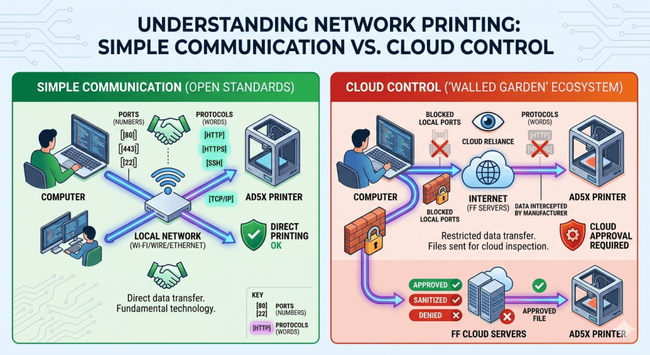
The divergence between the maker community and these proprietary ecosystems has reached a breaking point. Tethering hardware to cloud-only platforms forces users to choose between subservience to a manufacturer’s roadmap or the path of the tinkerer. Having worked in tech and internet technologies for over thirty years now—where did the time go?—I know that communication should be a simple matter of a computer sending a signal via wire or Wi-Fi to a printer. Whether referred to by number or by descriptive protocols like SSH, HTTP, or HTTPS, these ports are fundamental technology that has existed for decades. What is happening here is that the software port on the printer is being intentionally blocked, forcing the device to contact Flashforge servers to receive an “approved” and “sanitized” file.
By choosing to step outside of this managed ecosystem, I have opted for a direction where my tools remain under my control, serving my needs without the interference of forced updates or remote service requirements. This will be the last Flashforge product I own, and once this machine reaches the end of its life, I am done with them unless they fundamentally change their stance. Time will tell. The future of my workshop lies in open, transparent systems where ownership is not merely a legal status, but a functional reality.
Take Action: Reclaim Your Hardware
1. Secure Your Own Perimeter (The “Gateway Cutoff”)
If you haven’t been locked out yet, take control of your network settings immediately to prevent your printer from “phoning home”:
- Assign a Static IP to your printer.
- Clear the Gateway and DNS fields (or set them to a non-functional address like
192.168.0.0). - Verify: This ensures your machine remains a local tool, immune to forced cloud-based “updates” that remove your autonomy.
2. Join the Fight for Right to Repair
As advocates like Louis Rossmann have shown, the battle for ownership isn’t just happening in our workshops—it’s happening in our legislatures. If you are tired of companies treating your property like a leased appliance, don’t stay silent:
- Find Your Representative: Use House.gov to identify and contact your local representative.
- Be Clear and Direct: When you call or write, mention specific legislation (like the REPAIR Act). Tell them you are a constituent who believes that if you bought it, you own it—and that includes the right to repair, modify, and use your equipment without manufacturer interference.
- Follow the Leaders: Support organizations and advocates like the Repair Association and Louis Rossmann who are actively fighting to dismantle the anti-consumer “parts pairing” and software-lockdown models that plague our industry.
D. Bryan King
Sources
- Comprehensive Response to Bambu’s AGPLv3 Violations – Software Freedom Conservancy
- Bambu Lab Faces Open Source Licence Firestorm Over OrcaSlicer Fork
- Drama at Flash forge! EULA includes spying on what you print.
- Migliaccio & Rathod LLP: Consumer Protection and Class Action Investigations
- MakerWorld launches Creator Copyright Protection Program – VoxelMatters
- Selling 3D Printed Items – A Legal Guide | All3DP Pro
- What Is RFID Filament? The Guide to Smart Spools – Snapmaker
- Is RFID Filament Killing Open 3D Printing? – YouTube
- Take a Stand for Maker Rights and the Future of Additive Manufacturing
- The differences between open-source printers and closed-source printers
- GNU Affero General Public License, Version 3
- Electronic Frontier Foundation: Right to Repair
- The Repair Association: Right to Repair
- FTC Policy Statement on Repair Restrictions
- Rossmann Repair Group
- SFC Baltobu GitHub Repository
- U.S. Copyright Office Guidance on AI and Copyright
- Bambu Lab Accused of AGPL Violations
- The Future of Open Source 3D Printing – 2026 Analysis
- Software Freedom Conservancy Takes on Bambu Lab
- The Right to Repair is Coming to 3D Printers
- RepRap Wiki: The Foundation of Open Source 3D Printing
- Prusa Research: Open Source Philosophy
- Digital Millennium Copyright Act Overview
- 17 U.S. Code § 512 – Limitations on liability relating to material online
- Cults3D Marketplace
- MyMiniFactory Marketplace
- Thingiverse: The Original Open Design Platform
- SFC Confronts Bambu Lab over Copyleft Compliance
- 3D Printing Manufacturer Faces Backlash Over Proprietary Locks
Disclaimer:
The views and opinions expressed in this post are solely those of the author. The information provided is based on personal research, experience, and understanding of the subject matter at the time of writing. Readers should consult relevant experts or authorities for specific guidance related to their unique situations.
Related Posts
Rate this:
#3DPrinterSurveillance #3DPrinting #3DPrintingEthics #3DaaS #AD5X #additiveManufacturing #AGPL #AIGeneratedSTL #antiRepair #BambuLab #cloudPrinting #cloudTethering #communityCollaboration #consumerRights #corporateControl #dataPrivacy #digitalLandlord #digitalSovereignty #DRM #firmwareSecurity #firmwareTampering #firmwareUpdates #Flashforge #hardwareModification #hardwareOwnership #intellectualProperty #licenseLaundering #makerCommunity #makerEthos #openDesign #openHardware #OpenSource #openSourceVsProprietary #OrcaSlicer #patentTrolling #printerHacking #printingHardware #proprietaryConsumables #proprietarySoftware #reverseEngineering #RFIDFilament #RightToRepair #slicerSoftware #softwareFreedom #STLCopyright #techRepair #techSurveillance #userAutonomy #vendorLockIn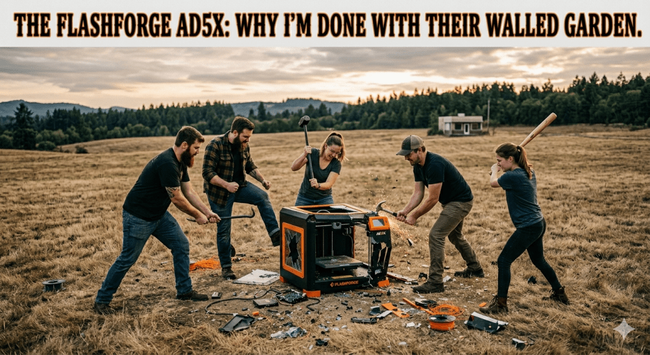
 TechTinkTronics
 anjila
 FIXAMAC MacRepairNorthLondon
 Hacker News
 Mel M
Mel M 
 going to be soldering a ps5 hdmi tomorrow. It’ll be my first time soldering, I’m a little nervous. I have low melting point solder and I’ll be ventilating the hell out of everything, I feel like I just need to watch a few YouTube videos about it and I’ll be fine…
 Daniels Technik-Service
 CellShoppe Phone & Laptop Fix
 Reel Tubes