Do you have capital budget responsibility? It’s mid-June, so if you didn’t start your capital budget prep at the beginning of the year, now it’s absolutely time to get rolling. A well-managed company whose fiscal year matches the calendar year will be collecting capital budget requests in September or October. Mismanaged companies will have their pants on fire and do a half-baked rushed budget in November or December.
1) Start preparing a list of capital items you need.
2) Hold some team meetings. What do your people advise that is needed?
3) Check equipment age and manufacturer’s end-of-support and end-of-life lists. What is working, but should be replaced?
4) For everything on the list: what support equipment is required? The support equipment may or may not be capitalized, but you need to include it in your planning.
5) For everything on the list: what employee training is required? Training that’s part of a capital project can be capitalized, too.
6) Know your labor needs. Does this project require additional headcount? If so, will you need to hire additional full-time employees, or obtain the assistance of integration vendors or consultants?
7) Parallel to steps 1-6, start getting quotes from vendors. Be kind to your vendors. Drop vendors that raise your blood pressure.
8) When requesting quotes, tell your vendors, “I’m getting quotes for things we may not purchase for another year. Include any projected price increases.”
9) Prioritize your list. When you go into your budget negotiation meeting, you’re not going to negotiate on dollars. You’re going to negotiate on projects.
10) This one should be obvious from #9: know your “why.” For every project in your capital budget, know why it should be done, the benefits of doing it, and the consequences of not doing it.
11) Know your calendar. Don’t kid yourself into thinking you can do a two-year project in one year, or a six-month project in three months.
12) When you go into your budget negotiation meeting, don’t use fear tactics. Fear tactics alienate the decision maker(s), and reduce your credibility. You’ll be viewed as a fear-monger, not a trusted advisor.
13) Don’t pad your numbers very much. The financial decision makers will include an overall pad in their planning behind closed doors. That’s not your issue. Make your numbers realistic, with enough margin to account for price increases. Have supporting documents (vendor quotes, for example) to justify your numbers. Have a spreadsheet to show how you calculated your capitalized labor costs.
14) Include a couple of “nice to have” projects. This gives you something to negotiate away. They’re sacrificial lambs.
15) Consider bringing me in as your consultant on budget preparation. I’ve done a lot of multi-million dollar budgets. Paying for an hour a week could save you money and reduce your stress level.
#CallMeIfYouNeedMe #FIFONetworks
#CapitalBudget #Budgeting #ProjectPlanning
 sayzard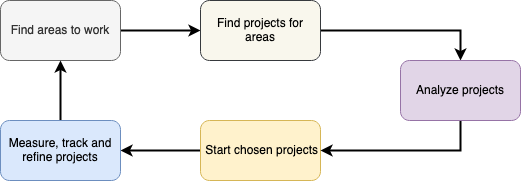
 Patrick Kennelly
 Reel Tubes
 Devintelle
 Maciej Sypien
 agile
agile OriginalMacGuy
 Bob Young
 dodothedev🦤💻