@_DigitalWriter_

#ksnip ist seit Jahren der perfekte Screenshotter für mich - und der Grund, warum mein #KDE_Linux immer noch mit #X11 läuft...

Schön zu sehen, dass es nun nach fast 3 Jahren zumindest ein v1.11.0 pre-release gibt.

Ich war schon dabei, langsam auf spectacle umzusteigen... BTW auch eine super software, unschlagbar gut in #KDE integriert. Aber halt nicht ksnip 😉

Jetzt lass ich erstmal einen Kaffee für Damir Porobic raus: paypal.me/damirporobic

ksnip cmmand for shortcut


google search

To set a custom keyboard shortcut to take a screenshot with ksnip, use the main command
ksnip followed by specific arguments in your system's custom shortcut settings.

Looking for results in English?
Change to English
الاستمرار باللغة العربية
إعدادات اللغة
عرض النتائج عن ksnip command for shortcut
البحث بدلاً من ذلك عن ksnip cmmand for shortcut
نبذة باستخدام الذكاء الاصطناعي
To set a custom keyboard shortcut to take a screenshot with ksnip, use the main command
ksnip followed by specific arguments in your system's custom shortcut settings.
The command arguments allow for various capture modes:

ksnip -r: Capture a rectangular area.
ksnip -f: Capture the full screen.
ksnip -m: Capture the current monitor (or multiple monitors).
ksnip -a: Capture the active window (requires the window to be focused).
ksnip -u: Capture the last used rectangular area.

How to set the shortcut (General Steps for Linux)

Open your system's settings for Keyboard Shortcuts (e.g., in KDE it's "System Settings > Shortcuts" or "Keyboard > Keyboard Shortcuts" in Gnome).
Add a new custom shortcut (sometimes called "Custom Command" or "Custom Shortcut").
Assign the desired keyboard combination, such as the Print Screen key or Ctrl + Shift + S, to one of the ksnip commands listed above (e.g., ksnip -r).
Ensure ksnip is running in the background for global hotkeys to work consistently. You can configure ksnip to start with your operating system for seamless use.
Disable any conflicting shortcuts from other screenshot tools (like Spectacle or the default Gnome screenshot tool) that might be using the same key combination.

Additional useful arguments

-c: Copies the screenshot to the clipboard automatically after capture.
-s: Saves the screenshot to a predefined location automatically.
-e: Opens the captured screenshot directly in the ksnip editor for annotation.

For example, the command ksnip -r -c -s will allow you to select a rectangular area and automatically copy it to the clipboard and save it to your default folder.


copied from Google search

#screenshot
#ksnip

@AppleFangirl

Cool! I run #Proxmox hypervisor + #Ubuntu/#Debian containers & VMs.

Ran #Kubuntu on my primary PCfor almost five years, then #LinuxMint for two. Tried #Bazzite & settled on on #DebianTrixie #KDE with #X11.

I loved #Bazzite, but couldn't use #Wayland as it prevents #ksnip screenshots.

@AppleFangirl

Yes, I tried #Bazzite for a few days as I was distro-hopping. It was amazing, and I played a few games on it too. Very stable and usable. Unfortunately I needed to move to #X11 due to some productivity utilities that won't run on #Wayland (#kSnip & #CopyQ ).

@Dendrobatus_Azureus

Yes, the future is exciting. I have similar constraint, with a clipboard manager (#CopyQ ) & screenshot tool (#kSnip ), that require X11.

@breizh @Khrys

Pas mieux.

Sous Linux, il y a #Converseen qui fait ça en joli via une interface graphique.

Tu importes ton PDF et il te sort les images au format de ton choix.

Sinon, y aussi #Ksnip (ou #Spectacle pour KDE - Wayland) : tu fais une capture d’écran et tu copie la partie que tu veux et paf dans le MD.

Mais les 2 premières solutions (ligne de commande ou converseen) sont bien plus efficaces et moins fastidieuses.

I made an upgrade from #debian12 to #debian13 on all my devices: desktop computer, laptop, VPS.

Everything went smooth with #debian upgrade as usual 

The only thing wrong was upgrade to #plasma6 for which #KDE switched from #X11 to #wayland and I was dumb enough to decide to give it another chance (my previous tries of Wayland were just failures)
So it's still not good. It's really quite better than months ago but there's application that can't work anymore, like #ksnip 

There's an interesting discussion about why it doesn't work anymore here:
https://github.com/ksnip/ksnip/discussions/884

That's really sad.
Comment like this one We obviously cannot grant every process access to the screenshots infrastructure let me think that we're also entering in a world where not only GAFAM decide for you, but also FOSS project will now decide which software (their) can bypass security and which (all the one they don't like?) have to use restricted usage with weird UI... 

Also #virtualbox doesn't work anymore too (looks like screen size detected is 0x0 and then crash at starting a VM); I'll probably have to switch to #KVM or something else, not sure.
I didn't had the time to test #Krita yet (even if I know Dmitry worked on a #wayland port...)

Lol it starts to be more and more bothering and I'll probably one day stop to use a computer... a just work in a terminal 

Support Capture Rectangular Area for Wayland · ksnip ksnip · Discussion #884

I love the new touch gestures for kde 5.25, as I use them on my laptop, however these gestures are only for the wayland version, and I would love to use ksnip's capture rectangular area feature for...

GitHub
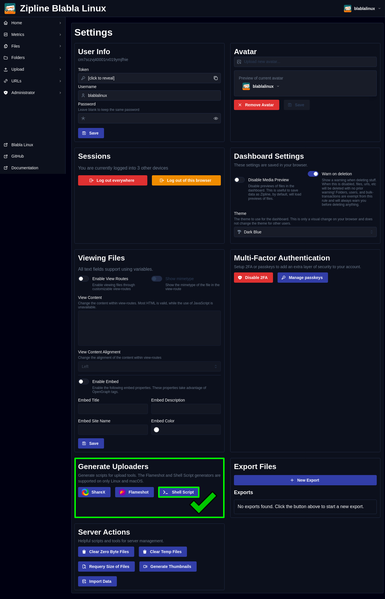
Dans la dernière vidéo (https://peertube.blablalinux.be/w/axYxGmvhCvibDTia16xTpF), je montrais comment bien utiliser #Zipline #ShareX file, notamment avec un #script via #FlameShot 👌
Vous pouvez générer également un script #shell, afin de l'utiliser avec #Ksnip, et ainsi envoyer vos captures automatiquement vers Zipline 🤙
Peut-être bientôt une vidéo 😉
Zipline ShareX File - Comment bien l'utiliser

PeerTube

Je découvre #KSnip qui ressemble fortement au très efficace mais plus maintenu depuis 2017 #GreenShot
#capturedécran #screenshot

Quick Screen Capture with KSnip, open source and powerful!
https://www.youtube.com/watch?v=pG99YrzkJ4E

Quick Screen Capture with KSnip, open source and powerful!

YouTube