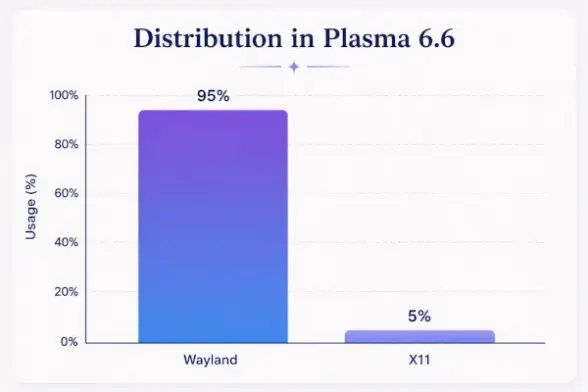
The KDE people are dropping support for X11 sometime in the next year or so. I keep trying Wayland, and it keeps frustrating me. It feels like a small step forward in performance, and three big steps backwards in feature-completeness and maturity. Dear KDE folks -- this is not ready for prime time. Please reconsider ditching X11 until Wayland is fully-baked. I'm totally OK with Wayland being the default, even, just don't throw out the baby with the bathwater.
#kde #plasma6 #x11 #wayland
Frischer Wind mit X: GhostBSD wechselt von X.org auf XLibre

Weil die Entwicklung beim Displayserver X.Org eher rückläufig ist, wechselt GhostBSD mit der kommenden Version 26.01 hin zu dessen Fork XLibre.

heise online
A couple of #KDE #PlasmaDesktop updates ago, file/folder renaming on #Dolphin broke (still is), where your new name does not take place unless you press (single click) the file/folder after renaming - rather than clicking Enter.

Actually even before then, jumping from Plasma 5 to 6, or specifically the default to
#Wayland (cos it's fine on #SteamOS which still uses #X11) has also sort of broken renaming on Dolphin where you have to click Enter twice to submit changes, rather than once. It's more broken now tho cos it doesn't work at all regardless.

The recent Plasma 6.6 update has broken Dolphin again, also related to naming - except it's not when renaming but when naming in the prompted dialog when creating a new file/folder. Try copying something outside of Dolphin, e.g. a string from Firefox or Kate or wtv, and paste it into the input field on that dialog - it'd paste nothing. It'd only paste successfully if the string you copied is from Dolphin itself. I thought maybe it's to do with if I'm copying something from a
#Flatpak and pasting it to a non-sandboxed app but that's not the case.

Other than that, Plasma 6.6 has been decent, like the new screen/window sharing portal is pretty nice (slightly confusing/busy maybe?), tho the bug with exposé still has not been fixed since the jump to Plasma 6, tho I reckon that'd be the case for a really long time as I suspect that's a Wayland issue.

@_DigitalWriter_

#ksnip ist seit Jahren der perfekte Screenshotter für mich - und der Grund, warum mein #KDE_Linux immer noch mit #X11 läuft...

Schön zu sehen, dass es nun nach fast 3 Jahren zumindest ein v1.11.0 pre-release gibt.

Ich war schon dabei, langsam auf spectacle umzusteigen... BTW auch eine super software, unschlagbar gut in #KDE integriert. Aber halt nicht ksnip 😉

Jetzt lass ich erstmal einen Kaffee für Damir Porobic raus: paypal.me/damirporobic

Another #qt desktop environment enters the arena:

Orbitiny Desktop is a new and innovative desktop environment for X11 based Linux operating systems, bringing you exclusive features and functionalities unavailable in other desktop environments.

https://orbitiny.com/

#orbitiny #linux #x11 #xLibre

RetroEdgeTech

On the #android part, this' what I've able to create so far, with #gemini .

Today, I'll work on the "Compose" page. The logic part of the Desktop side (on #Windows ) is almost ready. However, the UI side is still in development.

My main problem is actually on both the #linux window systems #wayland and #x11 .

#xdotool does work but the mouse-clicks remains frozen.

And on wayland, I'm not able to find a solution (for now).

#Mastodon tip: There is a way to use only part of a word as a hashtag!

For example, you might want to say the word “toots”, but use the hashtag “toot”.

To do this, place a U+2060 WORD JOINER before the “s” in “toots”. Example: #toot⁠s.

If you're using #X11 or #Wayland (i.e. #Linux or #BSD desktop), you can add the following line to ~/.XCompose to give yourself a keyboard shortcut:

<Multi_key> <w> <j> : "⁠" U2060 # WORD JOINER

Then just type Compose, then W, then J.

Esta semana estoy viviendo algo raro en #RebornOS #ArchLinux con el desktop #Budgie
El problema es que de golpe muchas Apps dejaron de funcionar
Ejemplo, el dock #Plank reclama que #x11 no esta corriendo z simplemente no se deja ejecutar
Otras apps, casi todas QT simplemente se ven horribles
Y no se como comenzar para hacer siquiera un diagnostico
Alguien tiene alguna idea?
so many desktop environments to choose from during the Debian setup process, this is incredible #yearofthelinuxdesktop #thisistheyear #wecandoit #x11 #letsgoooooo

I would never have guessed that unlearning what little I knew about X11 would be so difficult.

Wayland is actually just completely different.

It took me longer than I will admit to realize that @ and %i in the systemd user units, on Wayland, is AFAICT pointless because there's only supposed to be one of them anyway.

Running however many instances of your favorite window manager, started from as many TTYs respectively, that all bind to their respective on-my-back@%i.target or whatever you decided to call it, and only letting whichever one's extra special bind to graphical-session.target, is an idea that I stole from someone way smarter than me. On the off chance that he should ever read this, he should know that I look up to him and that I've been copying a lot of what he does for a few years now.

Also, X11 is actually somewhat terrifying when you consider that it even allows you to do stuff like that in the first place.

#YearOfTheLinuxDesktop #UnixPorn #X11 #Wayland #systemd