 Africano
 Begasus
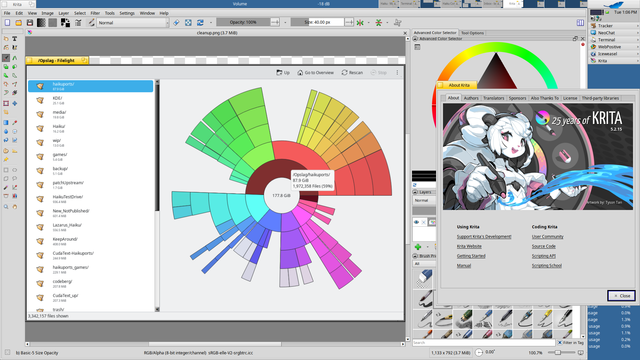
Bugfix release for Krita 5.2.15 available for Haiku too.
Read all about the bugfix release at: https://krita.org/en/posts/2026/krita-5.2.15-released/
#HaikuOS #haikuports #KDE #Qt #Krita #graphics #opensource #software #drawing #tablet #Filelight
@elrohir pois está dipoñible para o Windows.
É fantástico o programa.
https://apps.microsoft.com/detail/9pfxcd722m2c?hl=gl-ES&gl=ES

Filelight is an application to visualize the disk usage on your computer by showing folders using an easy-to-understand view of concentric rings. Filelight makes it simple to free up space! Features: * Scan local, remote, or removable disks * View detailed information about files and folders * Delete files or folders that are taking up too much space * Integration into the Dolphin, Konqueror, and Krusader file managers * Configurable color schemes
Bugfix release for Krita 5.2.15 available for Haiku too.
Read all about the bugfix release at: https://krita.org/en/posts/2026/krita-5.2.15-released/
#HaikuOS #haikuports #KDE #Qt #Krita #graphics #opensource #software #drawing #tablet #Filelight
Graphics 🎨 : #Inkscape , #GIMP , #Krita , #digikam
Tools 🔧 : #Flameshot , #KeypassXC , #Krusader , #InputRemapper , #vokoscreenNG , #diodon , #metadatacleaner , #OhMySVG , #Flatseal , #Filelight
Office 🖇️ : #zim , #Fakturama , #XournalPlusPlus , #Element , #pdfarranger , #thunderbird , #VSCodium , #libreoffice , #gscan2pdf
Games 🎮 : #0AD , #wesnoth , #wine
Multimedia 🎶 : #freetube , #audacity , #clementine , #obsstudio , #haruna
🧵 2/n strangely enough, running #Filelight as root, scanning "/" results in only ~16GB used!
THIS DOESN'T MAKE ANY SENSE! 😱
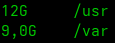
"df -sh /*" reports /usr + /var = 21GB! How d'fuq can it be 99% allocated?! (the other stuff is in the negligibly MEGAbyte range)
Which memo did i miss?
No, i've got 64GB of RAM - i'm not using swap.
EDIT: "discard" IS active in crypttab/fstab - that fancy SSD TRIM / fstrim stuff


If you don't know about #filelight I really recommend it, cross platform and #opensource. it's my go to when I need to clean up a computer manually.
While cleaning out my migration directory, i've found out that i can delete stuff from within the #Filelight app - via context click menu!
I'm very happy, having finally switched to #KDE / #KDEneon - i've endured the continuing UX downgrades of #Ubuntu #Gnome for far too long!
I can even see the actively developed improvements in KDE; e.g. when i detach a #Firefox tab, from a maximised window and drag it onto another monitor - it's maximised as well, now! 👍

Episodio 33 de #KDEexpress grabado bajo la lluvia, pero editado con amor por @raivenra.
La descripción y las notas como siempre en https://kdeexpress.gitlab.io/33
Os dejamos una tormenta de etiquetas sobre los algunos de los temas tratados:
#KDEframeworks #KDEneon #Calligra #Haruna #Dolphin #Filelight #Konsole #Kdenlive #Tokodon #Kate #Okular
Y si se os hace corto, Jorge y David acaban de publicar también hace nada un episodio de #AccesibilidadConTecnologiasLibres / #ATL
https://mastodon.escepticos.es/@DavidMarzalC/113075823324158978
~/.local/share/containers/podman/machine/applehv/podman-machine-default-arm64.raw (which I'm guessing is something like a qcow2 file?). I read that Podman allocates 100GB of storage for a Podman machine (VM), though in my case, if the path I shared really is the qcow2 file in question, it's taking up ~76GB. Does anyone know if the 76GB value means it really is taking up that much storage on my SSD (i.e. Used space: 76GB/100GB) or in reality it's not, it's just been allocated that much (i.e. Used space: ?GB/76GB)? If it really is taking up that much storage, what could I do to clean it up? Moini
Moini Multi Purr Puss
 Tasty
Tasty
 KDE España
 Mika
Mika
