 John Macintosh
An so einer Kiste habe ich vor fast 40 Jahren auch gearbeitet #RetroPrinting IBM 3800


@kalleboo @mejs Our local retro hack space lacks quite a few nice laser printers that we own for daily usage, because of this exact issue – and we don’t have the knowledge and skills to get old laserprinters fixed, sadly.
So we’re mostly relying on Epson MX-80, LX-800, LQ-570+, LQ-690 and LQ-2190 impact printers, and Stylewriter II/1200/2500. These are easier to handle for us.
But we miss the ozone smell, the warm up phase, and the »wuuup-wuuuuuuup« sounds of our laserprinters (HP LaserJet 4MP, LaserJet III+, Apple LaserWriter 8500).
Today I've started dismantling my first printer. It's a Rostock MAX that I got at Maker Faire 2013. It hasn't worked since 2016 or '17, and I need the space more than I need the memories.

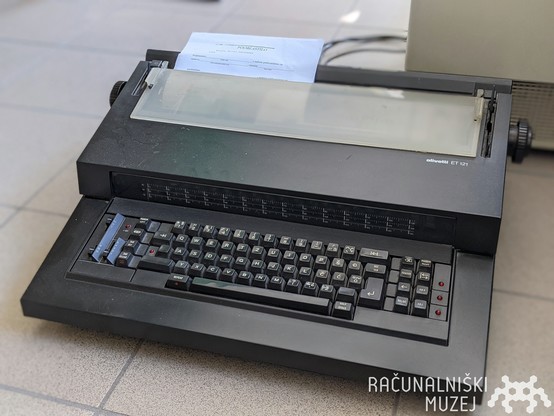
⌨️📃 Have you ever used a manual typewriter? What about an electric one, like this beautiful Olivetti ET121? 😍
#computermuseum #computerhistory #slovenia #ljubljana #softwareheritage #digitalheritage #typewriters #typewriter #museo #retrocomputing #videogiochi #vintagecomputer #vintagecomputing #informatica #elettronica #olivetti #tecnica #retroprinting
Having a complete hoot getting an old but surprisingly functional #OKI #MicroLine3320 #DotMatrix #Printer working with my #Atari800. It prints single lines beautifully, but it doesn't line feed on reaching the #ATASCII line ending 0x9B.
Looks like I need to configure the printer to understand the non-standard Atari linefeed. Let's see if that's possible!


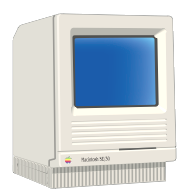
Making some Christmas cards for the family. I actually prefer the Christmas image selection on the original 80’s Print Shop when compared to the 90’s Deluxe edition 😁
Fun fact, I'm using the Mac SE for this - the original Print Shop isn't compatible with 32-bit addressing, which makes it a pain to run on the IIfx. Fortunately I have both machines able to print to my modern Brother printer (see how I did that here: https://oldbytes.space/@smallsco/111328130730011371 )
#RetroComputing #RetroPrinting #VintageMac #68K #Apple #Mac #MacOS #ClassicMac

Attached: 1 image Solved a problem tonight that’s been bugging me for weeks, and that’s getting printing to work from my classic Macs to my Brother MFC-L2730DW printer. Both the IIfx and the SE were able to see the printer in the Chooser, but not successfully print to it. The printer would make noise and eventually spit out a blotchy striped or checkerboard-patterned sheet of paper. Changing drivers (different versions of LaserWriter and AdobePS) didn’t seem to make any difference, nor did changing the PPD file. The solution was not to change the PPD file on the Mac, but instead on the Raspberry Pi which runs CUPS, locating the printer using Bonjour and re-broadcasting it over AppleTalk. And the PPD file I had to use is the “BR-Script” PPD, extracted from a Windows driver using the directions here: https://support.brother.ca/app/answers/detail/a_id/182593/p/9591/kw/MFC-490CW Once I had the PPD, I could visit https://raspberrypi.local:631/admin and swap it out from there. Then printed from the Mac and… success! #RetroComputing #RetroPrinting #VintageMac
Now my 8032 is well on the way to being sorted, thoughts turn to quite possibly the most beautiful printer I have ever seen. I give you the Commodore 8026, made in Western Germany.


Solved a problem tonight that’s been bugging me for weeks, and that’s getting printing to work from my classic Macs to my Brother MFC-L2730DW printer.
Both the IIfx and the SE were able to see the printer in the Chooser, but not successfully print to it. The printer would make noise and eventually spit out a blotchy striped or checkerboard-patterned sheet of paper. Changing drivers (different versions of LaserWriter and AdobePS) didn’t seem to make any difference, nor did changing the PPD file.
The solution was not to change the PPD file on the Mac, but instead on the Raspberry Pi which runs CUPS, locating the printer using Bonjour and re-broadcasting it over AppleTalk. And the PPD file I had to use is the “BR-Script” PPD, extracted from a Windows driver using the directions here: https://support.brother.ca/app/answers/detail/a_id/182593/p/9591/kw/MFC-490CW
Once I had the PPD, I could visit https://raspberrypi.local:631/admin and swap it out from there. Then printed from the Mac and… success!

 Regionales Retro-Rechenzentrum
 Kernel Bob
 Computer History Museum 🇸🇮
 Amin Girasol
 Scott Small 🇨🇦
 Colin Haynes