 axxuy
axxuyAh, what a lovely morning to figure out why my desktop suddenly isn't starting...
(I figured it out. I just needed to update my graphics drivers)
#archlinux #lightdm
Ah, what a lovely morning to figure out why my desktop suddenly isn't starting...
(I figured it out. I just needed to update my graphics drivers)
#archlinux #lightdm
I finally got OpenHamClock auto launching on my Raspberry Pi 5, using the kiosk installer from them
Lightdm wouldn't auto login, no matter which setting file I changed, nor what I changed it to
Eventually, out of desperation, I switched to gdm3 and now it's working perfectly as I expected, lol
That was an hour of debugging I wish I had back, lol
So...on my laptop, the Desktop Manager hides possible users on login. That's good for rubber hose security (only if I have password root login disabled) #lightdm
But my phone is another story. All users are known once logged in. There is no "hide other users" password. I often read about people getting popped by the police for political posts. ICE murders and disappears people for this kind of thing. Would be nice to have a certain password to log into a curated "work" safe account with a browsing history and photos I share with my boss.
This is also a post about #GraphineOS which may be secure, but not against the old rubber hose security bypass trick. And every ICE roadblock with guns pulled out.
.... I cannot believe that there is so much BS going on over the #KDE login manager where people are upset over the removal of BSD support... because it ties to systemd... isn't linux like it always been about giving options, KDE has more options than others like LightDM and SSDM it is just annoying people creating drama where there isn't any needed...
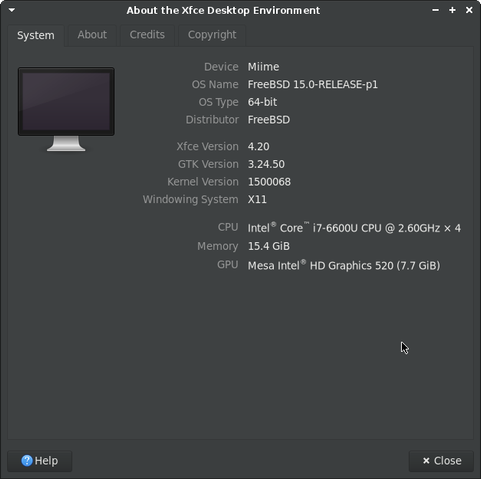
Spent last 2 days, during nap hours of the little one, to install #FreeBSD on my old HP EliteBook 840 G3 
It has been really interesting, faced some problems with hardware driver and crash that needed me to understand how to unload modules before boot, but at the end I've everything working fine for graphics and wireless drivers
Even installed #xfce and #lightdm to get a nice desktop environment
The pkg package manager is pretty similar to the #Linux #Debian apt so not totally lost here 
Still a lot to learn but the FreeBSD handbook is well writen
I won't stop to use Linux but it's a good experience ton learn here
@DavidMarzalC está ya casi camino de Valencia para impartir el #FediTaller gracias a @cdefguv.
Pero antes nos deja un episodio noticiero de #KDEexpress para que estéis al día de nuestra comunidad y del Software Libre en general. Gracias como es habitual a @raivenra y su generosidad🎙️🫶
Notas: https://kdeexpress.gitlab.io/posts/kdeexpress/61-kde-express/
Nos vemos este finde por Valencia, por las ondas o por el Fediverso.
Temas tratados:
#PlasmaMobile #KDEPlasma #LightDM #LinuxMint #Penpot #X11 #Thundebird #Firefox #Blender #VLC

Rozando ya las navidades, una época floja de podcasting, pero que no baja la intensidad de producción en KDE, os traemos una nueva selección de noticias de esta nuestra comunidad. Plasma 6.5.3 llega tras dos semanas con muchas mejoras y arreglos como por ejemplo en configuraciones multimonitor con frecuercia de refresco variable. Klipper se gana una review de MuyLinux Plasma Mobile 6.5 Integración con Waydroid desde la aplicación de configuración La pantalla de bloqueo ahora es más rápida y muestra mejor las notificaciones. Ahora puedes hacer un doble toque para bloquear. Mejora del "homescreen"/ pantalla de inicio/fondo, rendimiento, navegación con teclado... Separadas las configuraciones de navegación y del "Shell" Añadida la opción de configurar cuantos columnas de "quicksettings"/opciones rápidas tenemos disponibles. Ahora hay una nueva opción de estas rápidas para quien tenga multi-monitor Mejoras de diseño, como el tema de colores, animaciones ... Y por último aunque fuera de la 6.5 ya está la versión inestable 0.1.0 del nuevo teclado virtual que se está desarrollando de 0. KDE va a renovar desde cero el sistema de cuentas online que ahora mismo es bastante deficiente para mejorar su funcionalidad
 Eric
Eric Victoria (K8VSY) (she/her)
 diana 🏳️⚧️🦋🌱
 HACK13
 SuperIlu
 Grum999
 KDE España
 Jörg 🇩🇪🇬🇧🇪🇺
 Afterglow