 News
NewsGemini app adding new Google Contacts integration
The Gemini app’s latest first-party integration is with Google Contacts to provide "personalized insights and responses based...
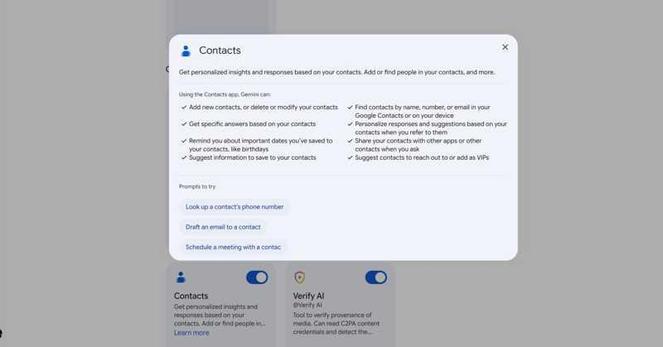
Gemini app adding new Google Contacts integration
The Gemini app’s latest first-party integration is with Google Contacts to provide "personalized insights and responses based...
#Android Gets Fake Call Detection That Uses #RCS
#Phone by #Google wants to combat the "growing threat of #impersonation #scams " and protect Android users against "sophisticated, AI-powered #deepfake attacks" with fake call detection. [...] Fake call detection requires that both parties are on Android and use the Phone by Google app, while #GoogleMessages and #GoogleContacts also have to be installed. When a contact calls, their phone "sends a silent confirmation signal in real time to your device to verify the call is legitimate and truly coming from the contact's device." This digital handshake uses end-to-end #encrypted RCS (Rich Communication Services).
#encryption #e2ee #privacy #security

An anonymous reader quotes a report from 9to5Google: Phone by Google wants to combat the "growing threat of impersonation scams" and protect Android users against "sophisticated, AI-powered deepfake attacks" with fake call detection. [...] Fake call detection requires that both parties are on Androi...
Solved, see comment
Any idea on how to fix google contact sync for a android device?
The sync is starting but never completes, no error is shown and nothing happens. Only the Contact app is having those issues. Every other google app is syncing normally.
I do use an old OnePlus Nord and just noticed that issue as it read "last sync 45 weeks ago"
Already tried the default troubleshooting steps, like re adding the account, cache clear ...
Lifehacker: Use Google’s New ‘Recovery Contacts’ to Let a Friend Help You Get Back Into Your Account. “From the Recovery Contacts page, click the button to add a contact, then enter someone you trust (you’ll see several suggestions) and send them a request to be a Recovery Contact for you. Once they accept it, they’ll be able to help you get your account back if you ever find yourself […]
Dus je hebt een #Android telefoon en je wilt van #Google af.
#Mail kan van een ander
#Agenda kan van een ander
Alles kan anders behalve de #telefoondailer om te bellen dat gaat niet. Want die haalt de gegevens toch weer online vanuit #GoogleContacts.
Iemand een oplossing?
This week, we added an unusual feature to ChronoLink:
You can now use our #CalendarSynchronization service to create calendar events for the #birthdays of your Google Contacts. For details (including the answer to "Why would one need that when Google offers similar functionality?"), see https://www.chronolink.app/userguide/systems/google-contacts/.
Join our free public beta, no strings attached!
https://www.chronolink.app
#Calendar #GoogleContacts #GoogleCalendar #IndieDev #IndieApps #SaaS
Tampermonkey script to un-Gmail Google Contacts
When you click on a contact’s email address in the Google Contacts web app, instead of opening a new draft in your default email app with the “To” field populated with that email address, which is what it should do, Google Contacts opens a Gmail compose window.
I hate this behavior. While I do have a Gmail account, it is not my default email account, and I hardly ever use it. I want email addresses in Google Contacts to do what they do on every other web page: open a new draft in my default email app.
So I wrote a Tampermonkey script to implement that behavior. You can find it here. And the code is also below, in case you prefer to just copy and paste it from here.
Share and enjoy!
// ==UserScript==// @name un-Gmail Google Contacts// @copyright Copyright 2025 Jonathan Kamens// @license GPL// @namespace http://tampermonkey.net/// @version 2025-02-03// @description change gmail links in Google Contacts to mailto: links// @author Jonathan Kamens <[email protected]>// @match https://contacts.google.com/*// @icon https://www.google.com/s2/favicons?sz=64&domain=google.com// @grant none// ==/UserScript==// Instead of displaying email addresses as mailto: links as it rightfully// should, the Google Contacts web app sends you to Gmail when you click on// them. This script changes the email addresses back into mailto: links so// that when you click on them they open in your configured email app.//// Uses a mutation observer because the Contacts app dynamically inserts content// into the page after the browser thinks the page is finished loading.(function() { 'use strict'; let callback = (mutationList, observer) => { let addresses = document.evaluate( "//span[starts-with(@href,'mailto:') or " + "starts-with(@data-href,'mailto:')]", document); let addressElement; while (addressElement = addresses.iterateNext()) { let href = addressElement.getAttribute("href") || addressElement.getAttribute("data-href"); let addressString = href.substring(7); let anchor = document.createElement("a") anchor.setAttribute("href", `mailto:${addressString}`); anchor.innerText = addressString; addressElement.replaceWith(anchor); } }; let observer = new MutationObserver(callback); observer.observe(document, {subtree: true, childList: true});})();Google Contact tests Google Play Store style search bar
📝 Read - https://thespandroid.blogspot.com/2024/03/Google-Contacts-Search-Bar-Revamp.html?m=1
Enable on your rooted device -
📦 Package -
com.google.android.contacts#com.google.android.contacts
🏳️ Flag - 45619663
 PrivacyDigest
 Xanatos
 ResearchBuzz: Firehose
 tech news ᳇ eicker.news
 ✍️ #MorpurgoMedia.nl
 ChronoLink
 Jonathan Kamens 86 47
 jik
jik
 AssembleDebug (Shiv)