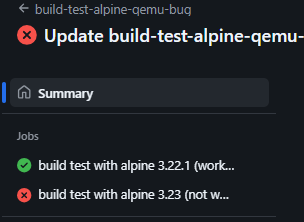
Shipped BuildKit for RISC-V64. Green CI, packages built. Users tried it: crash loop.

"No worker found" - missing runc, wrong ENTRYPOINT/CMD, hanging tests.

Lessons:
✓ Test integration, not just compilation
✓ Add timeouts everywhere
✓ Document WHY, not just WHAT

Visible success hiding more profound problems. Post-deployment debugging is the real work.

https://bit.ly/4oRyNhf

#BuildKit #RISCV64 #Docker #DevOps #Debugging #PostDeployment #LessonsLearned #OpenSource #devEco

BuildKit for RISC-V64: When Your Package Works But Your Container Doesn’t | Bruno Verachten

I shipped BuildKit for RISC-V64 two days ago. The workflows were green, packages built successfully, documentation looked thorough. Then users tried to actually use it. The container crash-looped immediately. "No worker found." Turns out "successful compilation" and "functional deployment" are very different things. The problems: - Missing runc binary meant OCI worker couldn't initialize (BuildKit needs at least one worker to run) - ENTRYPOINT/CMD split was wrong, so Docker Buildx was unable to pass runtime arguments - CI tests hung indefinitely when buildkitd tried to initialize workers without proper privileges - Cached GHCR credentials caused false "access denied" errors Three PRs later, the container works. But here's what I learned: - Testing individual components isn't enough. You need to test how components integrate with the systems that actually use them. It's not enough to verify the car starts; you need to verify it drives. - Always add timeouts. Even commands that "should never hang" will eventually hang. - Use your own packages consistently. Mixing Debian's runc 1.1.12 with our runc 1.3.0 builds created unnecessary version complexity. - Document the WHY, not just the WHAT. Explain when to use container images vs. APT packages. Users need context, not just instructions. The iceberg metaphor fits perfectly: visible success hiding more profound integration problems. Post-deployment debugging is where the real work happens. #BuildKit #RISCV64 #Docker #DevOps #Debugging #ContainerTechnology #LessonsLearned #PostDeployment #devEco

🔧 BuildKit for RISC-V64 in 4 Hours

Demo needed BuildKit for multi-platform builds. No RISC-V64 support in official image.

Built it myself:
✅ 0.26.2 compiled (pure Go)
✅ Debian + RPM packages
✅ Fixed dh_dwz for Go binaries
✅ Version filtering implemented

First Linux distro packages for BuildKit RISC-V64!

📦 https://bit.ly/4iKE20O
📖 https://bit.ly/4pSfKnW

#RISCV #Docker #BuildKit #DevOps #OpenSource #Linux #GoLang #devEco

Release BuildKit v0.26.2 for RISC-V64 · gounthar/docker-for-riscv64

Automated build of BuildKit for RISC-V64 BuildKit Version: v0.26.2 Build Date: 2025-12-09 Architecture: riscv64 What is BuildKit? BuildKit is a toolkit for converting source code to build artifacts...

GitHub
Java/Mavenビルドが1秒に!Docker Multi-stage Build+BuildKitで98%短縮した話 - Qiita

はじめに GMOコネクトの永田です。 開発中、コードを少し変更するたびに「docker compose build」を実行して数十秒待つ...この繰り返しにストレスを感じたことはありませんか? 今回、JavaアプリケーションのDocker開発環境において、ビルド時間を約3...

Qiita

So I've migrated a container build pipeline from (deprecated) #Kaniko to (shiny new) #BuildKit after reading documentation from #Gitlab on how to integrate image building in Gitlab CI/CD. Turns out the whole thing doesn't work without enabling privileged mode on the Gitlab runner. Judging from the discussion around the issue there is no tool except Kaniko that works without some sort of extended privileges.

https://gitlab.com/gitlab-org/gitlab-runner/-/issues/38957

🌗 使用 Podman、Compose 及 BuildKit
➤ 邁向無 Root、無 Daemon 的現代容器建置流程
https://emersion.fr/blog/2025/using-podman-compose-and-buildkit/
本文探討如何在不使用 Docker daemon 的情況下,利用 Podman、Docker Compose 和 BuildKit 順暢建置及執行專案。作者分享了從強制禁用 BuildKit 的 Podman Compose 替代方案,轉向利用 Podman socket 並建立 Docker context,最終實現 Docker Compose CLI 直接透過 BuildKit 進行建置的過程。更進一步,作者開發了 Bakah 工具,旨在將 Compose 專案的 Bake JSON 輸出轉換為 Buildah 的直接呼叫,以達成無 daemon 的建置流程。
+ 解決了 Docker Compose 在 Podman 環境下的痛點,尤其是
#容器化 #Podman #Docker Compose #BuildKit #開源
Using Podman, Compose and BuildKit · emersion

Using Podman, Compose and BuildKit · emersion

Якщо хтось не знав, у #buildkit є вбудований #debugger для білдів
```
% docker buildx debug --on=error --invoke bash build ...
...
--------------------
ERROR: process "..." did not complete successfully: exit code: 1
Interactive container was restarted with process "v3dc7heu3nd4jnrsbkd7ngon6". Press Ctrl-a-c to switch to the new container
(buildx) Switched IO
root@buildkitsandbox:/# це шел в контейнері рівно на тому місці, де впав білд
root@buildkitsandbox:/# Switched IO
(buildx) exit
%
```
buildkit - це збиральник #docker контейнерів, за допомогою якого можна збирати образи під потрібну платформу #ARM або #amd64

✨ DevOps girl tip: Want to speed up your Docker builds like a boss? 💅

BuildKit is your BFF for faster, secure, cloud-native workflows 🚀💻

If you’re into AI infra + containers, don’t sleep on this! 🛠️💖

https://youtube.com/shorts/Bsdx5I0qHuU

#DevOpsGirl #Docker #BuildKit #CloudNative

Before you continue to YouTube

✨ Just a DevOps girl showing you why Docker BuildKit is THAT tool 💅

⚡️ Blazing fast Docker builds
🔐 Secrets handled like a pro
🌍 Cloud-native & multi-platform magic

Catch this tech glow-up 👇
🎥 https://youtube.com/shorts/b3CyiilP9_Y

#DevOpsGirl #BuildKit #DockerGlowUp #CloudNative

Before you continue to YouTube