I tried the #ThinkPad #MagicEraser trick to refurbish the sticky rubber coat of my #X260 and #X250.
I tried (random order):
Wiping with cotton cloth with IPA.
Magic Eraser dry.
Magic Eraser in IPA.
Magic Eraser with water.
Paper Towels and IPA.
Worked like magic on my X260, but which of those steps really did the trick? Let's try on my reference X250:
I did several rounds of Magic Eraser and lots of IPA. Still sticky! Strong wipe with cotton cloth in IPA it is.
#MelaminSchwamm #SchmutzRadierer

Asking ChatGPT and Gemini. The electrical layout or protocol of the #ThinkPad TrackPad between #X270 and #X260 changed. Plugging a X270 keyboard (with TrackPad connected) into a X260 may have permanently damaged my X260 TrackPad mainboard part.
I will not test the X270 keyboard in my X250, as it could cause the same damage.

@tho ein weiteres Problem, das wir beim @uugrn #fixme gelöst haben, war an einem frisch installierten #Debian 13 (trixie) auf einem #thinkpad #x260: es ließ sich partout nicht aus dem Bereitschaftsmodus/sleep/hibernate wecken. Nur ein hartes ausschalten half. Die LED der FN-Taste leuchtete durchgehend im Schlafmodus. Ursache: etwas verhinderte den vollständigen Schlaf. Lösung: deaktivieren des #TPM-Chips & nicht genutzter Geräte im #BIOS.

@sh #hibernate #bereitschaft

I’ve done some experiments on my #FreeBSD laptop - a #Thinkpad #x260. I’m generally speaking a #Gnome person, but I wanted to dip my toes in something else.
#KDE #Plasma 6 on Wayland was beautiful, but way too slow to be usable on this hardware/OS combo.
But what do I like about Gnome? That it gets out of the way and lets me work.

You know what else gets out of the way? #Sway. It’s a lot more work to get useful, but having spent a few hours with it now, I think I could get used to it and even prefer it over Gnome.

#ThinkPad #P14s Gen6が届いて、ある程度のデータ移行等が完了したので、 #E495 を趣味用兼バックアップに転用した。半年ぶりぐらいに趣味用環境にWindowsが復旧。
これまで趣味用だった #X260 は休車。

During the last 2 years with #NixOS, I've mentioned multiple times that my system performance is very poor on my backup notebook: Lenovo #X260 with a 2y old crucial 2TB SATA SSD BX500 2.5"

After setting it up with Debian 13 on the 2TB SSD as well as on the original 250GB SSD, I have to say that the 2TB SSD seems to be the culprit: the system behaves very weird with sluggish waiting/resume/..., system updates take hours instead of minutes, ...

So it wasn't NixOS, but the 2TB SATA SSD. 😔

However, I'm glad to get rid of NixOS step by step anyway for other reasons, being able to run Python scripts again being the most important to me. (Please don't give me any Nix-python advice anymore, I've spent too many days on that issue without a sustainable fix.)

#ThinkpadX260

Trying out #openSUSE #Tumbleweed on my spare laptop (Lenovo #x260).

Notes so far:
- Network selection isn’t as intuitive as I’d like for a newcomer.
- Setting a hostname doesn’t feel like a natural part of the installation flow.
- I’d love a question about disk encryption during installation.

Other than that, the installation program has overall sane defaults and shouldn’t be scary to anyone capable of creating and booting from a USB stick, and reading text off a screen.

#NixOS 25.05 system update (approx. for 4 weeks) took 1h7min on my lenovo #x260 i5 (16GB RAM).

I have no idea why the performance is so poor on that machine in contrast to T490 with same NixOS configuration.

I'll see after I switched back to #Debian if this is related to Nix or the hardware.

I scored 2 #Thinkpad #X260 laptops at #EFM #electronicsfleamarket in March with a handful of batteries for really cheap.
a i7 2.6Ghz and an i5 2.4Ghz

The i7 is immaculate, and is running great.
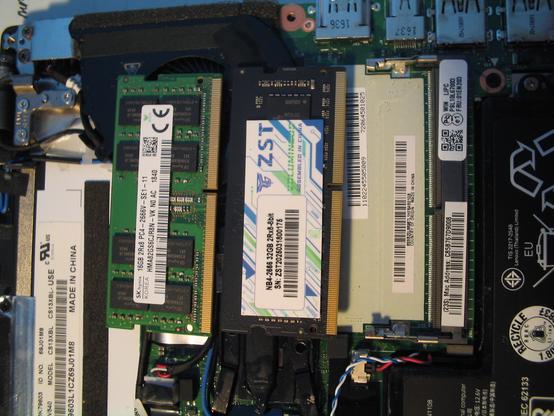
The i5 has some issues. Opening it up it was missing the SSD and SODIMM RAM, and I noted some corrosion on the aluminum frame around the SSD slot.

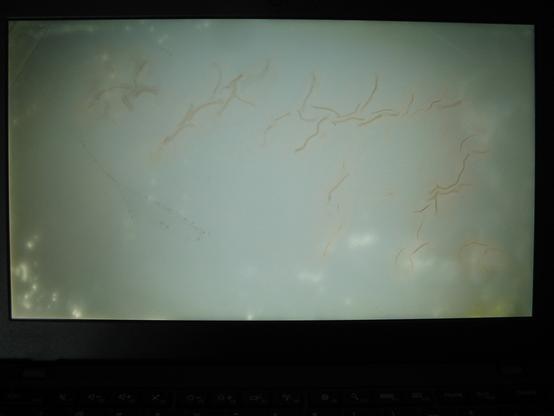
Getting it to moot up, there is this really weird spotting and "worms" with the #LCD that is really distracting. Not sure how this happened - and would love any insights as to the what & why this happened.
I suspect just easier to swap out the 12.5" 1366x768 for something with better resolution?

I did order two 32 GB DDR4 2666 SODIMMs from #aliexpress - the unofficial max #RAM for these X260's - and they work great. Both the i7 & the i5 detect the SODIMMs in the BIOS and in Win11. I initially had some spare 16GB SODIMMs in them, but why not max out the RAM when most apps and browsers are memory hogs lately?

#siliconValley #SillyValley #sanfrancisco #sanfran #sanfranciscocomputers #sanfrancomputers #sanfranciscovintagecomputers #sanfranvintagecomputers #sanfranciscovintagehardware #sanfranvin-tagehardware
#vintagecomputing #vintagecomputint #vintagecomputer #vintagecomputers #vintagecomputalk
#vintagehardware #computerHistory #retro #VCF #vintageComputerFestival
#retrocomputing #retroComputers #WallOfRetro #retroTech #retroTechnology
#nerdsOfVintage #happyNerding
#computer #tech #computerHardware #laptop #laptops
#upcycle #restore #TechnologyRepair #WasteNotWantNot #reuse #RepairReuseRecycle
#makeShitMonday #showmewhatyougot

I am an idiot (yes, I know that this is not news to some people).

After nearly 2 years of use, I realised today that this laptop has a fingerprint reader installed.

It never showed up in hwinfo so I didn't do anything about it, but for some reason today I installed the software for it (Debian, in the repo) ... & the fingerprint sensor worked.

No-one else is interested of course, but I'm quite delightd by it all. No more tedious passwords on the lock screen etc.

#thinkpad #x260 #debian