 Cecelia
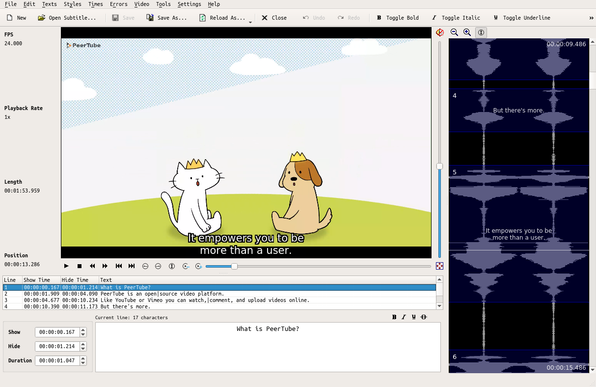
Trying Subtitle Composer. It’s really cool that this was included by default in my KDE Plasma install. I’m finding it a little visually glitchy and inconsistent with how I’m able to use keyboard commands (focus dependent on if I have editable text in focus—it’s a bit difficult to achieve blur), however in the Debian version—though it could be my particular theme tweaks or ancient graphics card. I’m a version behind, so maybe the painting issue has already been resolved.
Anyway, giving it a try to caption a short video. It’s really quite full featured and supports a bunch of formats. I may need to customize some keyboard shortcuts for efficiency since this MacBook Pro did not come with an Insert (Ins) key.
 Lord Daniel Salem
Neste vídeo, compartilho dicas de programas para criar e editar legendas no Linux. Este vídeo será muito útil para usuários novatos no mundo Linux, mostrando que existem ótimos programas para criar e editar legendas. Não é necessário usar Windows para isso; você pode fazer tudo no Linux!
Link: https://youtu.be/kH56fA1S37I
#criarlegendas #gaupol #subtitlecomposer #aegisub #gnomesubtitles #kde #gnome #gnomelinux #opensource #appimage #flatpak #flathub #GIMP #Kdenlive #linux #pop_os #system76


PROGRAMAS PARA LINUX - Os Melhores Programas para Criar e Editar Legendas no Linux #linux
 TOV
TOVSubtitle Composer is a KDE application that allows you to create and edit subtitles for videos.
This open-source, text-based subtitle editor allows you to work with two subtitles side-by-side.
Perfect for managing transcriptions, subtitling and translations.
https://subtitlecomposer.kde.org/
#linux #kde #subtitlecomposer #subtitle #transcriptions #translations

 Ethan 🌒
this is a long shot and i hate asking for #tech help on here BUT
i am currently using #SubtitleComposer, a #KDE #OpenSource #subtitle editor, to subtitle some #video for #NewEllijayTV.
my only real issue is that in the in-app video pane, the actual area in which my subtitles appear is WAY too small and just cutting out the heads and tails of my subtitle lines. as you might imagine, this makes it quite difficult to accurately edit them.
i have poked around in the settings and on the webpage to no avail. does anybody know how i can make my subtitle area in Subtitle Composer larger so i can see the whole line at once?
 Lapineige
Je découvre que le projet KDE sort un logiciel de sous-titrage des vidéos : https://subtitlecomposer.kde.org/
À première vue il a l'air pas mal fichu 🤔
Disponible sur Windows Mac et Linux 🙂 (et encore en bêta)
 skunksarebetter
#SubtitleComposer is an easy to use #subtitle creation tool.
With Subtitle Composer you can painlessly create #subtitles for any #video using a intuitive and simple interface featuring video playback, an audio graph, and a timestamped list of all subtitles.
Creating subtitles is as easy as selecting (with right-click) regions of the audio graph then typing in the spoken words.
Website 🔗️: https://github.com/maxrd2/subtitlecomposer
apt 📦️: subtitlecomposer