I Wanted Podcast Transcriptions. iOS 26 Delivered (and Nearly Melted My Phone).
Testing iOS 26’s on-device speech recognition: faster than realtime, but your phone might disagree
Apple’s iOS 26 introduced SpeechTranscriber – a promise of on-device, private, offline podcast transcription. No cloud, no subscription, just pure silicon magic. I built it into my RSS reader app. Here’s what actually happened.
The Setup
- Device: iPhone 17 Pro Max (Orange, if you’re curious)
- iOS Version: 26.2
- Test Episodes:
The Good News: It’s Actually Fast
EpisodeDurationTranscription TimeRealtime FactorWordsWords/sec
Talk Show #4361h 35m15m 22s
6.2x17,30318.8
Upgrade #5941h 46m20m 4s
5.3x19,97516.6
ATP #6681h 54m24m 49s
4.6x23,89216.0
4.6x to 6.2x faster than realtime. Nearly 2-hour podcasts transcribed in under 25 minutes. The Neural Engine absolutely crushes this.
The Pipeline Breakdown
The transcription happens in two phases (example from Upgrade #594):
Audio Analysis: 2m 2s
- Initial pass through the audio file
- Roughly 1 second of analysis per minute of audio
Results Collection: 18m 0s
- Iterating through ~1,288 speech segments
- Each segment yields transcribed text
The Bad News: Thermal Throttling Is Real
During my first test, I made a critical mistake: running two transcriptions simultaneously while charging.
The result? My phone got noticeably hot. Battery optimization warnings appeared. And performance dropped dramatically:
ConditionRealtime FactorPerformance HitSingle transcription4.6x – 6.2xBaselineTwo parallel transcriptions2.7x
46% slowerThe logs showed alternating progress updates as iOS juggled both workloads:
🎙️ 📝 Progress: 34% - 88 segments   // Transcription A
🎙️ 📝 Progress: 44% - 98 segments   // Transcription B
🎙️ 📝 Progress: 37% - 98 segments   // Transcription A
The Neural Engine throttles hard when thermals get bad. When I ran a single transcription without charging, the ETA stayed consistent and completed on schedule.
The Ugly: iOS Kills Background Tasks
Even with BGTaskScheduler, iOS terminated my background transcription:
🎙️ Background transcription task triggered by iOS
⏱️ Background transcription task expired (iOS terminated it)
For long podcasts, you need to keep the app in foreground. iOS’s aggressive app suspension doesn’t play nice with hour-long ML workloads.
AI Chapter Generation: The Real Win
Here’s where it gets interesting. Once you have a transcript, generating AI chapters is blazingly fast.
Note: ATP, Talk Show, and Upgrade already include chapters via ID3 tags – this is an experiment to see what on-device AI can generate. But Planet Money doesn’t have chapters, making it a real use case where AI generation adds genuine value.
And we’re not alone in this approach. As Mike Hurley and Jason Snell discussed on Upgrade #594, Apple is doing exactly this in iOS 26.2’s Podcasts app:
“One of the most interesting things to me is the changes in the podcast app in 26.2… AI generated chapters for podcasts that do not support them… They are creating their own chapters based on the topics.”
Jason nailed the insight: “The transcripts [are] a feature that unlocks a lot of other features, because now they kind of understand the content of the podcast.”
That’s exactly what we’re doing here – using on-device transcription as a foundation for AI-powered chapter generation:
EpisodeTranscript SizeChapters GeneratedTime
ATP #669143,603 chars (~26,387 words)27 chapters
2m 1sTalk Show #436~17,303 words13 chapters
1m 40sThe AI identified topic changes, extracted key phrases for timestamps, and generated descriptive chapter titles – all in under 2 minutes for multi-hour podcasts.
Sample generated chapters:
📍 0:00-2:18: Snowfall in Richmond
📍 42:43-49:11: Intel-Apple Chip Collaboration Speculations
📍 62:46-65:00: Executive Transitions at Apple
📍 95:56-105:04: Core Values and Apple's Evolution
The Code
Using iOS 26’s SpeechTranscriber is surprisingly clean:
@available(iOS 26.0, *)
func transcribe(fileURL: URL) async throws -> String {
    let locale = try await findSupportedLocale(preferring: "en")
    let transcriber = SpeechTranscriber(locale: locale, preset: .transcription)
    let analyzer = SpeechAnalyzer(modules: [transcriber])

    let audioFile = try AVAudioFile(forReading: fileURL)
    if let lastSample = try await analyzer.analyzeSequence(from: audioFile) {
        try await analyzer.finalizeAndFinish(through: lastSample)
    }

    var transcription = ""
    for try await result in transcriber.results {
        if result.isFinal {
            transcription += String(result.text.characters) + " "
        }
    }
    return transcription
}
Fast vs Accurate Mode: A Surprising Finding
iOS 26 offers two main transcription presets:
.transcription – Standard accurate mode.progressiveTranscription – “Fast” mode with progressive results
I assumed Fast mode would be… faster. The results were mixed.
EpisodeModeConditionRealtime FactorWords/sec
Talk Show #436AccurateSolo, cold
6.2x18.8
Upgrade #594AccurateSolo5.3x16.6
ATP #668AccurateSolo4.6x16.0
Planet MoneyFastSolo3.8x12.2
Planet MoneyAccurateSolo, warm3.5x11.4
On the same 31-minute episode, Fast mode (3.8x) was slightly faster than Accurate (3.5x). But both were significantly slower than the longer episode tests – likely due to residual heat from previous runs.
The “progressive” preset appears optimized for live/streaming transcription. For batch processing of pre-recorded files, results are similar when thermals are equivalent.
Lesson: Don’t assume “fast” means faster for your use case. Profile both.
Recommendations
Use .transcription for downloaded files – It’s actually faster for batch processingDon’t charge while transcribing – Thermal throttling is realOne transcription at a time – The Neural Engine doesn’t parallelize wellKeep the app in foreground – iOS will kill background ML tasksExpect ~5x realtime – About 12-13 minutes per hour of audio under ideal conditionsThe Verdict
iOS 26’s on-device transcription is genuinely impressive:
- Privacy: Audio never leaves your device
- Speed: 5x faster than realtime (when not throttled)
- Quality: Surprisingly accurate for conversational podcasts
- Offline: Once the model is downloaded, no internet required
The main gotchas are thermal management and iOS’s background task limitations. But for a first-generation on-device transcription API? Apple’s Neural Engine delivers.
Now if you’ll excuse me, I have 26,387 words of ATP to search through.
Tested on iPhone 17 Pro Max running iOS 26.x. Your mileage may vary on older devices.
Raw Test Data
Upgrade #594
- Audio Duration: 1h 46m 24s (106 min)
- Audio Analysis Phase: 2m 2s
- Results Collection Phase: 18m 0s
- Total Transcription Time: 20m 4s
- Realtime Factor: 5.3x (faster than audio playback)
- Words Transcribed: 19,975
- Processing Rate: 16.6 words/sec
- Segments Processed: 1,288
ATP #668
- Audio Duration: 1h 53m 54s (114 min)
- Audio Analysis Phase: 2m 20s
- Results Collection Phase: 22m 28s
- Total Transcription Time: 24m 49s
- Realtime Factor: 4.6x (faster than audio playback)
- Words Transcribed: 23,892
- Processing Rate: 16.0 words/sec
- Segments Processed: 1,557
ATP #669 Chapter Generation
- Audio Duration: 2h 2m 13s (122 min)
- Transcription Size: 143,603 characters, ~26,387 words
- Chapters Generated: 27
- Total Time: 2m 1s
- Processing Rate: ~219 words/sec
Talk Show #436
- Audio Duration: 1h 35m 52s (95 min)
- Audio Analysis Phase: 1m 37s
- Results Collection Phase: 13m 44s
- Total Transcription Time: 15m 22s
- Realtime Factor: 6.2x (faster than audio playback) ← Fastest test!
- Words Transcribed: 17,303
- Processing Rate: 18.8 words/sec
- Segments Processed: 971
Talk Show #436 Chapter Generation
- Transcription Size: ~17,303 words
- Chapters Generated: 13
- Total Time: 1m 40s
Planet Money – Chicago Parking Meters (Fast Mode)
- Audio Duration: 30m 56s (31 min)
- Audio Analysis Phase: 1m 3s
- Results Collection Phase: 7m 5s
- Total Transcription Time: 8m 9s
- Realtime Factor: 3.8x
- Words Transcribed: 5,981
- Processing Rate: 12.2 words/sec
- Segments Processed: 472
- Mode:
.progressiveTranscription (Fast)
Planet Money Chapter Generation (Fast Mode)
- Transcription Size: ~5,981 words
- Chapters Generated: 8
- Total Time: 31.9 sec
Planet Money – Accurate Mode (Parallel Stress Test)
- Audio Duration: 30m 56s (31 min)
- Audio Analysis Phase: 1m 9s
- Results Collection Phase: 10m 8s
- Total Transcription Time: 11m 19s
- Realtime Factor: 2.7x ← Severely throttled (ran 2 simultaneous)
- Words Transcribed: 5,983
- Processing Rate: 8.8 words/sec
- Segments Processed: 476
- Mode:
.transcription (Accurate) - Note: Ran in parallel with another transcription – 46% performance hit
Planet Money – Accurate Mode (Solo, Warm Device)
- Audio Duration: 30m 56s (31 min)
- Audio Analysis Phase: 1m 11s
- Results Collection Phase: 7m 32s
- Total Transcription Time: 8m 44s
- Realtime Factor: 3.5x ← Device still warm from previous tests
- Words Transcribed: 5,983
- Processing Rate: 11.4 words/sec
- Segments Processed: 477
- Mode:
.transcription (Accurate) - Note: Slightly slower than Fast mode on same episode (thermal impact)
Device Observations
- Thermal: Significant heat when running multiple transcriptions while charging
- Thermal Carryover: Running tests back-to-back shows degraded performance (6.2x cold → 3.5x warm)
- Cool-down Recommended: Wait 5-10 minutes between long transcriptions for optimal performance
- Battery Notifications: Battery optimization warnings triggered during parallel operations
- Background Tasks: iOS terminated BGTaskScheduler tasks during long transcriptions
- Beta Warning:
Cannot use modules with unallocated locales [en_US (fixed en_US)] – appears in logs but doesn’t block functionality
#436 #4361h #436AccurateSolo #594 #5941h #594AccurateSolo5 #668 #6681h #668AccurateSolo4 #669 #669143 #AppleIntelligence #iOS26 #NeuralEngine #onDeviceML #podcastTranscription #SpeechRecognition #SpeechTranscriber #Swift MacGeneration
 Arint - SEO+KI
 Tao of Mac
 Tycoon World
 Reddit Tech VN Bot
 Jake Spurlock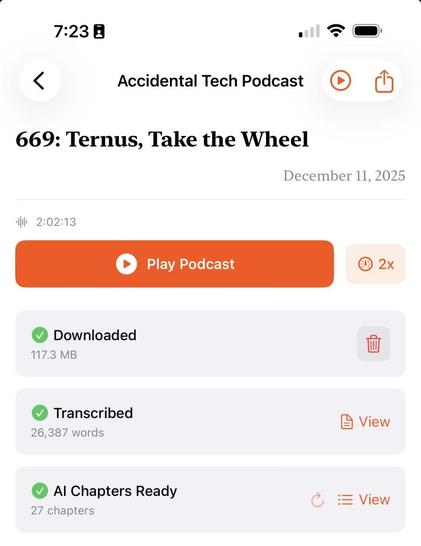
 AI Daily Post
 CEOTECH.IT