 Marcus Scott
When I was 16, I tried Ubuntu for fun and it was neat, but I didn't really get it. For some reason I really want to try Linux again. This next month (or more) I am going to give it ago. Does anyone have any tips or resources? I am going with Linux Mint.
 pilot824
Thinking of installing a fresh copy of Linux? I highly recommend looking into btrfs.
I switched to btrfs for the built-in snapshots (ie. built-in backup system) alone, but btrfs does have more benefits over the standard ext4:
* Snapshots
* File deduplication
* Copy-on-write (when writing to disk, btrfs makes a copy then writes. Prevents data loss if the disk is corrupt or due to power loss)
* etc...
#linux #linux_tips #operatingsystem #debian #archlinux #manjaro #fedora
 𝖆𝖒𝖆𝖗𝖔𝖐
To avoid using your HDD or SSD, you can use RAM disk. On a #Debian system those 2 are ready to use:
/run/user/your-user-id (other users don't have access)
/dev/shm (this is a system-wide user writable RAM disk, all users have access)
Using zram is also a possibility, with a custom mount point.
#Linux_tips #LinuxTips #CLI #sysadmin #Linux #GnuLinux
 Amoghavarsha
Why Use EasyBCD When You Have GRUB (to dual boot or multi boot)
https://amoghavarsha.in/posts/grub/grub/
#linux #linuxmint #linux_tips #linuxkernel #dualboot #dualbooting #dualbootsystem #windows #windows11 #windows10 #windowslife #windowslinuxmacos
Why Use EasyBCD When You Have GRUB
When you set up a dual-boot system, one of the most common hurdles is managing the boot process — specifically, selecting which operating system to boot into. This is where GRUB (Grand Unified Bootloader) steps in. If you’ve ever faced the hassle of relying on third-party tools like EasyBCD to change between operating systems, GRUB is the solution. In this article, we’ll explore how GRUB works, how it simplifies dual-booting, and some of its more advanced features that can enhance your experience.
How to run `systemctl poweroff` and `systemctl reboot` as a normal user and without a password.
#Linux #sysadmin #Linux_tips
https://www.baeldung.com/linux/poweroff-reboot-normal-user
#Linux #sysadmin #Linux_tips
https://www.baeldung.com/linux/poweroff-reboot-normal-user
 juergen
Siduction oder Spiral Linux ? #linux #debian #gnome #kde #linux_tips @linuxmagazine @Linuxkumpel @thelinuxEXP @linux_opensource
Siduction
Spiral Linux
Poll ended at .
A no nonsense blog on 'How To Connect Between Two Linux Machines'
#programming #programmers #ssh #privacy #linux #linux_tips #linuxmint #LinuxDayAT
How To Connect Between Two Linux Machines
Securely connecting two computers using SSH is fairly simple and powerful. But if you are new to the world of computers, especially GNU/Linux, it could be a bit tricky to get around some basic stuff. In this tutorial, I’m going to teach you the step-by-step process to communicate between two computers using SSH. Basics The idea is pretty simple. There are two Linux computers; let’s call them A and B. To access computer A from B (connecting to A using B’s machine), we need to place B’s public key inside A.
 Dinosa Labs 🦕🧶 Amigurumis
Tengo esto un poquito abandonado pero la verdad es que estoy teniendo mucho más trabajo del que pensaba y se me ha complicado un poco la cosa.
Aquí os dejo un Tux patronado por estas manitas 🐧❤️
#MastoArt #art #amigurumi #plushie #hechoamano #plushiesofmastodon #linux #linux_gaming #tuxlinux #LinuxNerd #linuxgaming #linux_tips #smallbusiness #smallbiz
 Hacker News
Linux on a MacBook Pro (M1 Pro): How Good Is Asahi Now?
https://www.youtube.com/watch?v=ZFx6R26aRHw
#ycombinator #linux #open_source #distribution #linux_distro #linux_help #linux_tutorial #linux_2023 #opensource #linux_tips #distro #linux_for_beginners_2023 #linux_tutorial_2023 #linux_vs_windows
https://www.youtube.com/watch?v=ZFx6R26aRHw
#ycombinator #linux #open_source #distribution #linux_distro #linux_help #linux_tutorial #linux_2023 #opensource #linux_tips #distro #linux_for_beginners_2023 #linux_tutorial_2023 #linux_vs_windows

Linux on a MacBook Pro (M1 Pro): How good is Asahi now?
 Sooraj
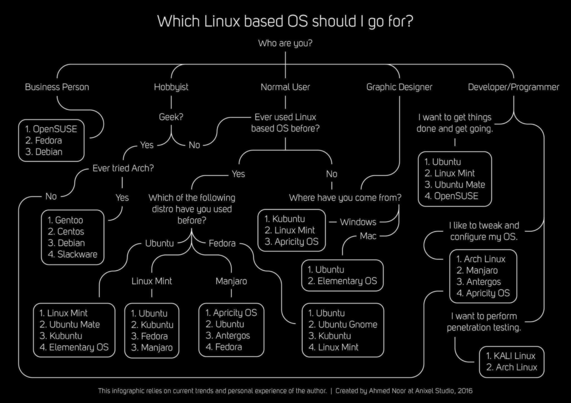
Interesting Infographic
#linux_tips #linux_howto #linux
For a daily driver, I suggest using Linux distros like Pop!_OS, Linux Mint, Fedora. What’s your current Linux distro and have you stopped distro hopping yet?
cc: @thelinuxEXP, @jay
#linux_tips #linux_howto #linux
For a daily driver, I suggest using Linux distros like Pop!_OS, Linux Mint, Fedora. What’s your current Linux distro and have you stopped distro hopping yet?
cc: @thelinuxEXP, @jay