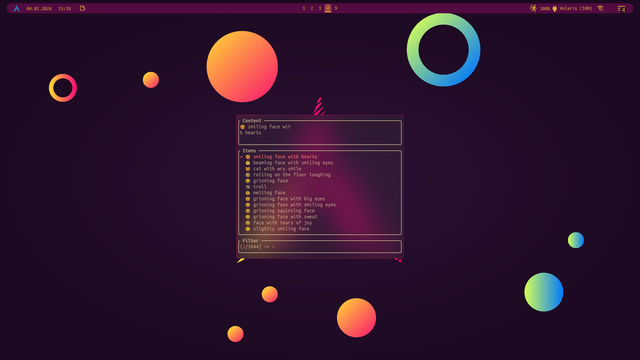
I reworked my emoji picker, I think it's kinda neat 😁.

Using a custom Hyprland config with kitty, fsel and bemoji.

#bemoji #fsel #linux #arch #hyprland #screenshot #emojipicker

Wait a minute, so we can insert emojis directly on Linux? No extra app needed?
😻

Steps:
1. Press
Meta and . buttons together, this will open the emoji search.
2. Enter a keyword to search for, then pres space to enter the suggested emoji.
3. Press space again to open the emoji picker, if you don't like the suggested emoji. You can use arrow keys to navigate in the emoji picker.
4. Press enter to insert the emoji.

Hint: If it is hard to get to press both buttons at the same time, press and hold
Meta , then press .

Fun fact: Meta was the name of what is now known as the Windows or Start menu button, before Windows rebranded it as such and the name stuck thanks to wide adoption of Windows. It is also sometimes referred as the [Super] key, which was another real button between [Meta] and [Hyper] keys. Look up for "Meta key" on the internet to learn about the interesting history of keyboards.

#Linux #GNOME #EmojiPicker #Meta #Keyboards
Things that were obvious design mistakes from #Apple:
- #TouchBar (not the technology, but the implementation)
- Removing #MagSafe (people like the convenience of not killing their laptop over tripping cables)
- Re-adding MagSafe (without actually addressing the problem that you need a whole new cable to just deliver power)
- Square alignment of arrow keys (does this even need a comment?)
- Removing the escape key (it's not just nerds)
- #TouchID button that can't visually tell you that it wants your attention (believe it or not, but some people have no effing clue what to do when the TouchID popup pops up)
- The contrast of #DarkMode on #OSX calendars (eternal shit show of trying to read purple text on a slightly darker purple background)
- Everything related to #EmojiPicker (the way it's been buggy for years, the slowness, the non functional fuzzy search, the 3! distinct and horrible ways it works, ...)
- #iMessage as a whole (anyone who is a tiny bit critical can't stand this piece of UX hell)

Related little typographical tidbit:

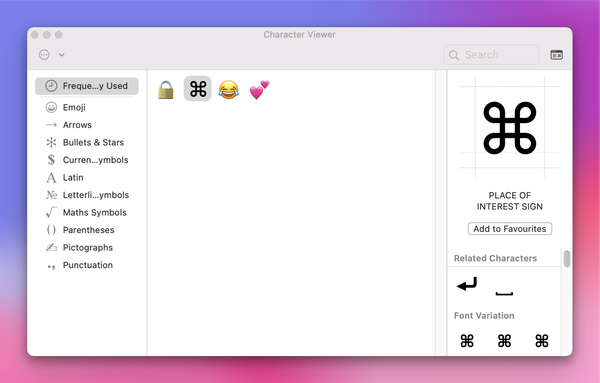
If you want to enter the symbol for the command key, it’s known as the “place of interest sign” and you can enter it via the emoji picker by searching for “place”.

#macOS #Mac #command #key #placeOfInterestSign #unicode #emojiPicker

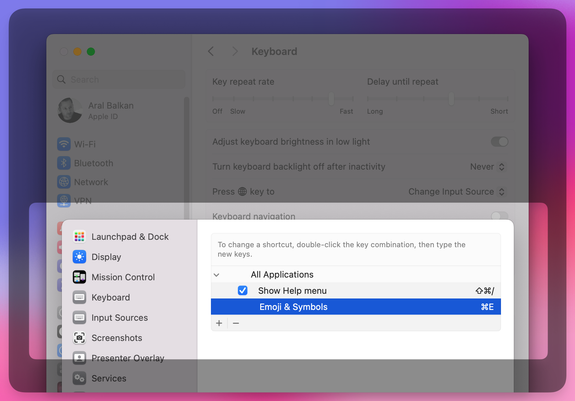
If you’re on a Mac and you want to change the keyboard shortcut for showing the emoji picker, e.g., to ⌘E, you can do so from Settings → Keyboard → Keyboard Shortcuts… → App Shortcuts → All Applications.

Press the + button to add a shortcut and, in the Menu title textbox, enter (exactly):

Emoji & Symbols

Hit Done and you’re, umm, done.

This is useful when using a non-Apple external keyboard and ⌘^space is too verbose.

#macOS #emoji #emojiPicker #keyboard #shortcut #keyboardShortcut

Years ago I was genuinely excited by #OSX #EmojiPicker. There was nothing like that on #Windows or #Linux. Many years fast forward and I'm really sad about the state of things:

1) The emoji picker did not evolve. At all. It's still super slow. It's still really bad at fuzzy search. It's still trying to (incorrectly) guess what set of emojis are important.
2) They added an incredibly bad #UX addition of inline emoji picker expanding on current word that:
2.1) Implements an anti-pattern of being invoked through the same keyboard shortcut. Sometimes, based on if there is a match or not. So I never know which action will happen.
2.2) Needs to be explicitly invoked via said shortcut. So I never know if my phrase will bring a match or not, until I press the sequence. Bringing so much extra typing.
3) Over the years they just bluntly ignored (typical #Apple) the industry standard of `:apple` emoji invocation that would just fix both 2.1 and 2.2.

#MakeEmojiPickerOnOsxGreatAgain

@evan Basically never, because that's an extra tap-and-hold at least.
I've almost stopped using emojis because #emojipicker on KDE shows every skin color for each emoji by default, and that's... less than ideal.
'sides, mastomojis are cooler 
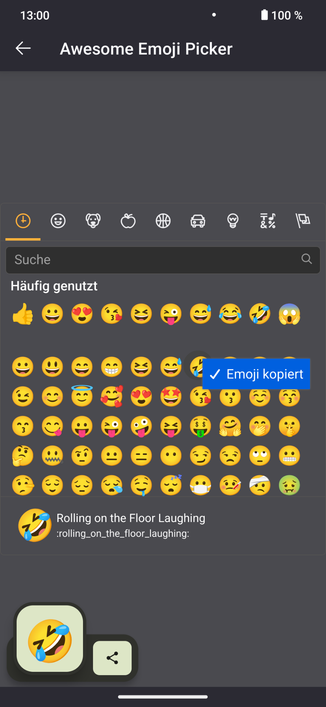
✨ Awesome Emoji Picker ✨ – Holen Sie sich diese Erweiterung für 🦊 Firefox (de)

Laden Sie ✨ Awesome Emoji Picker ✨ für Firefox herunter. Moderner, schöner Emoji-Picker, den du zum Finden 🔎 und Auswählen von Emojis nutzen kannst.😀 Es wird dann in die Zwischenablage kopiert 📋 oder sogar direkt in die Seite eingefügt, wenn du darauf klickst 🖱. Du wirst es sicherlich mögen. 😎

@blackwolf12333 @cassidy I think what you are referring to is the ibus emoji annotation mode (when pressed, a weird underlined e appears and allows for emoji selection). Interestingly this key binding does not work on my Manjaro GNOME install. Anyway, what I was looking for was a way to have the #gtk #emojipicker #systemwide which seems to be impossible by design for non GTK apps.
Is there a way in #gnome 44 to make ctrl+. invoke the #emojipicker #systemwide and not just in #gtk apps?