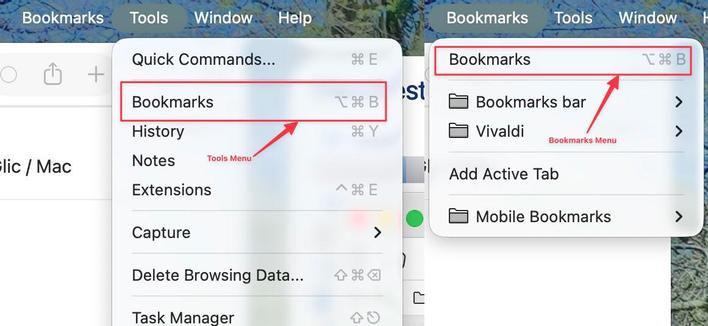
@Vivaldi #VivaldiBrowser Is it just me…. the ⌥ ⌘B keyboard shortcut in the Vivaldi web browser is supposed to open the Bookmarks page, but for me it does nothing, nada, zilch.

I’ve looked it all OS / App settings I can think of and I can't see any conflicts with macOS / Apps at all, it just doesn't work.
The only way it works is if I click on it with the trackpad.

I've even tried to execute the shortcut via Keyboard Maestro or Apple Script, still nothing.

If you are running Vivaldi on an Apple Mac can you please advise if it works for you?
If you have an idea as to what may be breaking it then please yell out.
If you can boost this post it'd be appreciated.

#VivaldiBrowser #macOS #keyboardshortcut #bookmarks

Wasn das Tastenkürzel in phanpy, um angehängte Katzenbilder in groß zu sehen?

in enafore/semafore/pinafore isses "i", in dem Webinterface von mastodon isses "e". Gibsas auch in phanpy?

#phanpy #keyboardShortcut

Is your accuracy with #keyboardshortcut (s) and #errorrate with the #10fingersystem also highly dependant on how you feel on a particular day?

Sometimes I feel like I'm flying over the #keyboard almost like Neo dodged the bullets in The Matrix, and on other days I feel like my fingers are scrambled all over the place. 🫣😅

My performance is consistent
28.6%
My performance varies greatly
64.3%
Something else
7.1%
Poll ended at .

Mình đã tạo ứng dụng Clipify để rephraser văn bản nhanh nhẹn với keyboard shortcut (Cmd + Shift + C) cho macOS/Windows! Nhập đoạn văn cần chỉnh sửa, nhấn combin khóa Combocmd + Shift + C để biến đổi. Thông cảm Tousreviewsiez để cải tiến. Tags: #Clipify #rewrite #macOS #Windows #KeyboardShortcut #NguoidungMac #UserMac

https://www.reddit.com/r/SideProject/comments/1oal1bt/i_built_a_tiny_app_that_instantly_rephrases_any/

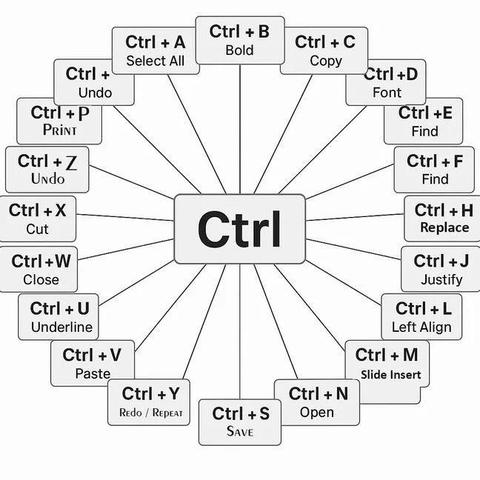
Common Control key (Ctrl) shortcuts on Windows include Ctrl+C for Copy, Ctrl+X for Cut, Ctrl+V for Paste, and Ctrl+Z for Undo. #windows #Tech #keyboardshortcut #Ctrlkey #Technology

TIL how to take a full page screenshot in Google Chrome using the native dev tools rather than a plugin.

1. Open Dev Tools (Cmd+Option+I)
2. Run command (Cmd+Shift+P)
3. Search for "(Capture full page) screenshot"

#TIL #GoogleChrome #keyboardShortcut

I was today years old when I learned that #MicrosoftEdge lets users switch to a particular tab with the #keyboardshortcut ctrl-1 through 9, depending on tab. Too bad for all you out there with 999 tabs open... but good for people like me. Thank you, #Microsoft ! #usability

Se suas teclas multimídia (play, pause, next, previous, mute etc.) não funcionam, pode ser que o pacote "playerctl" não esteja instalado.

Para instalar no Debian: sudo apt playerctl

Fiquei meses com este problema até (re)descobrir uma anotação minha, com esse detalhe.

Para quem precisa tomar notas durante videoaulas e afins, ajuda demais ter como pausar o vídeo rapidamente, sem perder o foco na digitação e sem perder a linha de pensamento.

#i3 #i3wm #playerctl #MultimediaKeys #keyboardNavigation #keyboardShortcut #Debian

I do love the way @github now displays the keyboard shortcut on the create issue label button #github #ux #dev #KeyboardShortcut

Okay, I don't know if this is a #GTK thing, a #Gnome thing, a #LibreOffice thing, or a #Cinnamon thing, but I just discovered probably the most user-hostile "helpful" behaviour I've seen in a piece of #software in a long, long time.

The find-and-replace dialog in the LibreOffice #spreadsheet - I haven't checked the remainder of the apps - has the typical buttons for "Find All", "Find Previous", "Find Next", "Replace", and "Replace All".

... and no obvious keyboard shortcuts for them. Nothing shown, no #affordances, no typical underlined or bolded letter in each button's label text. Doing a large amount of selective search&replace (don't ask #Etsy cough cough) is incredibly painful. There's *got* to be #keyboard #shortcuts, right?

Here's the #evil: the shortcut keys are not indicated *until you hold down the alt key*. Then it underlines the appropriate letter in each button's label, but those underlines disappear again when you release the alt key.

So you can study this bloody dialog box until the cows come home and never see a hint of a keyboard shortcut, even though it has them.

#$*&!^%@ Who thought this was a good idea?

#usability #accessibility #KeyboardShortcut #UI #UX #Linux #FreeSoftware #OpenSource