What command line methods can I use to to disconnect, and then reconnect, a rotated monitor on Ubuntu 24.04 Wayland #multiplemonitors #display #wayland #xrandr

https://askubuntu.com/q/1564649/612

What command line methods can I use to to disconnect, and then reconnect, a rotated monitor on Ubuntu 24.04 Wayland

Context I have a dual monitor setup for normal daily use. My primary monitor (DP-1) is in landscape orientation and my secondary monitor (DP-2) is rotated 90 degrees clockwise (portrait right). This

Ask Ubuntu

inverting colors using xrandr screws up font display in Thunderbird and LibreOffice (but not in other apps) - why? #libreoffice #fonts #thunderbird #xrandr

https://askubuntu.com/q/1564117/612

inverting colors using xrandr screws up font display in Thunderbird and LibreOffice (but not in other apps) - why?

I am on Ubuntu 24.04 LTS. I am using xrandr's brightness switch to invert the colors on my screens, which makes extended work on my computer much easier on my eyes: $ xrandr --output eDP --brightne...

Ask Ubuntu

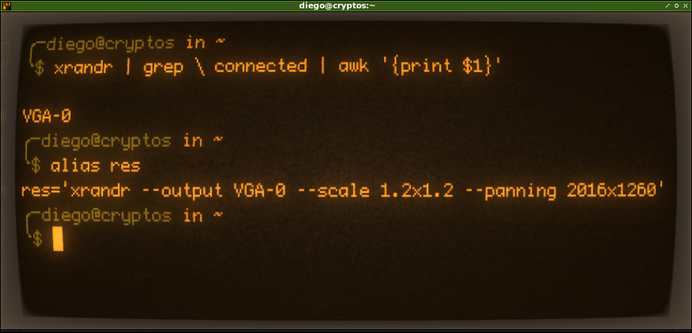
Es más fuerte que yo, si un comando medianamente largo lo tengo que ejecutar más de dos veces, sale alias xD

Y lo peor, he creado un script que lo ejecuta sólo cuando inicio sesión en #lxqt, y ya no necesito ejecutar el comando 😅

Más sobre alias en la terminal de comandos? 👇
https://youtube.com/shorts/lp3upinnuGk?feature=share

#gnu #linux #alas #xrandr #juncotic

RE: https://mstdn.io/@d1cor/115906601058645890

Va perfecto esto en #X11, el único tema es que, cuando suspendo el sistema, al despertarlo, tengo que ejecutar el comando xrandr de nuevo porque pierde el escalado de pantalla...

He probado varias cositas pero nada parece funcionar... habrá que actualizar y seguir buscando info 🙂

La otra, pasar mi #lxqt a #wayland, y cruzar los dedos con el driver de la #nvidia, mientras no se me joda el #minecraft, todo bien 😅

#gnu #linux #xrandr #resolution #screen #scaling

@psa Fair point!

That case should probably include an #xrandr `--rotate inverted` for the full effect. A bit of an adjustment period, but I don't think #xsnow has an option to make it snow 'up'.

It would reduce the adjustment period if 03|04|05 and 09|10 used `xrandr ... --rotate right` and `--rotate left`, respectively, but the planet doesn't rotate on that axis. :(

Wrote a blogpost about simple (I mean with a shell and a text editor) #X11 configuration.

Covered topics:
1) #Trackball configuration for left hand. Also remapping of some buttons to have scrolling and middle button (not exists out of the box).
2) Theming: #GTK2 #GTK3 #QT , installing cursor(s), fonts and icons.
3) #Xrandr for multimonitor configuration
4) #Xserver settings for #HighDPI
5) #XDG utils and #Emacs as a system file manager
6) #XDM login window

https://eugene-andrienko.com/en/it/2025/07/24/x11-configuration-simple.html

#FreeBSD

How to configure X11 in a simple way

TOC    Preamble High DPI Keyboard configuration Rewrite configuration for xorg.conf Mutlimedia keys Pointing devices Touchpad Trackpoint Trackball Mouse Drawing tablet Screensaver Disable screensaver for fullscreen videos Compositor (no, not that thing from Wayland) Changing size of usual windows Transparent splash screens Sliding dialog windows Effects for Emacs Librewolf: menu fix Effects for StumpWM parts Disabling unwanted outputs Juggling with displays Terminal Display manager (XDM) Xdg-utils Emacs Dired as a default file manager Emacs Compose as a default mail agent nSxiv as a default image viewer MPV as a default video/audio player Emacs as a default editor for some files Emacs PDF-tools as a default PDF viewer Beauty Changing the cursor theme GTK2 theme GTK3 theme GTK4 theme Qt theme Librewolf theme Fonts Icons Notes Preamble The modern common Linux and as a result also a UNIX desktop is heavily bloated. Even if you install not a full-scale DE like Gnome, but a small WM: i3wm, WindowMaker, XFCE, StumpWM, etc. These window managers are small itself, but when user installs a necessary GUI programs — then a lot of bloat will be installed too: gsettings-daemon, D-Bus daemon, polkitd, console-kit-daemon, etc, etc…

Dragon’s notes

One of the often repeated claims is that you need #Wayland to support multiple monitors with different #DPI and have correct #scaling, because there's no way in #X11 to do it.

Well, that's always been a myth. Now there's some nice blog post demonstrating that with actual code:

https://flak.tedunangst.com/post/forbidden-secrets-of-ancient-X11-scaling-technology-revealed

Yes it requires an extension, #XRandR, but that's been a "standard" extension in #Xorg for a LONG time. It's exactly what I'm still planning to also support in #Xmoji, as soon as I find the time.

forbidden secrets of ancient X11 scaling technology revealed

OTT: Extreme Multihead For Gaming (on Linux PC):
https://beko.famkos.net/2021/05/31/extreme-multihead-for-gaming-on-linux-pc/

All these hoops are basically obsolete with #gamescope nowadays, because this micro compositor allows to configure any virtual display size that games get to see - and handles upscaling on top.

#gamingonlinux #linux #linuxgaming #xrandr #x11 #xorg #xserver #multihead #widescreen #ultrawide #widescreen

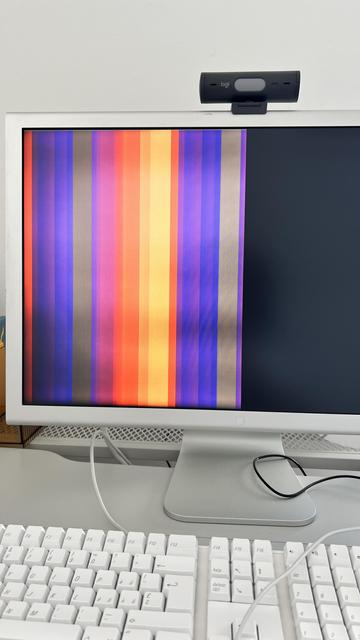
This is how the Apple Cinema Display 23 responded when I tried to overclock its refresh rate. I knew it wouldn't work, but I still wanted to try using:

cvt 1920 1200 61.

I also tried 75 Hz, but the display turned off.

#freebsd #apple #xrandr #cvt #overclocking #monitor

Configured #i3, added #polybar (and changed a few settings from default), got it working on multiple monitors, fixed my #xrandr setup, installed a few random #emacs packages. I should probably go to bed now but it was a lot of fun!