 Chase Hainey
Seeing this new #apple M4 iPad Pro with the new Magic Keyboard really has me hoping that #WWDC gives us macOS Touch. The hardware specs are insane for the severely gimped iPadOS. I only have a work issued MBP and my personal laptop is a bulky #RazerBlade15 Linux gaming rig. This could be the perfect laptop replacement. #hopium
 Michael
Ordered 64GB of DDR5 for my #razerblade15. Probably will need to swap out the second SSD soon for a 2 or 4TB.
 petapixel (unofficial)
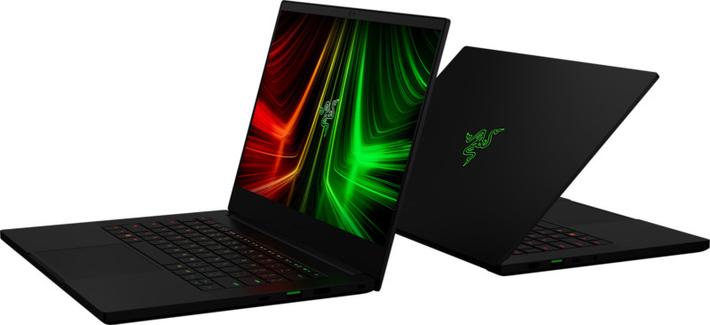
Razer Updates its Blade 14, 15, and 17 Laptops for Greater Performance
Razer has announced that it has refreshed its Blade 14, 15, and 17 laptops with NVIDIA's GeForce RTX 30 series GPUs (up to an RTX 3080 Ti), Windows 11, DDR5 memory, and in the larger models Intel's latest 12th-generation Core H-Series processors.
Razer's Blade series laptops were already an excellent choice for gamers and photo editors alike -- both the Blade 15 Advanced and Blade 14 were positively reviewed by PetaPixel 's team -- but the updates are poised to make them even more compelling.
Razer says that each Blade features a CNC-milled aluminum chassis and high-quality custom components, which it claims results in a laptop unlike any other on the market. The new Blades sport a refreshed keyboard design with slightly larger keys, which the company says makes the typing experience more ergonomic than before. The revised design also includes laser-cut speakers, a refined hinge design with a thinner profile, and additional ventilation with rubber feet specifically designed to create cooling airways.
Razer Blade 14 2022 Updates
The Blade 14 is the only one of the group that won't offer Intel's latest chips as an option. The company did not specify, but it is likely a decision based entirely on heat dissipation, and the Blade 14 chassis is too small to accommodate Intel's latest. Instead, they will only be shipping with AMD Ryzen 6000 Series processors: Razer says that every configuration offers the Ryen 9 6900HX processor. That improved processor is joined by up to 16GB of DDR5 memory, which Razer says makes it faster and even more powerful than before.
Razer also implemented a MUX Switch, which allows the computer to disable the integrated graphics on the laptop and allows for an increase in performance at the cost of battery life. The new laptop also adds features found on the larger Blade 15 and 17 laptops including the same fingerprint-resistant coating and a 1080p IR webcam that supports Windows Hello, which Razer says makes video calls twice as clear as before.
The new Razer Blade 14 starts at $2,000.
Razer Blade 15 2022 Updates
The Razer Blade 15 can now come equipped with Intel's latest 12th-generation Core H-Series Processors -- up to an Intel Core i9-12900H with a new 14-core count over the previous 8-core generation. Razer says that Intel's processors bring a "revolutionary" new design with a performance hybrid architecture that combines performance-cores with efficient-cores, offering users the freedom to chat, browse, stream, edit, record, and play. The newest generation of Intel Core i9 processors will see high-speed frequencies up to 5.0GHz.
Beyond that, the Bade 15 will continue to offer the same Full HD 360Hz and QHD 240Hz configurations, but now also offers a new 4K UHD 144Hz configuration. That additional resolution might not be strictly necessary on a display this small, but few photographers will complain about more pixels. Razer says that the new IPS-Grade display features improved refresh rates, up from the 60Hz of previous generations, while simultaneously covering 100% of the DCI-P3 color gamut.
Just as is the case with the Blade 14, the Blade 15 also ships with DDR5 memory. The new Razer Blade 15 starts at $2,500.
Razer Blade 17 2022 Updates
The Razer Blade 17 takes everything offered in the Blade 14 and 15 and adds a bit more. Like the Blade 15, the Razer Blade 17 now also comes with the option to use Intel's latest 12th-generation processors and comes equipped with DDR5 memory. The Blade 17 not only has a larger chassis and therefore physically larger display, but Razer used that space to improve the audio experience. The Razer Blade 17 features eight speakers which doubles the number from the previous generation. It also has a larger 82 watt-hour battery, which is more than 10 watt-hours more than the last version of the laptop.
The new Razer Blade 17 starts at $2,700.
Availability
The Razer Blade 14 laptop will be available to pre-order starting on February 10. The Razer Blade 15 and Blade 17 laptops will be available to pre-order on January 25. All three laptops do not have a specified availability date, but Razer says they will begin shipping and become available for general purchase sometime in Q1 of 2022.
#equipment #news #amd #creatorlaptop #intel #intel12thgen #laptop #razer #razerblade #razerblade14 #razerblade15 #razerblade17

The Best Laptops for Photographers and Photo Editing in 2021
Seasoned photographers know that the search for the right laptop comes down to far more than a list of individually impressive specs. The perfect laptop for photo editing will not always be the one with the most bells and whistles, because perfection here is about so much more: usability, ease, intuition -- all the things that combine to create not just powerful imagery, but a powerful workflow as well.
With this total experience in mind, we have created a list of the best laptops for photo editing in 2021.
What We’re Looking For:
A photographer has many competing needs when selecting a laptop, so we have attempted to cover the most common areas for this list. We have considered price, functionality, performance, and durability to come to the following selections.
- Best PC Laptop for Photographers: Dell XPS 15 (9510)
- Best Apple Laptop for Photographers: MacBook Pro M1 (13.3”)
- Best Budget Laptop for Photographers: Asus VivoBook S15 S533
- Best Detachable 2-in-1 Laptop for Photographers: Microsoft Surface Pro 8
- Best Overall Workstation-Class Laptop for Photographers: HP ZBook Studio G8
- Best Value Workstation-Class Laptop for Photographers: Gigabyte Aero 17
Best PC Laptop for Photographers: Dell XPS 15 (9510)
CPU: Intel Core i7-11800H (11th Gen)
CPU: Intel Core i7-11800H (11th Gen)
GPU: NVIDIA GeForce RTX 3050 4GB GDDR6
RAM: 32GB DDR4
Storage: 512GB M.2 PCle NVMe SSD
Display: 15.6-inch, 3.5K OLED (3456×2160)
Size: 13.57 x 9.06 x 0.71-inch
Weight: 3.99lb
Price: Starting at $2,008.99
The key to any pick for "Best PC" on a list like this is not that it does a few things flawlessly or that it's loaded to the brim with features that are frankly excessive for 99% of photographers, but that it does everything "well." No laptop on this list fits that bill better than Dell's XPS 15 (9510): it just flat-out works.
No matter your need, skill, or financial situation, there is a configuration of the XPS 15 that is going to make you happy, and, most importantly, get the job done. The massive configuration and options that are available are a big part of what makes this our top pick. Every spec is user-selectable without changing the entire system. For example, if you don't care about the 3.5K OLED screen, you can downgrade to the 15.6-inch FHD+ InfinityEdge and knock about $200 off, for example. That said, we think that an extra $200 is more than worth the extra expense given how much of an improvement you get.
We have picked what we view as the optimal combination for processing power, storage, screen quality, and price and it will run you around $2,000. Its 15.6-inch 3.5K (3456×2160) Anti-Glare Screen is incredibly impressive, with 400-nits brightness and razor-thin Infinity Edge bezels on all four sides. In terms of processing power, you will get the 11th Generation Intel Core i7, a whopping 32GB of RAM, and a 512GB SSD, which is plenty suitable for most -- particularly since many photographers work off external storage.
Design across all configurations is sleek and comfortable, with the already-pleasant keycaps and touchpad getting a size increase over prior models. In keeping with the "Do everything pretty well" vibe of an all-arounder, port selection is mostly fine, offering three USB-C ports for charging and connecting to peripherals. Two of these are Thunderbolt 4, which is extremely welcome and something that not many PCs boast. There's also a full-sized SD card reader.
For those who want more spring in their step, you can increase your investment by moving to the Core i9 CPU, double your RAM to 64GB, and enhance your storage capacity all the way up to 8TB, and even boost your graphics to NVIDIA's GeForce RTX 3050 Ti. You also have the option to upgrade to the UHD+ 3740×2400 500-nit brightness screen. All of these upgrades are overkill for almost all photographers, but those whose work entails a hybrid of both photo and video may find the increased CPU, RAM, storage, and graphics power to be well worth the extra cash.
Conversely, the base level model is available starting at $1,273.99 -- if you're willing to drop to a Core i5 CPU, 8GB of RAM, a 256GB SSD, integrated Intel UHD graphics, and a basic FHD+ (1920×1200) display. But, as mentioned, you can adjust many of these specs to suit your needs (and budget). And perhaps best of all, both the RAM and SSD are user-upgradeable (nothing soldered here), making the jump from the base model to 16GB or even 32GB of RAM fairly easy and affordable after purchase. The integrated graphics of the base model are a demerit, but casual photographers will have no complaints as most photo editing applications rely largely on CPU processing.
No matter which configuration you choose for the XPS 15, you are going to find yourself steadily working without fuss, without issue, and with a good bit of enjoyment. The only downside to this machine is that it is so popular you might have a little more trouble locating one in stock. If all else fails, they are always available directly from Dell, and the website offers a price-match guarantee.
If you're not a fan of Dell, a solid alternative option would be the Razer Blade 14 QHD thanks to its excellent build quality, AMD Ryzen 9 5900HX CPU, NVIDIA RTX 3070 GPU, large 1TB SSD, and impressive port selection. In our review, we noted it was made for gamers, but is great for creators. The Razer Blade 14 was made for gamers, but photographers have no choice but to love it, too. Razer makes higher-end options (noted further down), but the Blade 14 gives photographers pretty much all they need, and then some.
Best Apple Laptop for Phototographers: MacBook Pro M1 (13.3”)
CPU: M1 8-Core (4 high-performance and 4 high-efficiency cores)
GPU: M1 8-Core Integrated
RAM: 8GB Embedded DRAM
Storage: 256GB Integrated PCle SSD
Display: 13.3-inch, Retina Display (2560 x 1600)
Size: 11.97 x 8.36 x 0.61-inch
Weight: 3 pounds
Price: Starting at $1,199
The 2019 MacBook Pro 16-inch was, and remains, one of the most impressive laptops in the industry. So why focus on the MacBook Pro with M1? Predictably, it all goes back to that M1 chip, which we described as "a revolution" in our review of the M1 MacBook Pro. It may seem like an exaggeration if you have not used this device, but the M1 makes for a legitimately transformational experience. This thing moves at the speed of your whims.
It is possible to bog the M1 down, but you have to sweat to do it by opening an insane number of windows and programs before the hint of a stutter appears. When it comes to Photoshop, this machine flat-out smokes much of the competition, especially those in the same price tier. Factor in the battery life and the M1 starts to feel unbeatable.
From a design perspective, it is exactly what you would expect from a MacBook, complete with all the benefits and drawbacks one expects. The 13-inch screen, while boasting that beautiful Retina display (with 100% DCI-P3 coverage), still suffers from the annoyingly thick bezels. That said, it is far brighter than you expect, surpassing numerous competitors (even popular members of the MacBook line), and delivers quality color information. The Magic Keyboard may not be suited to everyone, but those who love it will really, really love it. Overall weight is still an issue, but manageable.
The maximum 16GB of RAM is one sacrifice here, though it should be noted that the M1’s RAM goes much further than those with Intel or AMD-based processors -- the 16GB model will serve those who edit very high-resolution photos and/or video, while the 8GB model is a great option for the everyday photographer on a budget. The other niggle is its mere two Thunderbolt 4 ports, but this is easily expanded with excellent products like the OWC Thunderbolt 4 Hub or Thunderbolt 4 Dock.
It is also important to mention here that the new 14-inch and 16-inch MacBook Pros that Apple just announced, which feature your option of the M1 Pro and M1 Max chips, appear to be a thunderous step forward not only in the MacBook line itself but computing in general. This could inform your decision to hold off a purchase in two ways -- either preorder one of the newer, more powerful models or wait for the price to drop on the 13.3-inch M1 version. We are confident saying you will not be disappointed either way.
The most affordable model -- the MacBook Pro 14″ with M1 Pro chip -- starts at $1,999. You gain a minimum of 16GB of RAM and 512GB SSD (versus 8GB RAM and 256GB SSD for the M1), the 10-bit True Tone 100% DCI-P3 Liquid Retina XDR with HDR mode and ProMotion (up to 120hz), and a sustained 1,000 nit brightness (1,600 nit peak), three Thunderbolt 4 ports (versus two), the return of Magsafe power, an SDXC card slot and HDMI port, and a 3.5mm audio jack. Oh, and of course you get the new M1 Pro chip, with an 8-core CPU (six performance, two high-efficiency cores), 14-core GPU, and a 16-core Neural Engine. So, yeah, I'd say it's worth the extra $800.
One note: supply is currently an issue across the entire tech landscape, so getting your hands on the newest Macbook Pros might be difficult.
If you need a computer immediately, the best alternative is the slightly more affordable MacBook Air 13.3-inch M1 that comes in at $949. It loses very little when compared to its bigger brother: seven GPU cores versus eight, the screen brightness drops from 500 nits to 400, and you lose the touch bar (which may actually be a positive for many).
Best Budget Laptop for Photographers: Asus Vivobook S15 S533
CPU: GPU: Intel Iris Xe
RAM: 8GB DDR4
Storage: 512GB PCle SSD
Display: 15.6-inch, Full HD (1920 x 1080)
Size: 14.2 x 9.2 x 0.63-inch
Weight: 3.97lb
Price: Starting at $729.99
The Vivobook S15 S533 is not the most powerful computer on this list. It does not have the most beautiful display. It does not have the graphics or CPU power of the top of the line. What it does have, however, is a price that will make you feel like you have gotten away with something. For just over $700, this is the most complete laptop a photographer counting their pennies will find.
Make no mistake, despite its budget-level price you will feel no shame pulling your Vivobook S15 out to get to work in any location. The look and feel are strictly professional, thanks in no small part to the large 15.6-inch full HD (1080p) display. The build is slim too, which means it will easily into your bag. The weight is solid, but not overbearing. The processing power here won’t blow your hair back, but the Intel Core i5 is no slouch, and for an extra $270, you can upgrade to the VivoBook S15 S532EQ a Core i7-1165G7, 16GB RAM, 1TB SSD, and a dedicated NVIDIA MX350 graphics card.
For the average user, the 512GB SSD is adequate. Anyone beyond that level will already be investing in additional external storage, so the base model Vivobook S15 poses no significant downside for average, budget-conscious users. Again, did we mention the price? The VivoBook S15 punches above well above its price class and is a pleasant surprise and the best option for those on a budget. Oh, and it comes in your choice of black, gray, red, green, and white.
As an alternative, the Lenovo 15.6-inch IdeaPad 5 is a solid option. This machine exists at the perfect sweet spot between processing, affordability, and reliability. With an 11th Gen Intel Core processor and a generous 16GB of DDR4 RAM booting and running your photo editing software will be no problem. The screen is fine at full HD, but the IdeaPad also provides you with an unexpected amount of storage (512GB) for the price. It is definitely worth considering.
Best Detachable 2-In-1 Laptop for Photographers: Microsoft Surface Pro 8
CPU: Intel Core i5-1135G7 Quad-Core
GPU: Intel Iris Xe
RAM: 8GB LPDDR4x
Storage: 128GB SSD
Display: 13-inch, PixelSense Flow 10-Point Touchscreen (2880 x 1920)
Size: 11.3 x 8.2 x 0.37-inch
Weight: 1.96lb
Price: Starting at $1,099.99
Every company makes them at this point, but Microsoft remains king of the hill when it comes to tablet-style "2-in-1" PC. The company's Surface line remains a juggernaut in an ever-expanding market, and the Surface Pro 8 is the latest example of that dominance. Combining the performance increases of the 7 with the modern design of the X, then improving on both, the Surface Pro 8 is the best the line has ever offered.
One look at the screen and the leap forward becomes clear -- literally. Gone are the chunkier bezels of the past, making room for a larger 13-inch PixelSense display. Size isn't the only upgrade; resolution has been boosted to a welcome 2880 x 1920. If you are in the market for a detachable 2-in-1, you are already aware your screen will not compete directly with a dedicated laptop, but this sharper display goes a long way toward making you forget. Add in the surprising new 120Hz refresh rate and PixelSense's stellar track record with color and brightness, and you have one gorgeous display. Your eyes are not alone in their excitement, though. Your fingers get their due as well. That increased refresh rate means every touch practically glides across the display at the speed of thought. There is no usage for the touchscreen not improved by this upgrade, and you will notice.
What you may not notice, however, is that the weight and thickness of the Surface Pro 8 have expanded with the revamp -- and this is a good thing. The Surface Pro has always been compact and light, an obvious positive in the 2-in-1 space. This provided Microsoft the space to bulk up for the right reasons without becoming cumbersome. So what does the extra size mean for you? Increased thermal space, and thus increased performance. Using the Puget Systems' PugetBench for the Photoshop test, Surface Pro 8 shows itself to be near the top of the pack amongst peers for the tasks most crucial for a photographer.
The trouble, of course, is that to really feel the upgrade the Surface Pro 8 represents, one needs to commit to the $1599 model featuring the 11th Gen Intel Core i7-1185G7. At this point, cost-benefit has to come into play, especially considering Microsoft refuses to include a keyboard out of the box. The good news is, both the keyboard cover and Slim Pen are wonderful to use. The bad news is, you are looking at nearly $300 more for the pleasure (or the necessity, as it were). Of course, if you are in the market for a Surface, you have likely made peace with these realities already, and the heading here is "Best Detachable 2-in-1", not "Best Budget 2-in-1." The Surface Pro 8 is a truly beautiful device, and the best on offer from the leader in the field.
It probably doesn't come as much of a surprise that the best option outside of the newest Surface Pro is… Microsoft's next-to-newest" the Microsoft Surface Pro 7. With the introduction of the 8, the Pro 7 is due for a discount.
Best Overall Workstation-Class Laptop for Photographers: HP ZBook Studio G8
CPU: Intel Core i7-11800H 8-Core
GPU: NVIDIA Quadro T1200 4GB GDDR6 VRAM
RAM: 16GB DDR4
Storage: 512 GB PCle M.2 SSD
Display: 15.6-inch Anti-Glare IPS (1920 x 1080)
Size: 13.94 x 9.24 x 0.7-inch
Weight: 3.95lb
Price: Starting at $2,349
As we noted in our recent review, the ZBook line has always vied for attention in the mobile workstation segment but has continually gone under the radar. With the ZBook Studio G8, we think that should change. In some ways, it should come as no surprise that a line seemingly arguing with itself over whether it wants to pump out business laptops or gaming rigs would eventually split the difference and stumble on a machine ideal for photo editing.
The price may raise eyebrows, but the ZBook Studio G8 positions itself in direct competition with premium machines available from the likes of Razer. Once expectations adjust, you will find the Studio G8 a more than worthy option in that space. The G8 is an all-in-one machine meant to facilitate any work, play, or viewing experience you throw at it.
The construction alone confirms the dual focus on luxury and strength. The magnesium and aluminum alloy build is as rugged as it is refined. The design is sharp, sleek, but its durability is never in question. We touch on how extensive the testing is on these machines in our review but suffice to say: you can be confident the G8 can handle whatever you throw at it. Literally.
The keyboard action is pleasing and precise, and the glass-topped trackpad, while smaller than you may expect, is quite responsive and provides a very satisfying, tactile click. The 15.6-inch 4K OLED touchscreen is brilliant and one of the most satisfying screens on this list. Playing back into that marriage of polish and durability, it is also covered in Gorilla Glass 6.
Under the hood, there is quite a lot to cheer for. The marriage of the 8-core Intel Core i9-11950H, 16GB of RAM, and the Nvidia Quadro T1200 4GB GDDR6 graphics card makes this a fantastic fit for any photographer. The 512GB M.2 SSD is plenty for those who work off external SSDs or hard drives as well.
But the ZBook Studio G8 can take the leap from being a very good photo editing machine to an absolute monster for photo, video, and graphics editing -- or pretty much anything else you can throw at it. Maxed out with an Intel Core i9-11950H processor, 32GB of RAM, a 1TB M.2 SSD, an NVIDIA GeForce RTX 3080, and a 120hz 3840 x 2160 DreamColor IPS Display, it can handle just about anything you throw at it -- all while remaining as sleek and user-friendly as any mid-sized laptop should be. It will cost you an eye-watering $5,198.95, however.
The one deficit -- and it seems a rather noticeable one given the goals of the device -- is the dearth of available ports. The two Thunderbolt 4 USB4 Type-C are certainly welcome, but they are accompanied only by a single USB-A 3.2 Gen 1 port, one 3.5 mm headphone/mic combo audio jack, one HDMI 2.1, and one Mini DisplayPort. It is a survivable amount, but for the price HP is asking, we would hope and expect a bit more. Predictably, for a desk-rider like this, battery life is only middling -- Five hours is simply frustrating at this level.
Still, this is one of the more beautiful, more powerful laptops on the market, and, despite its price, will likely be under-considered by those who could most appreciate it. Reliability and performance are the keys to high volume, consistent work against a deadline. On this front, the Studio G8 is a marvel. In the end, it may be most exciting for what it portends. If this is a signal to the direction the ZBook line is moving, the future is incredibly exciting.
Alternatively, we think the Razer Blade 15 Advanced is a solid pick. While not necessarily a "workstation" like the Studio G8 is, we reviewed the Razer Blade 15 Advanced and found it to be an excellent, powerful option. Slimmer and sleeker than you would expect for the power it contains, it is one of the most usable, enjoyable laptops on the market. Its half-inch thick frame holds an 11th-Gen Intel Core i7 with 32 GB of RAM and an NVIDIA RTX 3080 graphics card that will rip through whatever creative multitasking you throw its way.
Best Value Workstation-Class Laptop for Photographers: Gigabyte Aero 17 HDR XD
CPU: Intel Core i7-11800H
GPU: NVIDIA GeForce RTX 3070 8GB GDDR6
RAM: 16GB DDR4
Storage: 1TB SSD
Display: 17.3-inch 4K UHD HDR OLED (3840 x 2160)
Size: 15.6 x 10.6 x 0.85-inch
Weight: 5.5lb
Price: Starting at $2,149
The Gigabyte Aero 17 successfully goes beyond “best laptop” into “best workstation” territory in a way few rivals can claim. The raw power of the Aero 17 is impressive, even more so once one considers its very reasonable price.
The first thing that catches my attention about the Aero is its GPU. One of the first laptops released in 2021, it boasts the latest in NVIDIA GeForce RTX 30-series GPUs. Whether you opt for the 8GB GDD6 3070 or 16GB GDDR6 3080, the graphics processing force of this machine places it ahead of the pack. These may not be the desktop versions of these much-hyped (and impossible to find for anywhere near a reasonable price) cards, but they will still knock your socks off.
Whether it's Adobe Premiere or Da Vinci Resolve or something else, the Aero is built to easily handle 8K footage, ray tracing, virtual reality, 3D modeling and animation, and visual effects work. NVIDIA DLSS utilizes the Tensor Cores for a boost in AI rendering, while the AI-powered Dynamic Boost 2.0 manages power on a per-frame basis, allowing the computer's AI to constantly optimize the CPU, GPU, and GPU memory for the maximum performance boost. These features are entirely overkill for those who solely engage in photo work, but I imagine 3D artists and video editors read these specs and immediately break into a sweat, nodding and cheering. This makes it the ultimate choice for those of us who edit photos as well as video, or any other graphics-intensive work.
The build quality here is exceptional. While certainly not a slim device, it is far less bulky than one would anticipate given its robust performance. The Gigabyte Fusion RGB Per-Key Backlit Keyboard may aggravate some who value cleaner and sleeker aesthetics, but this is part and parcel with a rig that screams “game on.” Unlike some other laptops on the list, you are practically spoiled with ports on the Aero 17, which features three USB 3.2 Gen1 Type-A ports, one Thunderbolt 4, an HDMI 2.1 port (which supports 4K up to 120Hz), a Mini DisplayPort 1.4, a UHS-II SD Card Reader, as well as headphone out and mic in ports. As far as sound, the Aero sports DTS: X Ultra speakers which enable virtual 7.1 surround sound, and Two-Way AI Noise Cancelation for class-leading incoming and outgoing audio.
If there is a disappointment to be found with the Aero, it comes in battery life. This tracks, given how much processing power is packed into this thing, but for those on the go, planning out a charging strategy will be a must. It also tends to run somewhat hot and a little noisier than some may prefer; just tell yourself these are the prices you pay for power. To its benefit, however, the Aero sports Microsoft Azure AI, which Gigabyte touts as "the world's first AI laptop." As you use the laptop and various applications, the Microsoft Azure Machine Learning platform gathers data and then optimizes the CPU and GPU usage for both processing speed and to limit wattage consumption, thus enhancing battery life.
All this, and we failed to touch on the 17.3-inch 4K UHD OLED Anti-glare screen with 100% Adobe RGB coverage all surrounded by "the world's first" ultra-thin 3mm three-sided bezel. Oh, and every individual unit is factory X-Rite calibrated with a Pantone Validated certification. Want accurate colors right out of the box? Yes, I think I do, thank you.
Upgrade to the Aero 17 HDR YD and you bump the specs up to a Core i9-11980HK, 32GB RAM, a GeForce RTX 3080 GPU with 16GB GDDR6, and a 512GB PCIe Gen4 SSD as well as a second 1TB Gen3 hard drive for additional storage.
If you want a suggestion beyond Gigabyte, the Lenovo ThinkPad P15 Gen 1 is a solid alternative. It is blazing fast, has a phenomenal screen, and sports a generous port selection which makes the Lenovo ThinkPad P15 one of the best mobile workstations for creatives out there. With Gen 2 just around the corner, Gen 1 is already seeing massive discounts online. Not just a great value selection, this one is a steal.
#equipment #guides #products #technology #apple #asus #dell #dellxps #gigabye #gigabyteaero17 #hp #laptops #lenovo #macbook #macbookpro #microsoft #razer #razerblade14 #razerblade15 #surfacepro8 #thinkpad #vivobook #zbook


Razer Blade 15 Advanced Review: Small Update, Huge Performance Gain
When Razer announced the "mid-2021" Blade 15 Advanced back in May, it seemed like a standard refresh. The company swapped out the 10th-Gen Intel CPUs in the "early-2021" model for 11th-Gen processors and added a new anti-fingerprint coating to the chassis. No big deal, right? Wrong -- that 11th-Gen processor has allowed Razer to upgrade just about everything under the hood of the latest Advanced model, leading to a huge performance uplift.
The switch to 11th-Gen Intel adds support for faster storage, faster RAM, and better connectivity, all while improving overall performance in every single benchmark that we've run.
Since we've already reviewed several Razer Blade laptops on PetaPixel in the past -including the AMD Ryzen-based Blade 14 just last month -- this is going to be a fairly straightforward review. I won't spend much time on the Blade's build quality or explain (again) why I approve of Razer trading a little bit of performance for a thin, sleek design that is, therefore, harder to cool.
The main point of this review is to compare the latest Blade 15 Advanced with the 11th-Gen Intel Core i9-11900H against the previous model that maxed out at a 10th-Gen Core i7-10875H and the ASUS G14 with the excellent AMD Ryzen 9 5900HS. I was lucky enough to have all three laptops on hand during this review, which allowed me to evaluate just how much the Blade 15 Advanced has improved with this one internal upgrade, and whether or not that upgrade alone makes the Blade 15 Advanced a worthwhile purchase.
The mid-2021 Blade 15 Advanced comes in several different configurations depending on the CPU, GPU, and display that you go with. We reviewed the $3,400 variant with the 4K OLED display. (click for high res)
Our review unit is the most expensive variant of the Blade 15 Advanced, which comes with the aforementioned Core i9 processor, NVIDIA RTX 3080 GPU with 16GB of VRAM (95W variant), 32GB of 3200MHz RAM, 1TB of PCIe 4.0 NVMe M.2 storage, and a 60Hz 4K OLED display that supposedly covers 100% of the DCI-P3 color gamut.
Weighing in at $3,400, it's definitely not a cheap computer, but it's also not outrageously priced given the quality of the hardware and the build quality of the computer itself.
Design and Build Quality
In terms of design and build quality, the latest Blade 15 Advanced is essentially identical to every other Razer laptop we've reviewed. Check out our review of the Blade 14 or the Blade Studio Edition if you want a deeper dive.
Suffice it to say that Razer puts a lot of emphasis on the strength and sleekness of this aluminum unibody design, opting for high-end components and a thin, rigid chassis that I personally quite like. I'll touch on the performance trade-off further down, but in terms of design, the keyboard is still excellent, the trackpad is still one of the smoothest and most responsive on the market, and the overall fit-and-finish is still Apple-esque in its attention to detail.
As such, I'm only going to call out four design elements from the mid-2021 Blade 15 Advanced. In order of importance, we have: the excellent OLED display, the improved port selection, the Full HD webcam, and the new anti-fingerprint coating.
The Display
The most expensive (and only the most expensive) variant of the Blade 15 Advanced comes with an excellent 4K OLED display that claims 100% coverage of the DCI-P3 color gamut. In our testing, the display only fell 1% short of that claim and did so with an excellent Delta E 2000 of less than 1. Anything below a Delta E of 2 is considered invisible to the human eye, and less than 1 is on par with the best displays we've ever tested.
As a bonus, it also covers nearly 98% of the AdobeRGB color gamut, making this one of the best laptop displays we have ever tested, even among 4K OLEDs.
This is a significant improvement over the previous 4K OLED in last year's Blade, which managed a full 100% of DCI-P3 but only 90% of AdobeRGB in my testing. That's significant for photographers who prefer to work in Adobe's color space rather than the cinema-standard DCI-P3.
Improved Port Selection
Razer also improved the port selection on the new Blade Advanced. You're still looking at three USB Type-A ports, two USB Type-C ports, an HDMI 2.1 port, an audio jack, and a UHS-III SD Card slot, but instead of one Thunderbolt 3 and USB-C 3.2 Gen 2 port, you now get two Thunderbolt 4 ports, one on each side of the computer.
That gives you two ports that can transfer data at 40Gbps, charge the device, and/or drive external displays up to 8K resolution at 30Hz uncompressed or 60Hz with Display Stream Compression (DSC).
For professional, color-critical workflows that rely on Thunderbolt, having two TB4 ports is a huge benefit. I also like it because the previous model had no markings on the chassis to tell you which USB-C port was Thunderbolt and which wasn't. Consider this the best way to say the problem has been solved.
Full HD Webcam
The vast majority of laptops, including extremely expensive top-shelf models, still use god-awful 720p webcams that have no business existing in the year 2021. I understand not spending a ridiculous amount of money putting a nice camera inside of a thin laptop bezel, but given the massive shift from office work to work-from-home, a nice webcam is practically a necessity.
The mid-2021 Blade 15 Advanced trades that poor 720p webcam for a 1080p Full HD camera that looks significantly better, without giving up nice-to-have features like Windows Hello facial recognition.
Anti-fingerprint Coating
The last and least important update was the addition of an anti-fingerprint coating. It seems silly to even mention it, but the previous model was just SO bad that I have to call this out. The moment you started using any previous Blade laptop with a black coating it was covered in smudges and fingerprints, making me wish that Razer offered a silver version of the Advanced model.
The new anti-fingerprint coating is not perfect, and I do still wish that there was a silver version of the Blade 15 Base and Advanced models, but the new coating represents a huge improvement over that fingerprint magnet that Razer used to use.
Photo Editing Performance
The main criticism leveled at Razer over the years is that it prioritize style over substance. By choosing to make the Blade laptops ever thinner, it is difficult to properly cool the components inside and so you either have to thermally throttle your CPU and GPU, or you have to go with a less powerful variant of the same.
To some extent, this is still the case with the latest Blade 15 Advanced.
In exchange for that sleek aluminum unibody design, you're limited to a Core i9-11900H instead of the more powerful i9-11980HK you'll find in top-tier gaming laptops, and the Blade uses the 95-105W variant of the NVIDIA RTX 3080 GPU instead of the maxed out 155-165W card that some beefier options are able to support. Personally, I've always thought that this trade-off is worth it (possibly because I've used Apple computers for so long), but still wanted to mention it.
If you're looking for a laptop that prioritizes performance above and beyond all else, there are other options out there. Just be prepared for a bulkier, louder laptop that won't put as much emphasis on design and build quality.
That said, the mid-2021 Blade 15 Advanced is no slouch in the performance department. In fact, it's downright excellent. The upgrade to 11th-Gen Intel doesn't just mean a faster CPU with a larger built-in cache, the new Blade 15 also supports up to 4TB of faster PCIe 4.0 storage and up to 64GB of faster 3200MHz RAM. And since the 11th-gen chips run a little bit cooler, the mid-2015 Blade is able to push the GPU a little bit harder, boosting to a TGP of 105W instead of 95W.
All of this together translates into a huge performance uplift in every benchmark we've run: Lightroom Classic, Photoshop, and Capture One 21 all benefit. For the benchmarks below, we tested three machines: the early-2021 Blade 15 Advanced, the 2021 ASUS Zephyrus G14, and the new mid-2021 Blade 15 Advanced.
Full specifications below:
Lightroom Classic
Import, preview generation, and export all see big gains with the latest Blade 15. Previously, the ASUS G14 was the fastest laptop we'd tested in Lightroom Classic thanks to the AMD Ryzen 9 CPU and that laptops's support for faster 3200MHz RAM. Now that Intel has caught up, the latest Blade 15 doesn't just match the Ryzen 9 5900HS, it exceeds it.
First, we imported and generated 1:1 previews, using 110 Sony a7R IV and 150 PhaseOne XF RAW files:
The results were kind of shocking, but we ran these tests a minimum of three times in a row on all three machines using the exact same settings. Ultimately, import and preview generation is heavily dependent on raw CPU performance, and the 11th-Gen i9 flexes serious muscle here.
We then applied a custom preset to each batch of RAW photos and exported them as both full-res 100% JPEGs and 16-bit TIFFs:
As you can see, the early-2021 Blade 15 can't quite keep up with the ASUS G14 despite the Core i7-10875H's crazy 5.1GHz boost clock. Being limited to 2933MHz RAM and struggling to stay cool inside the Blade's thin aluminum chassis, it falls short. According to Adobe, import, preview generation, and export do not use GPU acceleration in Lightroom Classic, so these numbers are all down to CPU, RAM amount, and RAM speed.
Capture One 21
When we run these same tests in Capture One 21, the mid-2021 Blade 15 Advanced yet again steals the crown from the ASUS G14 in all but one test, and outperforms the early-2021 model by a lot more than we initially expected.
As before, import generation sees a substantial boost. Although it's worth pointing out that Capture One is creating smaller 2560px previews, so these results are not comparable between programs:
In terms of export performance, the Blade makes a much bigger leap when encoding TIFFs as opposed to JPEGs. Exporting 100% JPEGs still saw a big jump, helping the Blade to (almost) match the ASUS G14, but when it comes to TIFFs the Blade reigns supreme:
Because Capture One is using hardware acceleration for both import/preview generation and export, the Blade 15 was always supposed to win this contest -- it contains a beefier NVIDIA RTX 3080 with way more VRAM and at least 25W more power. Surprisingly, the early-2021 model lost to the ASUS G14 in every category, but now that the Intel CPU is pulling its own weight, we see the results we've always expected.
Photoshop
Last but certainly not least, Photoshop performance also benefits significantly from the faster CPU and faster RAM in the latest Blade 15 Advanced. We ran Puget Systems' excellent PugetBench benchmark (v0.8, the last version to include Photo Merge), and saw a significant improvement in every single category.
Despite the lower TurboBoost clock speed of the i9-11900H (4.9GHz instead of 5.1GHz), the new CPU's faster base clock (2.5GHz instead of 2.3GHz), increased CPU cache (24MB instead of 16MB), and support for 3200MHz RAM helps the mid-2021 Blade 15 Advanced earn the highest score we've ever seen from any computer we've tested, including the M1 Mac mini.
As a reminder, the scores break down into an Overall scores and four category scores: General, GPU, Filter, and Photo Merge:
I'm no huge fan of the Intel versus AMD discussion -- just give me the one that works best -- but it's not an exaggeration to say that the 11th-Gen Core i9 has transformed the mid-2021 Blade 15 Advanced into a much better value than the early-2021 model. The new CPU has allowed Razer to produce a lot more performance out of the same exact chassis. That's no small feat.
As a bonus, it puts some pressure on AMD, who has been kicking Intel's butt all over the playground for the last couple of years. If the performance above is anything to judge by, Intel is finally ready to strike back.
A Huge Performance Leap
On the surface, the upgrade from the "early-2021" version of the Blade 15 Advanced to the "mid-2021" version seems pretty minor -- jumping up to the latest generation of Intel processor doesn't always mean much. But in this particular case, it has totally transformed this computer.
We were already fans of Razer's design and build quality, and occasionally cut the Blade series a bit of slack on that account, but this latest build doesn't really require us to do that. Thanks to the faster CPU, faster RAM, faster storage, better display, and better ports, there is very little to legitimately complain about.
Pros
- Much faster CPU
- Support for up to 64GB of 3200MHz RAM
- Support for up to 4TB of PCIe 4.0 NVMe storage via two M.2 slots
- Exceptional 4K OLED display with excellent coverage of both DCI-P3 and AdobeRGB
- Extensive I/O with HDMI 2.1, two Thunderbolt 4 Ports, and a UHS-III SD card slot
- 1080p Full HD webcam with Windows Hello support
- New anti-fingerprint coating
Cons
- Poor battery life when doing serious computing
- OLED display only available on most expensive model
- Core i9 CPU only available on most expensive model
- Expensive
I've said it before and I'll say it again: if you're looking for the best combination of price-to-performance, then a Blade laptop probably isn't for you. You can almost always cobble together the same CPU, GPU, RAM, storage, etc. in a cheaper chassis for a little less money. But you're going to give up a lot more than you realize when you chase affordability or prioritize specs like a 165W TGP and an ever-so-slightly faster CPU.
To me, a slight decrease in overall performance -- probably meager when it comes to photo and video editing application -- compared to the top-shelf gaming PCs on the market is worth it when you factor in the quality of key components like the display, the keyboard, the trackpad, the webcam, and the I/O.
But the TL;DR comes down to this : with the release of the mid-2021 Razer Blade 15 Advanced, Razer has added way more than $100 worth of performance for only $100 more in MSRP.
Are There Alternatives?
Every time Intel unveils its latest generation of CPUs, you can expect most PC makers to release updated versions of flagship laptops. That's what happen with the "mid-2021" Razer Blade 15 Advanced, which was joined by alternatives like the latest [MSI GS76 Stealth](https://www.adorama.com/msigs7611078.html?kbid=67085” rel=“norewrite sponsored”) or the latest Dell XPS 17. These two models in particular feature 4K UHD displays that claim 100% coverage of Adobe RGB, making them both a solid choice for content creation.
If you want to go even more powerful, you can go with something like the Lenovo Legion 7i Gen 6, Alienware x17, or MSI GE76 Raider, which all feature the more powerful i9-11980HK CPU and an NVIDIA RTX 3080 GPU that can handle 155W - 165W of juice -- that's pretty much the most powerful GPU you can currently put in a laptop until you start cramming in desktop components and adding a second AC adapter. Unfortunately, of these three options, only the Alienware x17 features a color-accurate 4K display; the other two use high-refresh-rate Full HD displays that are aimed at gamers, not creative professionals.
Finally, another great option is to go with an AMD Ryzen system like the ASUS Zephyrus G14 we tested, its big brother the ASUS Zephyrus G15, the Lenovo Legion 7 or Legion Slim 7, or Razer's own Blade 14. All of these are fantastic options, but pay attention to the display configuration since most offer a choice between a high-refresh-rate Full HD display with 100% sRGB coverage, or a slower but more color-accurate QHD display that can covers 100% of DCI-P3.
Should You Buy It?
Yes.
With the early-2021 model of the Blade 15 Advanced, we were on the fence. With faster, cheaper, cooler processors like the Ryzen 9 5900HS and HX often selling in computers there were $500 to $1,000 cheaper, the entire justification for going Razer came down to design, build quality, and usability.
With the addition of an 11th-Gen Intel CPU, an even better OLED display that covers over 97% of both DCI-P3 and AdobeRGB, faster memory, faster storage, and a killer port selection, the mid-2021 Blade 15 Advanced is no longer "on the fence." It's actually a great value for the hardware that's packed inside.
At the time of publication, I have no problem recommending the $3,400 model to any creative who wants a professional-grade laptop and/or desktop replacement.
#equipment #reviews #adobergb #blade15 #computerreview #dcip3 #laptopreview #oled #pc #photoediting #postprocessing #razer #razerblade15 #razerblade152021 #razerblade15advanced #razerreview #review #srgb


 the phoblographer (unofficial)
Razer Adds Intel 11th-Gen Processors to Razer Blade 15 and 17 Laptops
Razer has announced new versions of its Razer Blade 15 and 17 laptops that feature Intel's latest 11th-generation Core H-Series processors. Razer says that these new laptops have faster performance, faster storage, and Thunderbolt 4.
Both laptops not only feature Intel's latest, and the Blade 17 can come packed with up to the NVIDIA GeForce RTX 3080 laptop GPU (the Blade 15 ships with either an RTX 3060 or 3070). Combined, Razer says that either the Blade 15 or the Blade 17 will be both powerhouse gaming laptops as well as ones that will serve creators well.
Razer Blade 17
The Intel Core H-Series processor (i9-11900H) has eight cores and 16 threads, which Razer says allows the Blade laptops to reach performance metrics that were previously unheard of in any Intel-based Blade laptop in the past. The 2.5Ghz CPU clocks in with a max turbo frequency of up to 4.90GHz, meaning users can expect drastically improved speeds both in-game and in multi-threaded workloads. By pairing it with the NVIDIA GeForce RTX 3080 Laptop GPU and display options up to a 4K Touchscreen, Razer says it has created one of the most powerful 17-inch gaming laptops on the market.
For input options, the Blade 15 and 17 can offer three USB 3.2 Gen 2 Type-A ports, two Thunderbolt 4 ports that also operate as USB-C 3.2 Gen 2, an ethernet port, a power port, a single HDMI 2.1 port, and one UHS-III SD card reader. Razer says that its improved glass touchpad supports Microsoft Precision Touch for multi-touch gestures, and the Blade 17 gratefully sports a Full-HD webcam that also works with Windows Hello.
Razer Blade 15
As is often the case, the Razer Blade laptops come with several configuration options that change core aspects of the device. For example, the base model of the Blade 15 doesn't come with an SD card reader, isn't compatible with WiFi 6E, only has one Thunderbolt 4 port, and has a smaller 65 watt-hour battery (the "advanced model" has an 80Wh option). No Blade 15 model has the 1080p webcam option, instead, all versions only ship with a 720p webcam.
Both laptops come with support for THX Spatial Audio and while they will charge faster with the included power cable, both can also be charged via USB-C.
Both the Razer Blade 15 and 17 have different display options that can be selected based on what is important to the user. For example, the Blade 17 has three options: a 4K display with a 120Hz refresh rate, a QHD 2K display that can hit up to 240Hz, or a lower resolution Full-HD display that can achieve 360Hz. In all three cases, the laptop features thin six-millimeter bezels and Razer states that the displays will all hit 100% of Adobe RGB.
That promised power doesn't come without a cost, however. The Razer Blade 17 weighs a hefty 6.06 pounds (2.75 kilograms). Razer says the Blade 15 is approximately 4.7 pounds.
Razer Blade 17
All but one of the Razer Blade 17 laptops feature touch compatibility, with the only outlier as the most affordable $2,399 model that features a QHD 165Hz non-touch display and an RTX 3060 GPU. The most expensive model will cost $3,699 and feature the 4K 120Hz touch screen with 32 gigabytes of DDR4 memory, the aforementioned 8-core 11th-gen i9 processor, and an RTX 3080 GPU with 16 gigabytes of VRAM. It should be noted that for the Razer Blade 17, the only model that features the new 11th-gen i9 processor is this most expensive version, while the other six configuration options will have the 8-core 11th-gen Intel Core i7 2.3GHz processor (i7-11800H) that clocks at a max turbo frequency of 4.6GHz.
Razer Blade 15
The Razer Blade 15 laptop will be a Razer.com exclusive and comes in three iterations at the "base" model that only vary based on the display and GPU. The base model is $1,800 and features a 144Hz full-HD IPS monitor that promises to hit 100% of sRGB and comes with an RTX 3060 GPU. The most expensive of the base models upgrades to an RTX 3070 GPU and a QHD 165Hz display that promises to hit 100% of the DCI-P3 color space. Today's announcement only adds the new Intel processor to the three base models, as it is already available in the advanced models. But for reference, the most advanced version of the Razer Blade 15 features an RTX 3080, the 11th-gen i9 processor, and a 4K 60Hz OLED touch display that promises to hit 100% of the DCI-P3 color space and costs $3,4000.
Razer Blade 15
Both the new versions of the Razer Blade 15 and 17 laptops are available to pre-order starting today (with the Blade 15 only available on Razer.com and through RazerStore retail locations). No expectation of delivery date was provided ahead of publication.
#equipment #news #1080p #1080pwebcam #1440p #720pwebcam #amd #hdmi21 #intel11thgen #intelhseriesi7 #intelhseriesi9 #intelprocessor #laptop #nvidia #nvidiageforce3060 #nvidiageforce3070 #nvidiageforcertx3080 #pc #razer #razerblade #razerblade15 #razerblade17


