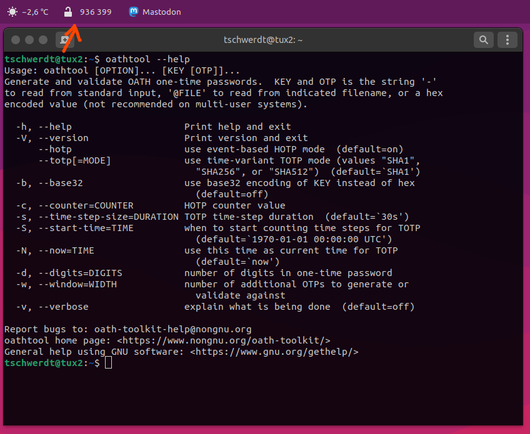
New Episode: hpr4503 :: One time passwords using oathtool

This podcast is about using one time passwords by means of "oathtool"

Hosted by Whiskeyjack on Wednesday, 2025-11-05 is flagged as Clean and is released under a CC-BY-SA license.

Tags: #OATH, #oathtool.

Today on the #HackerPublicRadio #Community #Podcast

#HPR ❤️ #CreativeCommons

https://hackerpublicradio.org/eps/hpr4503/index.html

Hacker Public Radio ~ The Technology Community Podcast

Hacker Public Radio is a podcast that releases shows every weekday Monday through Friday. Our shows are produced by the community (you) and can be on any topic that is of interest to hackers and hobbyists.

🌗 擺脫 Google Authenticator:將 TOTP 驗證碼轉移至命令行
➤ 告別手機應用,擁抱終端機的雙重驗證碼生成
https://imrannazar.com/articles/degoogle-otp
本文作者分享如何將 Google Authenticator 的時間型一次性密碼 (TOTP) 驗證碼轉移至命令行工具 oathtool,藉此減少對 Google 服務的依賴。作者詳細說明瞭從 Google Authenticator 匯出驗證碼、透過 QR Code 遷移、解碼 Protobuf 資料、提取祕密金鑰,最終在 macOS 或 Linux 環境下使用 oathtool 進行 TOTP 生成的完整技術流程。
+ 終於有人分享這個方法了!一直想把 TOTP 碼移出手機,但又怕麻煩,這個指南真是太及時了。
+ 感謝作者詳盡的技術解析,尤其是 Protobuf 解碼那部分。不過將祕密金鑰存放在檔案中確實有安全疑慮,後續加密會是個好方向。
#雙重驗證 #TOTP #Google Authenticator #oathtool #CLI
Degoogling TOTP Authenticator Codes

I've been slowly removing Google apps from my life, and one of the last ones left is Authenticator. In this post I look at migrating codes out of Authenticator to a command-line OTP tool, and the steps involved.

Imran Nazar
🚀 Imran Nazar embarks on the Herculean task of using less Google on his... Android phone. 🧐 After bravely tackling the Goliath of TOTP codes, he discovers the mystical 'oathtool' for the command line—because nothing screams freedom like swapping one tech giant's app for a command line utility on a device powered by said giant. 💡
https://imrannazar.com/articles/degoogle-otp #ImranNazar #GoogleAlternatives #OathTool #AndroidFreedom #TechJourney #HackerNews #ngated
Degoogling TOTP Authenticator Codes

I've been slowly removing Google apps from my life, and one of the last ones left is Authenticator. In this post I look at migrating codes out of Authenticator to a command-line OTP tool, and the steps involved.

Imran Nazar

@mittorn @bagder I've read rumors on the Internets that a program called "oathtool" lets you generate TOTP 2-factor authentication codes on a desktop computer.

#oathtool #totp #2fa

I probably should slim down my #Termux install, I only really need #oathtool and #ssh, no need for a full-on X11 and development environment lol ​

TOTP без смартфона

Когда я решил избавиться от необходимости постоянно носить с собой смартфон, одной из проблем оказалась двухфакторная аутентификация ( 2FA , приложение Google Authenticator). Остаться без возможности авторизации на множестве сервисов было неприемлемо, нужна была альтернатива. Беглый поиск вывел меня на утилиту oathtool : командная строка, POSIX , OSS — всё, как я люблю, проблема в принципе решена. Но, как и большинство CLI утилит, её удобно использовать в сочетании с другими утилитами, а для этого полезно написать скриптовую обвязку. Собственно этой обвязкой, а также опытом использования, я и решил поделиться.

https://habr.com/ru/articles/802953/

#командная_строка #двухфакторная_аутентификация #totp #oathtool

TOTP без смартфона

Когда я решил избавиться от необходимости постоянно носить с собой смартфон, одной из проблем оказалась двухфакторная аутентификация ( 2FA , приложение Google Authenticator). Остаться без возможности...

Хабр
You can use #oathtool (kit) as alternative or a backup 2FA/MFA code generator. No reason usually to install those bloated Microsoft authentication apps.
Update to #gnome   42 (from 3.38) brought many #extension incompatibilities.. I had to #rewrite my own extensions. It struck me that I never published my #oathtool wrapper and only use it for myself. Is there any interest in this? #TOTP #MultiFactorAuthentication 

When an online service asks you to install the Google Authenticator app (for Android), yet you don't feel like either using proprietary software or using your (personal) mobile device for this purpose, you can install the #oathtool package on your desktop or server (in #Debian #GNU/Linux). Use it like so to get a one-time password (#OTP): oathtool -b --totp 'a passPhrase g1ven by the Service'

#2FA #freesoftware

J'ai compris.

Le "secret" est donné dans le QRCode qu'on peut lire avec FreeOTP. Si on lit le même QRCode avec une autre application (Barcode Scanner , par exemple), on peut voir le "secret" à passer dans #oathtool.

On peut du coup faire
$ oathtool --totp --base32 SECRET

Reste plus qu'à sécuriser un peu tout ça et à faire un alias. :-)