Emulador de DEC PDP-8/E con ESP32-S3
Vamos a viajar atrás en el tiempo a la era de los microordenadores. Vamos a utilizar una placa basada en ESP32-S3 para emular un PDP-8 de Digital Equipment Corporation. En particular, por el alcance de la emulación, estaríamos trabajando sobre algo similar al modelo PDP-8/E.
Sobre el DEC PDP-8/E
A finales de los años 60, DEC se planteó el reto de convertir su exitoso PDP-8/I en un ordenador de propósito general. Para ello, este último se rediseñó de modo que se redujo su tamaño y se simplificó su arquitectura a partir del concepto de OMNIBUS, que permitía gestionar hasta 96 señales simultáneas a través de un bus, en lugar de las típicas conexiones punto a punto (wire-wrap) del modelo I.
A nivel de arquitectura HW, el PDP-8/E disponía de varias tarjetas de circuito impreso con lógica TTL que conformaban una CPU de 12 bits. Su RAM era de 4K palabras de 12 bits. Disponía de un vistoso panel frontal que permitía leer y escribir directamente en los registros y la memoria de forma manual.
Emulador
Utilizaremos como base el emulador PDP8-ES simulator de Edzelf que adaptaremos a una placa ESP32-S3.
Cambios en nuestro emulador
Se realiza cambios en el código original incluyendo:
- Adaptación a perfil lolin_s3_mini.
- Activado perfil de 4 MB.
- Ajuste de tamaño máximo a 1 179 648.
- Ajuste del toolchain para que compile adecuadamente.
- Mejorado el parser del servicio Telnet para la interpretación de secuencias IAC.
- Se deshabilita el OLED.
- Se deshabilita el uso de SD.
Entorno e instalación del emulador
Elementos
Vamos a necesitar los siguientes elementos:
- Placa WeAct Studio ESP32-S3-MINI.
Instalación
Nos basta con descargar el código fuente de GitHub.
$ git clone https://github.com/RafaGS/ESP32-s3-pdp8-simulator-lite.git Si no hemos instalado aún PlatformIO, procederemos a ello:
$ paru -Ss platformio platformio-udev-rules Entramos al directorio donde acabamos de descargar los fuentes del emulador del PDP-8.
$ cd ESP32-s3-pdp8-simulator-lite Puesto que la gestión de nuestro PDP-8 la realizaremos vía Telnet, introduciremos las credenciales de nuestra Wi-Fi en el archivo config.h.
// config.h
// Some definitions for the used hardware
// Note that the flash size (4 or 16 MB) should be configured in platformio.ini!
#define MEMBLOCKS 8 // Number of 4k memory blocks, max is 8
#define WIFI_SSID "ssid" // Enter your WiFi credentials here
#define WIFI_PASSWORD "clave"
#define TIMEZONE "CET-1CEST-2,M3.5.0/02:00:00,M10.5.0/03:00:00" // Time zone Europe/Madrid
#define OTA
Conectamos la placa al PC y procedemos a generar y subir los binarios.
$ pio run --target upload Emulación
Una vez realizada la subida, automáticamente se inicia el emulador, al que accederemos vía Telnet. Al entrar nos aparecerá un mensaje de bienvenida del emulador y nos pedirá que pulsemos una tecla para continuar.
Welcome to PDP8 simulator running OS/8
Written by Ed Smallenburg
Press any key to continue...
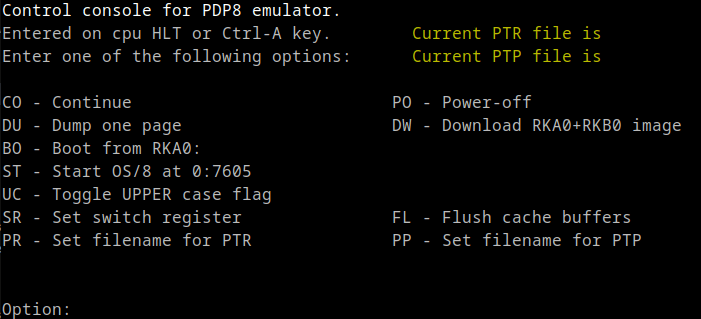
Nos aparecerá un menú.
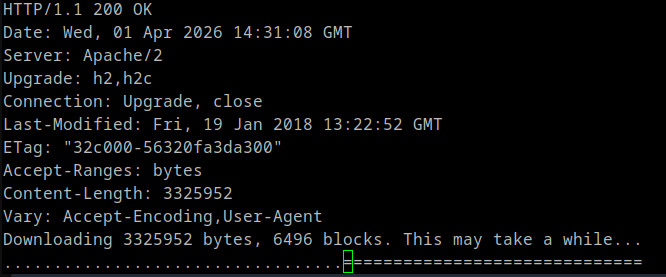
Escribiremos la opción DW, de modo que se descargue la imagen de las unidades RKA0 y RKB0.
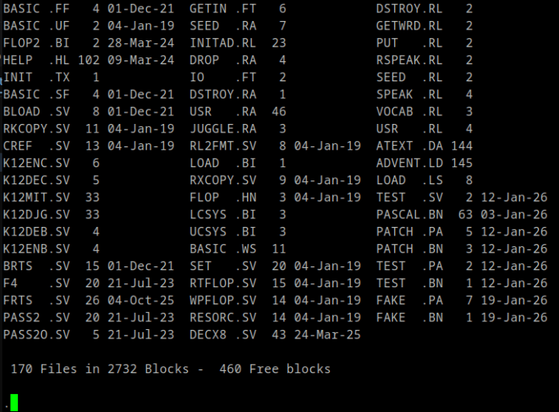
Una vez finalizada la descarga, introduciremos la opción de menú BO, para que se inicie el sistema operativo OS/8. Aparecerá un sencillo prompt «.». Podremos introducir órdenes del sistema operativo como DIR o HELP.
También podremos arrancar alguna aplicación como BASIC.
.R BASIC Desde el sistema operativo podremos crear archivos de texto y visualizar su contenido. PIP es el editor por defecto de OS/8.
Finalmente, podremos el el contenido de nuestro archivo de texto con TYPE.
#1970 #DEC #OS8 #WeActStudioESP32S3MINI Jeremy Tribby
 Japan Pop Videos
 Notas sobre robótica, domótica, sistemas operativos y programación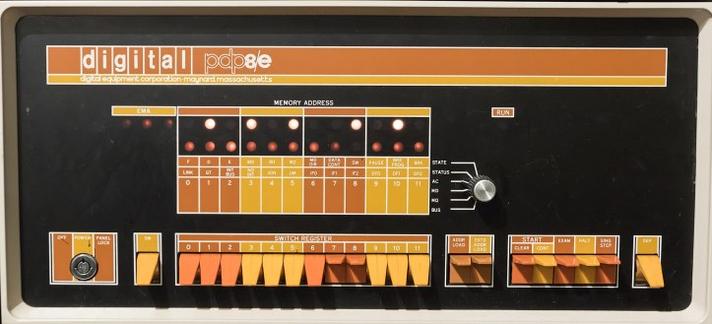
 えろばへろみ
 Hacker News
 Space Hobo
 Johannes Brakensiek
 Marco Giannini

 chris actual
 The Chaotic Good 🏳️⚧️🏳️🌈🖖