Our NuGet total downloads reached 2M!

We have finally reached 2 million downloads across all our NuGet packages, which consist of both the current and the past libraries that have been downloaded over the lifetime of our NuGet feed existence that started on August 2019. Thanks to everyone who have tried out our packages and used them in their applications!

This is a minor milestone, but we are aiming for major ones, such as 5 million downloads across all packages. To celebrate this milestone, we’re introducing brand new versions of libraries. This is to add new features and to improve existing ones.

Nitrocid 0.1.3 is going to have a major arrangement overhaul when it comes to the API, so we’re going to mark this by increasing the API version to v4.0 from v3.1 as it’s a huge breaking change. This will make sure that the Nitrocid application acts like a “launcher” for the core Nitrocid kernel, which, in turn, depends on the base kernel library. This is vaguely similar to how v0.0.20 was developed.

Textify will be updated to improve the RTL reverse performance by getting rid of the libicu library in favor of the more efficient method after this experiment proves successful. As always, we are aiming to change how we make experiments to make sure that they don’t hinder the final production code, but, sometimes, we’d release a version that includes such experiments to gather feedback.

We are going to try reducing the distribution size of Terminaux starting from v7.0, and Beta 3 will include this improvement to ensure that we reduce the download size, especially for future Nitrocid versions. We have already updated Terminaux 6.1.x to include this improvement, and docs have been already updated to reflect this change.

Finally, we are going to introduce some subtle changes to the CI system across all projects, as well as some more build system improvements that we’ve promised, to improve build times and to increase reliability. This applies to developers only.

Enjoy!

#Net #Net6 #Net60 #NET7 #NET70 #Net8 #Net80 #Net9 #Net90 #NetCore #NetCore31 #NetFramework #NetStandard #C #csharp #NuGet #NuGetPackageManager #NuGetOrg #Package #PackageManager #Packages #Packaging #VBNET

Nitrocid 0.1.2 – Ink-redible Hotness

Built on top of Nitrocid 0.1.0 and 0.1.1, we are very excited to announce that the public release of Nitrocid 0.1.2 has come! We gave the whole kernel a fresh coat of paint, while adding new features and general improvements that make your experience more intuitive than before. Seven months after the 0.1.1 release, we are early celebrating the first birthday of the 0.1.0 release on March 11th, 2024.

Our hard work in this version of Nitrocid resulted in new features and internal improvements. Such changes were necessary to improve the Nitrocid kernel even more. Using Terminaux 6.1 to empower terminal rendering, we’ve managed to modernize the kernel to fit with today’s design trends, which made Nitrocid 0.1.2 earn the codename of “Ink-redible Hotness“. As a result, the following striking changes were made:

Modern design

Nitrocid KS 0.1.2 uses Terminaux 6.1 to provide you with a modern design that aligns with today’s standards. Instead of using non-curved rectangles in borders, we’ve used the curved borders in rectangles to make every single interactive TUI, be it The Nitrocid Homepage or the interactive settings TUI, more attractive than before. This uses the appropriate Unicode character set to render those curved corners.

As for the ambience, we’ve added ambient sounds to add some audible events, such as the startup sound, the shutdown sound, and even the screensaver ambient sounds that play with the screensaver simultaneously to make your experience more relaxing. Such themes are free to download from our SoundCloud:

This improvement is available in the third service pack of 0.1.1 and 0.1.0.

The existing configuration will not be affected, so you may still see the old design if you came from older versions of Nitrocid that don’t use the newer corners, due to how the settings storage works since 0.1.0. You can, however, quickly restore the settings entry to its default value using the SHIFT + R key on a configuration entry.

More TUIs

We have added more interactive TUIs that allow you to use your favorite things more easily, such as the following interactives:

  • FTP
  • SFTP
  • Mail manager
  • Mod manager

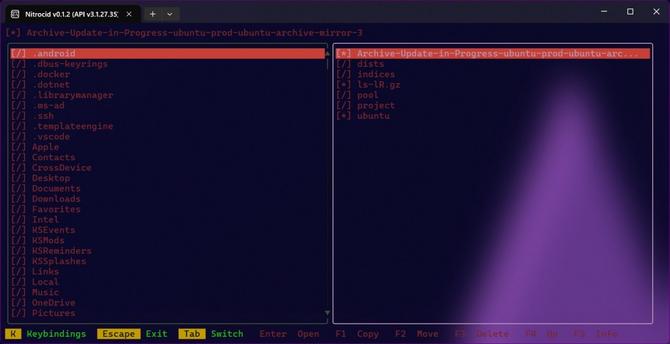
In addition to that, we’ve made improvements to the existing TUIs, such as the live timezones that refresh every second in the left selection pane. TUIs will continue to be improved in future Nitrocid and Terminaux releases as they closely interface with each other.

This improvement only exists in 0.1.2 and higher.

Packaging improvements

Nitrocid KS has earned a new PPA repository on Launchpad that solves all problems that the older PPA faced, and we’ve made several changes to the build scripts to be more agnostic to other distribution’s package formats. We’ve recently introduced canary builds for Arch Linux’s AUR package. In addition to that, you can now install all supported Nitrocid series side-by-side on both Ubuntu and Arch Linux.

Not only that, but we’re introducing the Windows Installer for the first time, powered by the WiX 5.x toolset! As we are fulfilling our promise to make experiences more intuitive, we’ve started to work on extending our package support for Nitrocid KS to more Linux-based operating systems.

This improvement is available in the third service pack of 0.1.1 and 0.1.0.

More screensavers and themes

More screensavers and themes have been added to Nitrocid KS! While the screensavers were added to add more mesmerizing console animations, we’ve introduced a brand new theme section: Linux! This section provides you with themes inspired from all the major Linux distributions and their popular flavors. We’re working to make sure that all the colors pop on your Nitrocid KS with the continued improvements to the Terminaux library.

More screensavers are available in the third service pack of 0.1.1 and 0.1.0.

Get it!

Get your copy here to make your kernel more attractive!

Download now!

#Net #Net6 #Net60 #NET7 #NET70 #Net8 #Net80 #NetCore #KS #nitrocid #NitrocidKS #update

The Mirage

This is one of the official Aptivi branding sound themes. The original branding music!

SoundCloud

It’s been a long ago since we’ve announced anything that had to do with Nitrocid KS, but today, we’re making one to tell you that something new happened to Nitrocid KS. It’s a good one! We are now thrilled to release the first service pack for both the current 0.1.1.x short term support (STS) series and the current 0.1.0.x long term support (LTS) series! We’ve worked hard to provide you with this service pack version of Nitrocid KS, and will keep providing future service packs for future versions of Nitrocid.

We had announced earlier about the Nitrocid KS service packs and how we’d distribute them for supported series via this blog post. These service packs focus on adding some new features while still maintaining the current API code and its bug fixes and improvements. This is to make it easier to use Nitrocid KS.

The Nitrocid Homepage

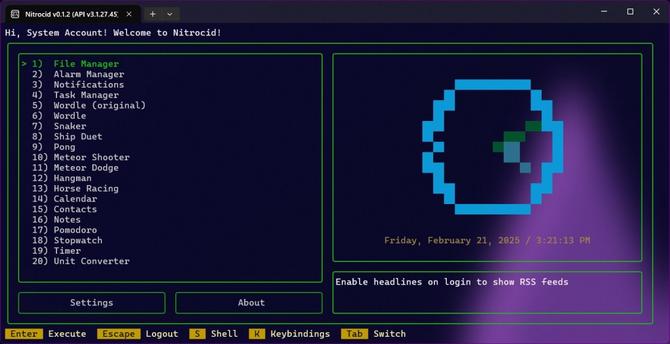
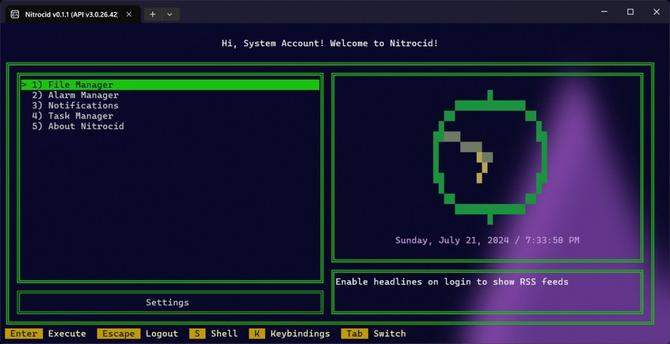
Did you remember that we’d announced Nitrocid KS 0.1.1, bringing in the topic of The Nitrocid Homepage as the first ever change? This feature was your home, but it wasn’t really your home as you thought; it’s an almost-barren house with just 5 options, an analog clock, a button, and three RSS feeds. Now, we’ve improved it a bit by allowing you to expand the homepage with a few more options, and by allowing the kernel addons, such as BassBoom, to add options, resulting in your home becoming better!

We’ve also upgraded the appearance to make it feel more like Windows 11 with its rounded corners. Of course, there is still room for improvement to make your homepage bigger and more intuitive so that it looks like a very magnificent house with a treasure of nice features!

More improvements!

The Nitrocid Homepage aside, we’ve also brought improvements to different kernel areas, such as:

  • Added an option to get lap list
  • Added unlocalized strings
  • Fixed transparency issues for some apps, such as Calendar TUI
  • Improved calendar event and reminder listing
  • You’ll need to sign in before being able to shut down or reboot from the login screen
  • General improvements and bug fixes
  • Removed extra localized strings

Get it!

Are you excited to try this version of Nitrocid KS out? Why not download the latest version here? Follow the installation instructions here.

Enjoy!

https://officialaptivi.wordpress.com/2024/09/14/nitrocid-ks-service-pack-1-0-1-1-17-and-0-1-0-23/

#Net #Net6 #Net60 #NET7 #NET70 #Net8 #Net80 #csharp #dotnet #KernelSimulator #KS #NKS #nitrocid #NitrocidKernelSimulator #nitrocidKs #update

Nitrocid KS Service Pack Announcement

We are excited to announce the first service pack for the two supported series of Nitrocid KS: the short-term 0.1.1 release and the enterprise-grade 0.1.0 release! This service pack brings several …

Aptivi

Nitrocid KS PPA now provides ARM64 versions

We had earlier worked on support for ARM64 building of the Nitrocid packages in the Ubuntu PPA for users to be able to more easily install Nitrocid KS using your system’s package manager. This happened during the late development stages of 0.1.0 when it was supposed to get the PPA ready for ARM64 builds. However, as we were so excited, we forgot to provide ARM64 dpkg versions.

However, today, we’ve finally managed to build Nitrocid KS deb files for the ARM64 architecture, which means that you’ll no longer have to manually unpack the Nitrocid ZIP file; you can use your system package manager to install it to your ARM64 system that contains Ubuntu.

Follow the instructions at this link to learn how to install the package on your ARM64 system.

Enjoy!

#Net #Net6 #Net60 #NET7 #NET70 #NetCore #NetFramework #Android #arm #arm64 #KS #Linux #nitrocid #NitrocidKS #NitrocidKS #PPA #Ubuntu #Ubuntu2004 #Ubuntu2204 #Ubuntu2404 #Ubuntu2410 #update

NativeLand and SpecProbe Merger is Complete!

If you’ve taken the latest version of NativeLand, you might notice that it got updated to the 2.0.0 version unexpectedly due to a new method that allowed more ergonomic native library loading with function delegates for frictionless development. However, we had to use a part of SpecProbe in the NativeLand native library, which results in circular dependency of some kind that we need to find the best way to untangle. We can’t keep cycling versions for each minor change in one of the libraries.

This merger for the two libraries is now done! This means that when you try to install NativeLand, you’ll get a warning stating that this library was deprecated and to switch to SpecProbe.Loader if possible. All projects that use NativeLand will have to switch to the mentioned library in order to keep getting updates from us. If you spotted a project that hasn’t been updated to use the Loader part of SpecProbe, contact them.

The following projects in our circle have been updated to the following versions:

  • Applications
    • Nitrocid KS (0.1.1.3, 0.1.0.14, 0.0.24.30)
    • BassBoom (0.1.5)
  • Libraries
    • Magico (1.0.3)
    • Terminaux (4.3.4)

Enjoy!

#Net #Net6 #Net60 #NET7 #NET70 #NetCore #NetFramework #Computers #CPU #HDD #libraries #Library #Linux #Native #NativeLibraries #NativeLibrary #NativeLand #NVMe #Ram #Specifications #specprobe #Specs #system #SystemSpecs #update

NativeLand and SpecProbe Merger

If you’ve taken the latest version of NativeLand, you might notice that it got updated to the 2.0.0 version unexpectedly due to a new method that allowed more ergonomic native library loading with function delegates for frictionless development. However, we had to use a part of SpecProbe in the NativeLand native library, which results in circular dependency of some kind that we need to find the best way to untangle. We can’t keep cycling versions for each minor change in one of the libraries.

This merger for the two libraries will be done by Thursday, August 1st, to further the development of this library and to integrate the native library loading system to the SpecProbe codebase. SpecProbe was initially meant to be a library that only queries system specifications in the best methods possible and with almost-clean code, but we’re extending it to include some of the most useful functions when dealing with platform-specific matters.

This code is going to be placed in a separate library that is part of the SpecProbe codebase to keep things straight and to separate the responsibilities, called SpecProbe.Native.

All projects that use NativeLand will have to use the abovementioned library in order to keep getting updates from us. NativeLand’s GitHub repository will be archived earlier on Tuesday to remind the developers about the merger. After the merger, all of our projects will be updated to use the new codebase and to minimize the maintenance burden between the two libraries.

The following projects in our circle will be affected:

  • Applications
    • Nitrocid KS (uses Terminaux)
    • BassBoom (uses Terminaux)
  • Libraries
    • Magico (NativeLand, SpecProbe)
    • Terminaux (SpecProbe)

Any project that uses either NativeLand, SpecProbe, or any of their dependents that use their code must update all the libraries to avoid conflicts. Contact the project developers to notify them about this merger if you saw projects that depend on NativeLand.

Enjoy!

#Net #Net6 #Net60 #NET7 #NET70 #NetCore #NetFramework #Computers #CPU #HDD #libraries #Library #Linux #Native #NativeLibraries #NativeLibrary #NativeLand #NVMe #Ram #Specifications #specprobe #Specs #system #SystemSpecs #update

Attest Our Projects using GitHub Attestations

GitHub has announced the Attestations feature back at the start of May 2024 and has released it as a public beta available to all GitHub users on June 25th, 2024. This blog article explains how the GitHub Attestations feature works using the Sigstore software that signs and verifies the open-source program artifacts usually generated by the continuous integration system. Here, it’s known as GitHub Actions. This allows you to reduce the supply chain attacks and increase the security of the broader software ecosystem.

The latest version of GitHub CLI tool, that you can install easily from this website (some distros still haven’t updated this tool to a version that supports this feature), can be used to verify the file signature by comparing it to the available attestation list found in your GitHub account.

Our projects’ GitBook docs, such as Nitrocid KS, are updated to add a verification step involving a single command line, assuming that the GitHub CLI is installed to your distribution with at least version 2.49.0 or higher. To verify that you’ve downloaded the right copy from the Releases window of our project in GitHub, follow these steps that apply to all the projects that use the attestation system (currently, we only support attestations in applications, with possible archived library docs support coming later):

  • Install GH CLI 2.49.0 or higher.
  • Sign in to your GitHub account using gh auth login.
  • Run this command: gh attestation verify <version>-bin.zip --owner Aptivi, where <version> is a version of Nitrocid that you’ve downloaded.
  • If everything went OK, you should see the output similar to this:

    Loaded digest sha256:6030eb1eb660f336d8b070202c598e8f51e50c8b9ca9084f30aa8d40ecbb996f for file://0.1.0.10-bin-lite.zip Loaded 1 attestation from GitHub API ✓ Verification succeeded! sha256:6030eb1eb660f336d8b070202c598e8f51e50c8b9ca9084f30aa8d40ecbb996f was attested by: REPO PREDICATE_TYPE WORKFLOW Aptivi/NitrocidKS https://slsa.dev/provenance/v1 .github/workflows/prepdraft.yml@refs/tags/v0.1.0.10

    If you saw an output other than the above, like 404 errors as shown below, it’s possible that you either got a corrupt download, or you got a malicious download that is unverified by us.

    Loaded digest sha256:78fc7b18c2e5e2753934652d294456d11d8dadad6f638dedc31513c4570587a1 for file://0.1.0.10-bin-lite.zip ✗ Loading attestations from GitHub API failed Error: failed to fetch attestations from Aptivi: HTTP 404: Not Found (https://api.github.com/orgs/Aptivi/attestations/sha256:78fc7b18c2e5e2753934652d294456d11d8dadad6f638dedc31513c4570587a1?per_page=30)

    Tell us how it worked for you! Enjoy!

    #Net #Net6 #Net60 #NET7 #NET70 #NetCore #NetFramework #Attest #Attestation #Attestations #devops #GH #git #github #GitHubAttestation #githubActions #Programming #update #Verification #Verify

    Unit Testing, enhanced!

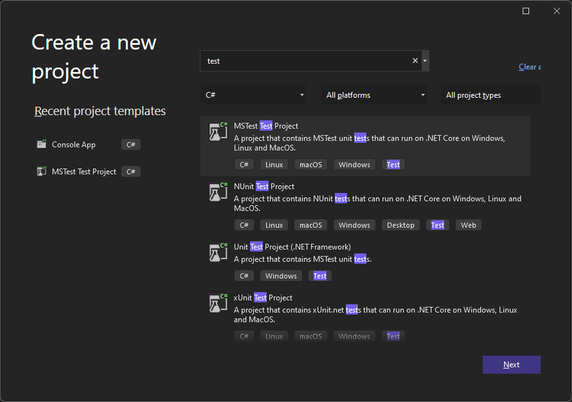
    You may have noticed that one library, Terminaux, had its unit test project improved. How? By using the newly introduced SDK, called MSTest.Sdk. According to this Microsoft blog post, it has several improvements over the older style that we’re migrating all our test projects from, such as:

    • Better defaults
    • Simplified usage
    • Extensibility of the MSTest runner
    • Easier opt-in for new features (e.g., native AOT tests).

    This new SDK not only boasts better default configurations, such as increasing your required MSTest.Sdk version at the top of your unit test .csproj file, but it also simplifies the definition of the project file itself by implicitly referencing the required MSTest NuGet packages using the version defined in the SDK definition, extends the MSTest runner, and letting you opt in to the new features easier than before, such as the native AOT tests.

    Our libraries will slowly migrate to use this testing style, ensuring that we have no intention to use any other test framework, such as NUnit (which we have used previously) and xUnit. This will bring improved testing performance, as well as improved testing reliability.

    However, this means that in order to be able to build our projects that have been migrated to use the new SDK, you’ll have to upgrade Visual Studio to at least 17.9.

    Enjoy!

    #Net #Net6 #Net60 #NET7 #NET70 #Net8 #Net80 #Net9 #Net90 #NETConsoleProject #NetCore #NetFramework #NetStandard #csharp #csproj #dotnet #dotnetfx #test #testing #unitTest #unitTesting

    Nitrocid KS 0.1.0 – Final – Magic Bloom

    This is the moment that all of you have been waiting for! Before going to the subject, we need to tell you the history of Nitrocid KS when it was Kernel Simulator in 2018. If you want to go straight to the announcement, skip to the below section colored in yellow.

    History of N-KS

    When Nitrocid 0.0.1 (Kernel Simulator back then) was released in February 2018, we had focused on the core features of the kernel that didn’t make its way to the final release, and it worked only on Windows systems that had .NET Framework 4.0 installed. Since then, various features were planned to be added to the kernel, but it required us to separate them into various different major versions.

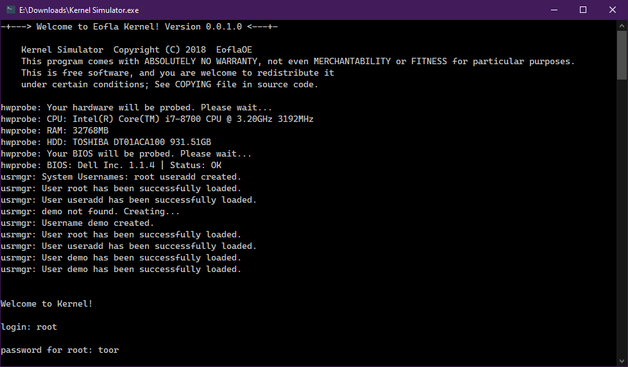
    The first version of the simulated kernel had only the most basic features, including hardware parsing and the minimal shell that only supported one-word commands with no arguments and switches. It was also colorless due to not using the colors feature in the console.

    Since then, the second version, 0.0.2, came out with colors and versions after that came with many new features, such as languages on 0.0.6, command arguments on 0.0.4, increased color support to 256 colors on 0.0.8, settings application on 0.0.12, dynamic themes on 0.0.16, splashes and true color on 0.0.20, and command autocompletion and conditions on 0.0.24.

    This is a huge leap forward, especially considering that this project wasn’t expected to be this big, so we’ve made several separations from this project’s source code, including the latest separation, Terminaux. Nitrocid heavily depends on it because it was a library that provided all console tools necessary for all our projects (and hopefully yours) to look nice.

    The separation began as early as 2020 when extensions and things unrelated to the kernel were being developed, with the release of Extensification (deprecated) and Inxi.NET (deprecated because of SpecProbe). Since then, various things have been developed, and some of them have come from Nitrocid itself.

    The overall state of 0.0.24, however, has convinced us to start afresh starting from August 10th, 2022, leading to a version that we have been talking to you about, with its three beta releases and a release candidate:

    • Beta 1 (February 22nd, 2023)
    • Beta 2 (August 10th, 2023)
    • Beta 3 (December 28th, 2023)
    • RC (February 1st, 2024)

    And now, we’re introducing you to a totally fresh new version of the kernel simulator that not only got a massive overhaul, but its codebase too…

    Nitrocid KS 0.1.0!

    Nitrocid KS 0.1.0 boasts a big amount of mind-blowing features, including endless amounts of additions and improvements. Let’s detail a few of the hit features, and we’ll hide the rest for you to discover as a surprise!

    Fact: Did you know that Nitrocid KS 0.0.24.0 in its codebase was actually a preparatory stage for this version of Nitrocid?

    When it comes to mods, we have simplified the screensaver and the splash addition from separate DLL files to their own individual managers with their associated register and unregister functions that allow you to add and remove your splashes and screensavers from your mods. Your mods can also load early, in case you want to add splashes.

    When it comes to interactives, we have improved a lot in this area by making it more dynamic. This ensures that you can resize the console without worrying about making the display unreadable until you manually refresh it. This improvement has been brought to different versions of Terminaux during the whole development of this version of Nitrocid KS.

    Kernel addons have also been introduced to the kernel, and it allows us to make two versions of the kernel: lite and full. The lite version can be upgraded to the full version of the kernel by a single command, getaddons. This allows us to update the non-core kernel parts without affecting the core kernel parts. In addition to that, your kernel modifications can communicate with kernel addons. They can also talk to each other, making the modifications dependent on each other. This is the reason we’ve added mod dependencies.

    The interactive file manager has been introduced to the kernel in order to be able to manage your files interactively without any single command. Just write “ifm” to get started! This was planned in 2018, and this version was the time that this feature has come to fruition.

    The hardware parsing feature got a significant performance boost with the help of the latest library, SpecProbe, that allows your .NET applications, such as Nitrocid, to parse your hardware faster than Inxi.NET that relied on management frameworks to get hardware information. SpecProbe finds the fastest way to get information about your hardware, beating Inxi.NET to deprecation and removal.

    We’ve also added countless amounts of screensavers to ensure more flexibility of the choices. These screensavers can be used once you’ve installed the screensaver packs addon.

    And the rest? Figure them out yourselves.

    Get ready!

    Are you excited? Get ready for this release and download it now!

    Download

    See you soon!

    #Net #Net6 #Net60 #NET7 #NET70 #Net8 #Net80 #Net9 #Net90 #NETConsoleProject #NetCore #NetCore31 #NetFramework #NetStandard #Announcement #application #ApplicationUpdate #apps #Aptivi #boot #bootManager #bootloader #C #Computer #ComputerSoftware #Computers #Console #dotnet #Kernel #KS #Launchpad #Linux #microsoft #MicrosoftWindows #msbuild #new #nitrocid #NitrocidKS #nks #OpenSource #OpenSourceSoftware #operatingSystem #OSS #update

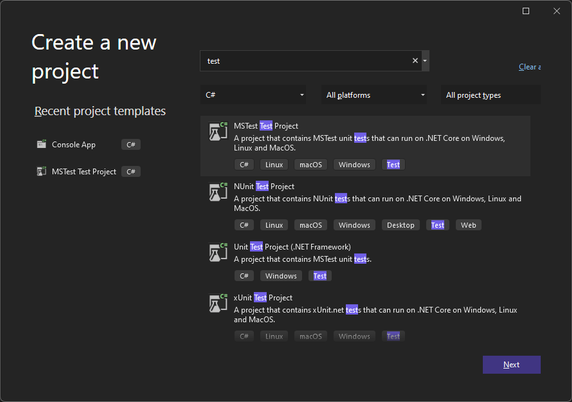
    Your C# tests can now run faster with MSTest!

    Unit testing is generally available for all C# projects that use one of the following test frameworks:

    • VSTest
    • NUnit
    • xUnit

    However, it looks like we have another test framework that aims to be faster than all the test frameworks, called MSTest. It was because it was built from scratch with a new idea in mind to be fully Ahead-of-Time (AOT) compatible. It uses a completely different method to detect and run tests.

    You can consult the blog article on how to enable the new MSTest feature here:

    Try it out!

    The new MSTest framework allows you to publish your unit test projects for the target computer using the dotnet publish command. It allows you to run your tests without requiring the .NET SDK for flexibility.

    This increases the performance of your unit tests to be able to run them in no time. This is beneficial for large tests. However, it aims to be more reliable than the current test frameworks. By default, it will fail the test when there are zero unit tests run, but you can override this by passing this argument to the unit test application (test.exe –minimum-expected-tests 0).

    This framework is also designed to be extensive by providing you with extensions to be able to orchestrate your unit tests even further and to increase its flexibility.

    Our projects

    Our projects currently use NUnit. As the changes made to the MSTest framework look promising, we’re in the process of moving all the projects that contain their own unit tests gradually to that framework from NUnit to allow us to test them faster than before.

    The first project that will witness the change is Nitrocid KS 0.1.0, as the final release of that project is coming to the close. Be assured that the release candidate will be released on February 1st, 2024.

    Enjoy!

    #Net #Net6 #Net60 #NET7 #NET70 #Net8 #Net80 #Net9 #Net90 #NETConsoleProject #NetCore #NetCore31 #NetFramework #NetStandard #dotnet #dotnetfx #test #testing #unitTest #unitTesting