.NET Short Term Releases get 2 years of support!

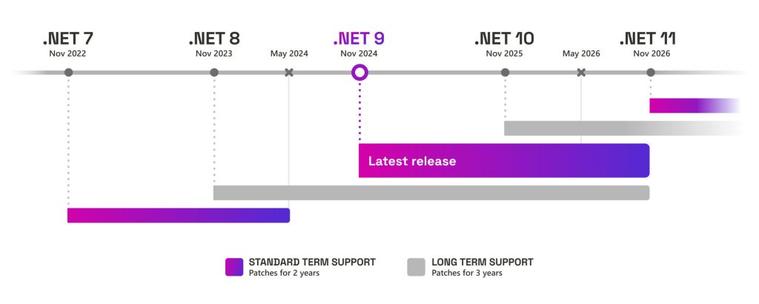
Earlier, the short term releases for each .NET version would last only 1.5 years (18 months), which means that once an LTS gets released, you’ll have to upgrade to that LTS versions before your .NET version gets deprecated. Now, it seems that Microsoft have adjusted this support length for short term releases of the modern .NET framework, starting from .NET 9.0 released November 12th of the last year.

Microsoft has added six more months to the total support length for such releases, making them end with their LTS version that came before. For example, on November 10th, 2026, both .NET 8.0 and 9.0 will reach end of life.

Here’s the chart that demonstrates the new support timeline:

This is a welcome change, as you’ll now have six extra months to upgrade to the new LTS release by the time the current STS and LTS versions are still in support. You can learn more about this change here.

Learn more #Net #Net9 #Net90 #NetCore #C #dotnet #news #Tech #Technology #update

Our NuGet total downloads reached 2M!

We have finally reached 2 million downloads across all our NuGet packages, which consist of both the current and the past libraries that have been downloaded over the lifetime of our NuGet feed existence that started on August 2019. Thanks to everyone who have tried out our packages and used them in their applications!

This is a minor milestone, but we are aiming for major ones, such as 5 million downloads across all packages. To celebrate this milestone, we’re introducing brand new versions of libraries. This is to add new features and to improve existing ones.

Nitrocid 0.1.3 is going to have a major arrangement overhaul when it comes to the API, so we’re going to mark this by increasing the API version to v4.0 from v3.1 as it’s a huge breaking change. This will make sure that the Nitrocid application acts like a “launcher” for the core Nitrocid kernel, which, in turn, depends on the base kernel library. This is vaguely similar to how v0.0.20 was developed.

Textify will be updated to improve the RTL reverse performance by getting rid of the libicu library in favor of the more efficient method after this experiment proves successful. As always, we are aiming to change how we make experiments to make sure that they don’t hinder the final production code, but, sometimes, we’d release a version that includes such experiments to gather feedback.

We are going to try reducing the distribution size of Terminaux starting from v7.0, and Beta 3 will include this improvement to ensure that we reduce the download size, especially for future Nitrocid versions. We have already updated Terminaux 6.1.x to include this improvement, and docs have been already updated to reflect this change.

Finally, we are going to introduce some subtle changes to the CI system across all projects, as well as some more build system improvements that we’ve promised, to improve build times and to increase reliability. This applies to developers only.

Enjoy!

#Net #Net6 #Net60 #NET7 #NET70 #Net8 #Net80 #Net9 #Net90 #NetCore #NetCore31 #NetFramework #NetStandard #C #csharp #NuGet #NuGetPackageManager #NuGetOrg #Package #PackageManager #Packages #Packaging #VBNET

Unit Testing, enhanced!

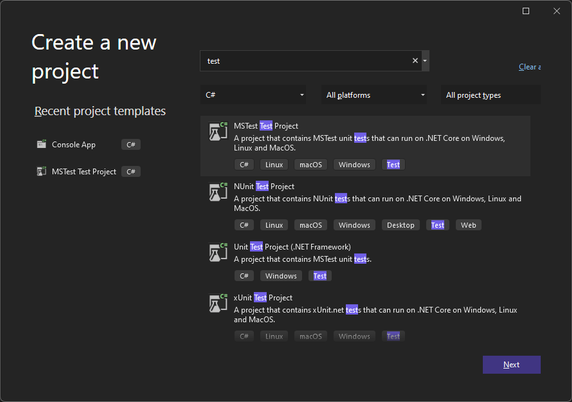
You may have noticed that one library, Terminaux, had its unit test project improved. How? By using the newly introduced SDK, called MSTest.Sdk. According to this Microsoft blog post, it has several improvements over the older style that we’re migrating all our test projects from, such as:

  • Better defaults
  • Simplified usage
  • Extensibility of the MSTest runner
  • Easier opt-in for new features (e.g., native AOT tests).

This new SDK not only boasts better default configurations, such as increasing your required MSTest.Sdk version at the top of your unit test .csproj file, but it also simplifies the definition of the project file itself by implicitly referencing the required MSTest NuGet packages using the version defined in the SDK definition, extends the MSTest runner, and letting you opt in to the new features easier than before, such as the native AOT tests.

Our libraries will slowly migrate to use this testing style, ensuring that we have no intention to use any other test framework, such as NUnit (which we have used previously) and xUnit. This will bring improved testing performance, as well as improved testing reliability.

However, this means that in order to be able to build our projects that have been migrated to use the new SDK, you’ll have to upgrade Visual Studio to at least 17.9.

Enjoy!

#Net #Net6 #Net60 #NET7 #NET70 #Net8 #Net80 #Net9 #Net90 #NETConsoleProject #NetCore #NetFramework #NetStandard #csharp #csproj #dotnet #dotnetfx #test #testing #unitTest #unitTesting

Nitrocid KS 0.1.0 – Final – Magic Bloom

This is the moment that all of you have been waiting for! Before going to the subject, we need to tell you the history of Nitrocid KS when it was Kernel Simulator in 2018. If you want to go straight to the announcement, skip to the below section colored in yellow.

History of N-KS

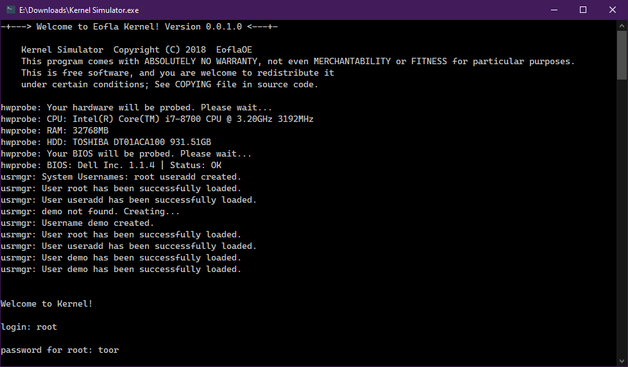
When Nitrocid 0.0.1 (Kernel Simulator back then) was released in February 2018, we had focused on the core features of the kernel that didn’t make its way to the final release, and it worked only on Windows systems that had .NET Framework 4.0 installed. Since then, various features were planned to be added to the kernel, but it required us to separate them into various different major versions.

The first version of the simulated kernel had only the most basic features, including hardware parsing and the minimal shell that only supported one-word commands with no arguments and switches. It was also colorless due to not using the colors feature in the console.

Since then, the second version, 0.0.2, came out with colors and versions after that came with many new features, such as languages on 0.0.6, command arguments on 0.0.4, increased color support to 256 colors on 0.0.8, settings application on 0.0.12, dynamic themes on 0.0.16, splashes and true color on 0.0.20, and command autocompletion and conditions on 0.0.24.

This is a huge leap forward, especially considering that this project wasn’t expected to be this big, so we’ve made several separations from this project’s source code, including the latest separation, Terminaux. Nitrocid heavily depends on it because it was a library that provided all console tools necessary for all our projects (and hopefully yours) to look nice.

The separation began as early as 2020 when extensions and things unrelated to the kernel were being developed, with the release of Extensification (deprecated) and Inxi.NET (deprecated because of SpecProbe). Since then, various things have been developed, and some of them have come from Nitrocid itself.

The overall state of 0.0.24, however, has convinced us to start afresh starting from August 10th, 2022, leading to a version that we have been talking to you about, with its three beta releases and a release candidate:

  • Beta 1 (February 22nd, 2023)
  • Beta 2 (August 10th, 2023)
  • Beta 3 (December 28th, 2023)
  • RC (February 1st, 2024)

And now, we’re introducing you to a totally fresh new version of the kernel simulator that not only got a massive overhaul, but its codebase too…

Nitrocid KS 0.1.0!

Nitrocid KS 0.1.0 boasts a big amount of mind-blowing features, including endless amounts of additions and improvements. Let’s detail a few of the hit features, and we’ll hide the rest for you to discover as a surprise!

Fact: Did you know that Nitrocid KS 0.0.24.0 in its codebase was actually a preparatory stage for this version of Nitrocid?

When it comes to mods, we have simplified the screensaver and the splash addition from separate DLL files to their own individual managers with their associated register and unregister functions that allow you to add and remove your splashes and screensavers from your mods. Your mods can also load early, in case you want to add splashes.

When it comes to interactives, we have improved a lot in this area by making it more dynamic. This ensures that you can resize the console without worrying about making the display unreadable until you manually refresh it. This improvement has been brought to different versions of Terminaux during the whole development of this version of Nitrocid KS.

Kernel addons have also been introduced to the kernel, and it allows us to make two versions of the kernel: lite and full. The lite version can be upgraded to the full version of the kernel by a single command, getaddons. This allows us to update the non-core kernel parts without affecting the core kernel parts. In addition to that, your kernel modifications can communicate with kernel addons. They can also talk to each other, making the modifications dependent on each other. This is the reason we’ve added mod dependencies.

The interactive file manager has been introduced to the kernel in order to be able to manage your files interactively without any single command. Just write “ifm” to get started! This was planned in 2018, and this version was the time that this feature has come to fruition.

The hardware parsing feature got a significant performance boost with the help of the latest library, SpecProbe, that allows your .NET applications, such as Nitrocid, to parse your hardware faster than Inxi.NET that relied on management frameworks to get hardware information. SpecProbe finds the fastest way to get information about your hardware, beating Inxi.NET to deprecation and removal.

We’ve also added countless amounts of screensavers to ensure more flexibility of the choices. These screensavers can be used once you’ve installed the screensaver packs addon.

And the rest? Figure them out yourselves.

Get ready!

Are you excited? Get ready for this release and download it now!

Download

See you soon!

#Net #Net6 #Net60 #NET7 #NET70 #Net8 #Net80 #Net9 #Net90 #NETConsoleProject #NetCore #NetCore31 #NetFramework #NetStandard #Announcement #application #ApplicationUpdate #apps #Aptivi #boot #bootManager #bootloader #C #Computer #ComputerSoftware #Computers #Console #dotnet #Kernel #KS #Launchpad #Linux #microsoft #MicrosoftWindows #msbuild #new #nitrocid #NitrocidKS #nks #OpenSource #OpenSourceSoftware #operatingSystem #OSS #update

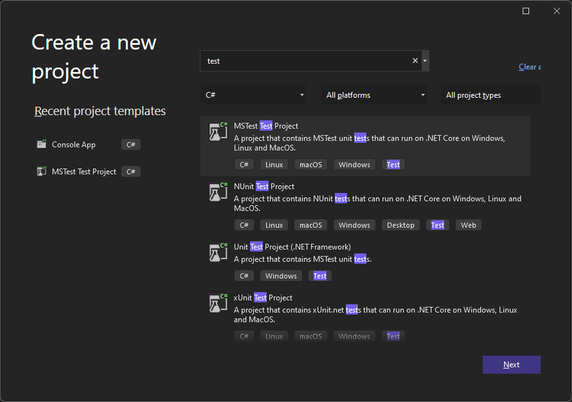
Your C# tests can now run faster with MSTest!

Unit testing is generally available for all C# projects that use one of the following test frameworks:

  • VSTest
  • NUnit
  • xUnit

However, it looks like we have another test framework that aims to be faster than all the test frameworks, called MSTest. It was because it was built from scratch with a new idea in mind to be fully Ahead-of-Time (AOT) compatible. It uses a completely different method to detect and run tests.

You can consult the blog article on how to enable the new MSTest feature here:

Try it out!

The new MSTest framework allows you to publish your unit test projects for the target computer using the dotnet publish command. It allows you to run your tests without requiring the .NET SDK for flexibility.

This increases the performance of your unit tests to be able to run them in no time. This is beneficial for large tests. However, it aims to be more reliable than the current test frameworks. By default, it will fail the test when there are zero unit tests run, but you can override this by passing this argument to the unit test application (test.exe –minimum-expected-tests 0).

This framework is also designed to be extensive by providing you with extensions to be able to orchestrate your unit tests even further and to increase its flexibility.

Our projects

Our projects currently use NUnit. As the changes made to the MSTest framework look promising, we’re in the process of moving all the projects that contain their own unit tests gradually to that framework from NUnit to allow us to test them faster than before.

The first project that will witness the change is Nitrocid KS 0.1.0, as the final release of that project is coming to the close. Be assured that the release candidate will be released on February 1st, 2024.

Enjoy!

#Net #Net6 #Net60 #NET7 #NET70 #Net8 #Net80 #Net9 #Net90 #NETConsoleProject #NetCore #NetCore31 #NetFramework #NetStandard #dotnet #dotnetfx #test #testing #unitTest #unitTesting