

Since #FydeOS was a bust on the #ebox, I did try a few other distros to see what sticks.

1) Tried #EasyOS. It was neat to play around with but not my cup of tea.

2) Attemptedto install #Fedora #LXDE, all three attempts failed during the install process.

3) currently running #AlpineLinux with #LXQT.  This might be the one I stick with for a while.


Anyone have any good ideas for a low spec cpu that has to much ram pc? The ebox is running an Intel Celeron 3965U with 16 gigs of ram?

After more tinkering, I feel #FydeOS was a bust. The goal was to make a light weight media streaming box (either with the ebox or the N100 mini pc). Video quality was all over the place and there was no good way to fix it/make consistent between apps and web apps.

Also to get the most out of it you will more likely use oneโ€™s Google Account. At that point, I suggest using #ChromeOSFlex
Okay team, I did some more tinkering. I decided to try #FydeOS on my #N100 mini pc instead of the #ebox; this allows me to do the โ€œmodernโ€ installation instead of the slim. I get a performance boost too; win-win.

Im a bit in the fence. The OS itself is super easy to use and what not. But with streaming the video quality is all over the place. I can get full 1080 on Youtube but HBO Max is super fuzzy. I will test out more streaming services as I have too many and will report back.

๐Ÿงต 2/n if touch input / on screen keyboard works with #KeePass, i won't need the #Android subsystem.

On #FydeOS, i only need the #NextCloud and KeePass Android app, for obvious reasons.

#Ubuntu (#Gnome + #Wayland), and #LinuxMint won't let me type in my KeePass password, in #TABLET MODE!

That's why i need to bother futzing around with alternatives.

I might try #GalliumOS, which is a "real" #Linux #Distro, instead of the #ChromeOS without Google #FydeOS.

If that works well-enough on my 7th gen Intel dual-core+SMT with only 4GB of RAM, IN TABLET MODE with on-screen-keyboard.

If not, i'll just #Ventoy / #MediCat reboot into #RescueZilla, and restore the FydeOS image off the NAS.

Btw, 1920x1200 (WUXGA) on my Lenovo IdeaPad Miix 510-12IKB is utterly illegible, w/o scaling, via my Millennial Mk1 eye holes - reConfig to 1280x800 is fine. ๐Ÿ˜…

What the?!?

Apparently, putting the #FydeOS tablet in stand-by - folding up the keyboard - triggering the magnetic sensor ... #KDEconnect PAUSES any playback on my daily driver main PC!

I'd consider that a bug - i didn't configure anything, related - this must be default behaviour!

I DO NOT WANT my daily driver playback to get paused, when i fold up my tablet keyboard, putting it into stand-by/hibernate!

What kinda #Bug is this?
#KDE, #FydeOS, the #KDEconnect #Android app running on FydeOS?

๐Ÿงต 8/n HEY #FydeOS!

WHY exactly AM I TURNING INTO THE "chronos" user, when i press Ctrl+Alt+t?

I DID NOT set mySELF up as "chronos", i am "user"!

WHY AM I NOT REQUIRED to type in my password, in order to become the chronos user?

Is this the DEV MODE?
Did i miss the memo?

Is this an #INFOSEC issue?

Edit: how much #N00bLube is the perfect amount? ๐Ÿคฃ
Edit2: no prior XP with #ChromeOS / FydeOS - i'm a #Millennial - i know #Windows, and #Linux - none of that new-fangled #Zoomer OS knowledge!

๐Ÿงต 7/n i am SO MUCH more confident in my old tablet, running #FydeOS, after confirming the automatic 2x RAM-as-SWAP memory scheme.

There's not much left to macGyver, on this tablet.

๐Ÿ‘‰ it reboots in almost no time
๐Ÿ‘‰ with all that swap space, i don't have to worry about too many tabs (within reason)

๐Ÿคฌ sometimes, though, my #Lenovo #IdeaPad Miix (510-12IKB) fails to detect the #battery state! (IT IS >90%, most of the time) sometimes it shows 0%, charging symbol, and reboots - makes NO sense! ๐Ÿคฌ

๐Ÿงต 6/n BLOODY FINALLY, meaningful results on #FydeOS! ๐Ÿ˜…

๐Ÿ‘‰ SWAP exists, already! (the point!)

๐Ÿ‘‰ confirmed, Ctrl+Alt+t brings up a terminal (i've previously enabled a bunch of dev modes, in order to install the #Linux #Subsystem, as well as the #Android subsystem, which might've influenced my results)
๐Ÿ‘‰ good news, everybody! ๐Ÿคฃ By default, we seem to get 2x the RAM in #SWAP space, on FydeOS! (that's what "free -h" says!)
๐Ÿ‘‰ imma not bother to ID where exactly that swap space lives.
๐Ÿ‘‰ ๐Ÿ‘€ img alt txt

๐Ÿงต 5/n let's see how #Copilot (incognito) fares.

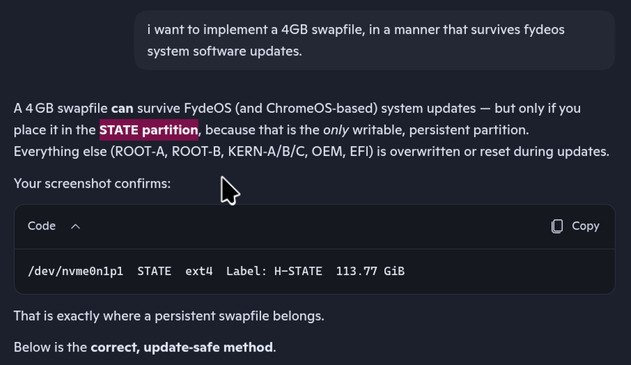
At 1st glance, it confirms my initial bias towards the STATE partition - that's the big partition, that looks like a persistent "USERDATA" overlay.

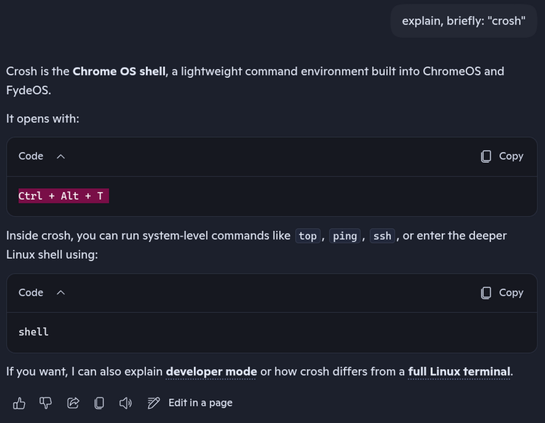
It seems, i can access the #crosh terminal (ChRome Os SHell) via Ctrl+Alt+t (not sure about case-sensitivity; uppercase T, technically means Ctrl+Alt+Shift+t)

..i'll reboot into #FydeOS, and try this 1st, before hacking around in parallel-boot environments like #PartedMagic.