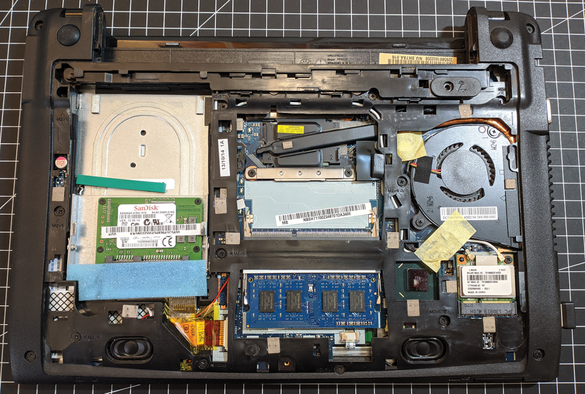
My late evening started by powerwashing (both outside and resetting) an old #Acer C720P #Chromebook, and installing #chrx with #GalliumOS. That went smoothly for the most part.

Installing #Lem was a PITA. First I had to inform the installation script wth galliumos was, then I had to debug the 20 or so #qlot stack traces. For the love of #lisp.

I’m too tired now to play with it 🥱😴

I'm about to test the latest #Gentoo LiveGUI USB Image (3.6 GB) on my 2013 Chromebook Pixel.

I've just spent some time backing up my #GalliumOS /home directory with tar, excluding ~/.cache:

$ cd /home
$ tar -cJvf /mnt/chromebook-home-backup.tar.xz --exclude='*.cache*' jhamby

I've also saved the output of "lshw", "lsusb", "lsmod", and "dmesg", and backed up the custom GalliumOS systemd scripts to enable zram-based swapping since I only have 4GB RAM, and a script to change screen brightness.

I stand corrected about swap. #GalliumOS has wisely chosen to "modprobe zram", which makes an LZ4-compressed swap space from free RAM, a sort of "RamDoubler".

jhamby@abstergo:~$ zramctl
NAME ALGORITHM DISKSIZE DATA COMPR TOTAL STREAMS MOUNTPOINT
/dev/zram0 lz4 5.7G 452.9M 164.7M 172.7M 4 [SWAP]

So 172.7 MB of my 4 GB RAM is holding 452.9 MB of paged-out r/w data. No paging to scarce SSD at all.

The desktop for #GalliumOS is Xfce, which is a sensible choice for a low-RAM environment.

I haven't noticed a huge diff between Firefox and Chrome, but I tend to use Firefox more often. With 4 GB RAM, I have 456 MB / 5824 MB swap used. So it is definitely thrashing away on the poor SanDisk 32 GB SATA SSD.

I didn't repartition it. I installed the final version of Chrome OS and then booted into debug mode and used a Linux-installing tool. I also used MrChromebox firmware. https://docs.mrchromebox.tech/

MrChromebox.tech

MrChromebox.tech website

It's more useful if I say what I've tried and what I'm using now that's old but works.

I'm using #GalliumOS 3.1 on it, a Linux distro for x86-based Chromebooks based on #Ubuntu 18.04, which is old enough to cause problems running newer programs.

I've tried newer versions of Ubuntu and the kernel driver support gets worse and worse. The SD card slot stops working, I think Bluetooth, then maybe even the USB slots? I'll have to try again and verify when devices stop working on it.

ZorinOS auf dem alten Chromebook

Nach­dem bei Gal­li­um­OS schon vor län­ge­rer Zeit die Ent­wick­lung ein­ge­stellt wor­den ist, muss­te irgend­wann mal ein neu­es Betriebs­sys­tem auf mein Chrome­book. Das ist jetzt Zori­nOS gewor­den und ich bin damit super zufrieden.

https://kaffeeringe.de/2024/10/03/zorinos-auf-dem-alten-chromebook/

#AcerC7 #BIOS #Bluetooth #Chromebook #GalliumOS #Gaming #Linux #MacOS #OpenSource #OpenSource #Touchpad #Ubuntu #Wayland #Windows #Xfce #Xubuntu #ZorinOS

Linux: ZorinOS auf dem alten Chromebook

Nachdem bei GalliumOS schon vor längerer Zeit die Entwicklung eingestellt worden ist, musste irgendwann mal ein neues Betriebssystem auf mein Chromebook. Das ist jetzt ZorinOS geworden und ich bin damit super zufrieden.

kaffeeringe.de
Breathe Life Back Into Your Old Chromebook with GalliumOS

A tailor-made image like GalliumOS “Bismuth” will keep your Chromebook healthy after its expiration date.

MakerSpace
@timpizey Update: just installed Linux on an old Chromebook. Phase 2: hosting my own NextCloud.
#Chrx is great! #Chromebook #GalliumOS #Ubuntu

@[email protected] @carnage4life Chromebooks are quite capable machines, especially since they can run modern browsers. They are at least as capable as most mobile phones, with the added benefits of larger screens, physical keyboard and expansion ports.

The only barrier to running Linux or any other OS of your choice is a locked BIOS straight from the manufacturer. When the BIOS can be unlocked, there are many Linux distributions that support them like #GalliumOS (https://galliumos.org/)

GalliumOS – A fast and lightweight Linux distro for ChromeOS devices

I am not a big fan of many products but find #DuckDuckGo heartening daily, mostly due to its evil competition.

The search adoption trick is making it the default os or browser search, for that #GalliumOS on a #Chromebook inspires though I do not own one & have never tried it.

If that ever happens dual-booting will be my 1st priority.

https://galliumos.org/

GalliumOS – A fast and lightweight Linux distro for ChromeOS devices