Genista
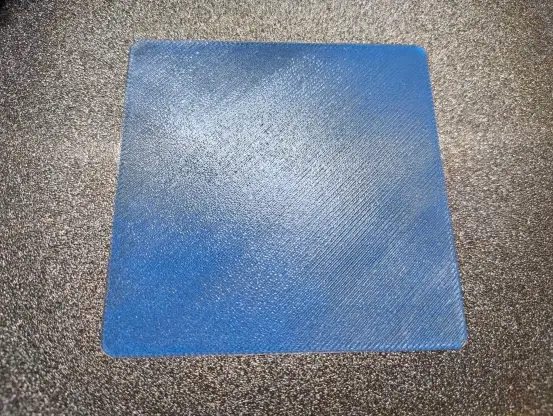
WOW .... ein perfekter Firstlayer.
Ich hab mich da jetzt mehrere Tage mit gequält und war sogar schon mal auf der richtigen Spur aber .... und dann war es doch soooo einfach 😭
Ständig hat mir die Düse Material vom Bed abgeräumt, der Frist-Layer war schon mist und es wollte mit PETG einfach nicht funktionieren.
PLA+ war der Layer nicht schön aber okay.
Das Bed mehrfach nivelliert, die PEI Plate mit Alkoholgereinigt und ein Haftspray hab ich auch schon verwendet.
Und hat jemand ne Idee?
Jo... richtig ... Spüli ☝
Peiplatte aufheizen, mit warmen Wasser und Spüli reinigen und mit nem Microfasertuch trockenreiben.
Bin da beim durchforsten der Foren drüber gestolpert und ZAck das war mein Problem.
Der Isopropanol Alkohol entfernt die Rückstände nicht richtig.
#3Ddruck #petg #elegoo #firstlayer
Ich hab mich da jetzt mehrere Tage mit gequält und war sogar schon mal auf der richtigen Spur aber .... und dann war es doch soooo einfach 😭
Ständig hat mir die Düse Material vom Bed abgeräumt, der Frist-Layer war schon mist und es wollte mit PETG einfach nicht funktionieren.
PLA+ war der Layer nicht schön aber okay.
Das Bed mehrfach nivelliert, die PEI Plate mit Alkoholgereinigt und ein Haftspray hab ich auch schon verwendet.
Und hat jemand ne Idee?
Jo... richtig ... Spüli ☝
Peiplatte aufheizen, mit warmen Wasser und Spüli reinigen und mit nem Microfasertuch trockenreiben.
Bin da beim durchforsten der Foren drüber gestolpert und ZAck das war mein Problem.
Der Isopropanol Alkohol entfernt die Rückstände nicht richtig.
#3Ddruck #petg #elegoo #firstlayer
 Stephan
 Solarbird
 wiart
wiart 𝘋𝘪𝘳𝘬
𝘋𝘪𝘳𝘬 LAYERED
 Kernel Bob

 Lucky Resistor
 Matthew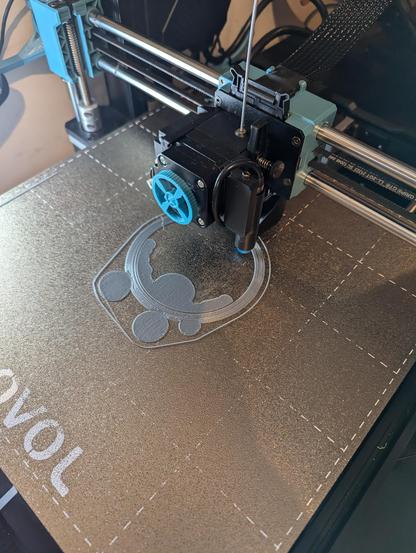
 nocci - old & backup account