lolcat tricks and fun
In case you have ever wondered what it would look like to have all of your favourite console output piped through lolcat(6) 🏳️🌈, here is a nice example
required (one of *sh is enough)
- Open Source OS
- sh
- csh
- ksh
- zsh
- bash
- fish
- syntax skills on piping I/O
- love of colours
- typing skills
- sense of humour
typing
man lolcat
...will get you the standard sh output delimited by the man command itself. This means that I used a simple trick to get all of my output piped through lolcat
ssh -Xv -p65534 -l userid |lolcat
This command syntax gets all of my commands in that ssh session piped through lolcat, creating an awsome rainbow colour galore
notes
- ssh secure session piped through lolcat gets you a slower output, compliments of the inner workings of lolcat. Feel free to optimize the program and release the patches if the lowerspeed irks you.
- test the speed by doing
ls -lR ~ and compare that in a standard ssh sessios without full lolcat pipe- I used the -X switch because I also start X programs from this shell (which I run in Xorg {it also works in wayland})
- I use the -v switch because I love log messages of ssh
- you can also animate your piped lolcat output with
lolcat -a- I watch the output on a large TV also, because lolcat(6) 🏳️🌈 is that awsome
sources:
lolcat --help
man lolcat(6) 🏳️🌈
https://github.com/busyloop/lolcat
man man(1)
#programming #rainbow #sh #csh #ksh #zsh #bash #fish #lolcat #man #manpages #OpenSource #Linux #BSD #POSIX #TV
 CSH Pharmacy Lahore
 RTN
RTN
 Dendrobatus Azureus
 Radio_Azureus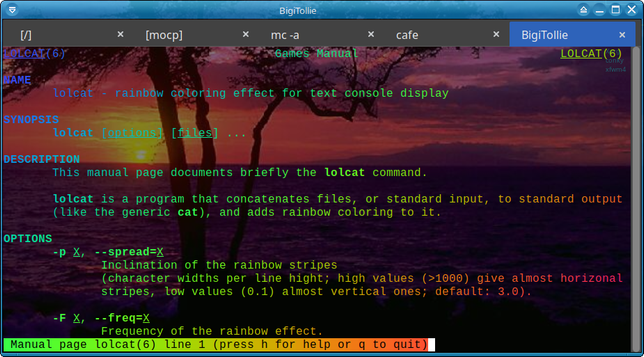
 Machabaeus
 Γιανίρης
 Xanathon