Android on the PinePhone: Installing GloDroid
PeerTubeI now have #Immich running as a Screensave on my #Amazon Alexa Show 8 1st Generation.
My Device is now #Android11 - fingers crossed for a newer version - but if not - this does what I need and no more Amazon Ads
I have trouble with
#Blokada5 it blocks all my apps on my phone 😕 when i use wifi but not data. This is new . Does anyone have similar trouble ?
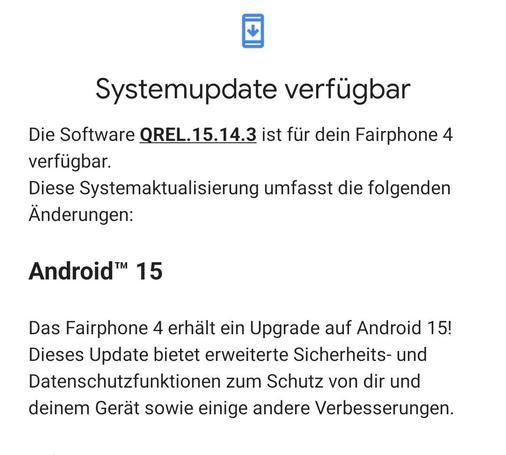
#Android11#fairphone4 bekommt jetzt Android 15.
Es kam laut
https://de.wikipedia.org/wiki/Fairphone_4 mit
#Android11 raus. Natürlich hätte das Upgrade für manche User auch gerne früher kommen können aber Hauptsache es kommt und läuft dann auch stabil...
...ich mach das erst heute Abend 😉
Danke an der Stelle mal an das Fairphone - Team!
In der eRezept-App habe ich folgende Mitteilung erhalten:
Keine Sciherheitsupdates für Ihr Gerät. Google stellt keine Sicherheitsupdates mehr für Geräte mit Android 12 oder älter bereit. Bitte aktualisieren Sie Ihr Gerät, um Ihre Daten zu schützen und die App sicher zu verwenden.
Ich besitze ein Gerät mit Android 11, für das es keine Sicherheitsupdates mehr gibt. Was kann ich tun, um mein Gerät für die App dennoch weiter sicher zu verwenden ?
#frage #problem #android11 #sicherheitsupdates #gematik #eRezept #eRezeptApp

Apple TV+ finally comes to Android phones, tablets – Pickr
Apple's slate of TV programming may well be focused on Apple's devices, but if you own an Android, you can now find Apple TV+ there, too.
Pickr@rena2019 @jenssiebert Es wäre toll, wenn du ihn einmal fragen würdest.
Auf meinem Bastel-#Android11 -Gerät lässt sich die #APK der #DjiFly noch nicht einmal installieren. Lapidarer Kommentar der Installationsroutine: App nicht installiert.

Supported OS für / for FP2
Android 7 through 11 are end of life and DivestOS provides best effort backports of fixes to them, which are shipped each moth. Please read: Patch Levels - DivestOS Mobile Patch Counts - DivestOS Mobile DivestOS is the most secure option for FP2.
Fairphone Community ForumSo my Pixel 3A XL is currently reverting from #Android11 to #android9 A necessary step before I flash with #ubuntutouch .
I wouldn't call this a simple process and not one I would wish to repeat in a hurry. I've used about 6 online guides to get this far, all of which have been helpful, but none of which told the whole story. #Upgrade2Ubuntu
I have a Teracube 2e running Android 11.
About 1.5 hours ago, the default alarm sound on my phone started sounding (it's Argon). Except I don't have an alarm scheduled. There's no notification in the drop down notification panel to turn off an alarm.
I verified the alarm settings: silence after 10 minutes (it's been a lot more than 10 minutes).
I cleared the cache and all stored data on the clock app, forced-stopped and disabled it. No luck.
I have rebooted my phone multiple times. Nothing has changed.
I have force-stopped all media apps (vlc, black player, yt music) on my phone just in case one of them had gone rogue and was playing the alarm audio clip. I'm pretty confident it's an alarm, because changing the "Alarm Volume" on the phone does affect it.
The only thing that makes it "stop" is Do Not Disturb with "alarm interrupt" disabled, but as soon as I turn DND off, the alarm continues. And unfortunately, I do use my phone as my alarm clock.
I did file a support ticket with Teracube, but the "we'll be in touch in 24 hours" + weekend makes me worry it will be longer. I don't have a backup phone.
I really don't want to factory reset, but will if I've exhausted all other avenues.