 Eniko Fox
I dont know why but I couldn't stop having -Z be forward so in the end I had to flip the Z axis for any translation and I probably fucked something up somewhere but I couldn't figure it out and i ran out of patience 🙃
Ok I guess I was assuming XNA and DirectX used the same handedness but apparently XNA is right handed even though DirectX is left handed and I'd like to take this opportunity to ask *what the fuck*
So if I want +Z to be forward I have to flip the axis in the renderer? That's obnoxious. But better than -Z being forward in world space since that would confuse the shit out of players
ok one more before i head to bed just to show that it can do more interesting things than just large rectangles made up of smaller cubes
so @Farbs said something about beveling the edges in my block game and that got me thinking and looking at some old 2D terrain art i did
i'm thinking i may stray from minecraft's aesthetics a bit and use this as a sort of style guide
okay so this may seem a little unorthodox but bear with me here
what if
shell texturing in block game
Can't decide if using shell texturing is a great idea or a stupid idea
i feel like i could soften the terrain significantly through no more than normals along the edges of blocks so i made this mockup in photoshop and i think this could actually work?
corners would still look kinda pointy but ¯\_(ツ)_/¯
if i kind of artfully place the camera to cut out the cornflower blue void surrounding this tiny chunk of terrain on all sides its almost starting to look like a real game :D
trying to add a faux edge bevel through normals and actual lighting equations is proving extremely challenging and i'm starting to give serious thought to manually baking the lighting into the textures
after endless futzing about and tweaking i think i have something that may just be workable for this faux bevel effect i want
(note that there's a "bevel" between adjacent blocks cause i haven't made the effect dependent on the block's neighbors yet)
I dunno I'm just not feeling the actual lighting model. Its not like minecraft exactly has realistic lighting anyway: blocks are lit from two opposite sides!
But the problem with baked lighting is if you have non symmetrical blocks you have to make 4 versions of each face to get all the lighting. Not that that's super onerous
Also if I made something like a lectern that would be a lot of work to do manually for each orientation
On the other hand when I made isometric games I'd have to make two of everything to get the lighting right and I didn't mind that so much so maybe I'm overthinking it
ok i figured out a reasonable way to fudge the normals so i won't have to manually bake lighting. basically what i do is set the normals of the edges so that they point towards where the adjacent faces are pointing (90 degree bend) and then i lerp from the face's lighting factor to the neighbor's lighting factor
that gives me the result on the left. i tried just having regular, actual normals, but it creates artifacts like on the right (its accurate that it shades it like that but it looks bad)
i was worried the corners would look too sharp without modification but honestly the smooth gradient does a great job without blunting the corners
took all day but i've optimized the vertex format for blocks *and* implemented auto-bevelled terrain. shown without textures to make the bevelling clearer
doing a side by side with my style guide i think i'm getting there. i'll probably wanna do some fancier color grading on the lighting though, and i want outlines, but the soft rounded feel of the terrain is definitely there now even though its still all cubes
i've brought back the grass, which is actually an obj model
see i made an engine before and appropriated it for this project. it could load obj models (with normal maps) so at first the blocks in my world were actually loaded from obj models
that's why i had to redo a buncha stuff to add the bevelling, since i had to generate the faces myself
I should probably start linking up chunks before I do much else so I don't wind up having to deal with a ton of "this block's neighbor is in another chunk" situations later
had a silly idea for block outlines using the bevel system. i take the dot product of the vector from the camera to the world position with the normal to determine if the bevel normal is pointing away from the camera, then add an outline based on that. there's some outlines where they don't belong but i can get easily rid of those
... i don't hate it? 🤔
lol the outlining has more than doubled the code in my fragment shader
texturing, lighting, and bevelling: 12 lines of code
just doing outlines: 19 lines of code
Not to pat myself on the back too hard but it's really nice how good this is turning out, like, aesthetically. It's not exactly trivial to make graphics look good when you only have a single 16x16 texture >_>
On the other hand I guess it would be fair to say these graphics are looking a little...... muddy
Eh? Eh? Eh? :D
i'm commander shepherd and this is my favorite spot on the citadel
(seriously i cannot get enough of looking at this particular subsection of a screenshot i took of the outlines in my voxel engine)

debating what i wanna do with grass in my engine. atm i have a block shader, and a model shader. i feel like i could efficiently implement shell textured grass by making a shell texturing shader, but i also don't want to balloon the number of different shaders i need to render all my terrain 🤔
i could just use the model shader, but it becomes a pain in the ass to implement shell textured terrain then
i could try and combine it with the block shader but they both do really different things
hmm if i want to add bits to the shell texturing so it doesn't look bad viewed side-on i kinda have to go the model route
though i figured out i can get away with only 6 variations to get all the edge transitions 🤔 that could be doable if a bit annoying
i'm overthinking the grass thing so i've made the textures required to make the shells for a 16-tile transition and i'll just generate the model for each of those 16 and implement them in the engine and move on so i don't wind up blocked by choice paralysis
if i want i can always just change it later

 2dchaos
here it is compared to my style guide image. how did i do, chat?
i probably wanna pull the grass away from the edge a bit more because it obscures the outlines, but i'm pretty happy with this overall
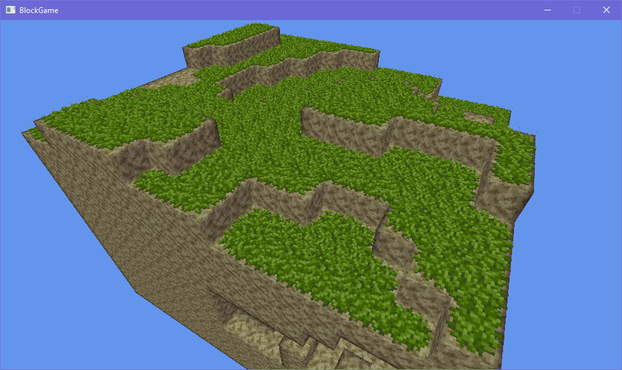
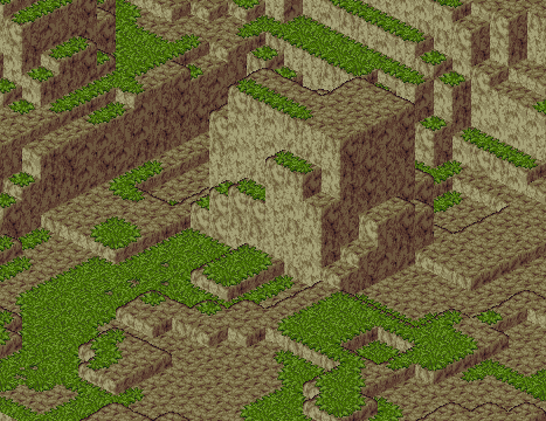
At the moment the wild grass is actually a block on top of the dirt (like carpets in minecraft) but I'm thinking maybe I should change it so that the grass is part of the dirt block that sticks out above it as it were. That way things can occupy the same block as the grass without deleting it, like shrubs, flowers, or other non-opaque blocks
here's another close up i really enjoyed of the terrain in my block game
i've got columns of chunks working, but they're not really connected at the moment so i gotta fix that next
chunks connect properly now! with bonus shot of the sprawling cave systems beneath the surface
i made a staged chunk generation system where chunks can request their neighbors be generated but only up to a certain stage, which keeps the generation from going infinitely in all directions, because the requested stage must always be lower than the chunk's current stage of generation
you can see through the sides of chunks now because the chunks (correctly!) note that their underground sides faces are obscured. it's just that they're obscured by chunks you can't see because they haven't fully been generated yet
 mmby
mmby@eniko I love how the look turned out so much like your pixel art
@mmby thank you im very proud of it :3
 Joshua Barretto
@eniko Time to throw the generator on another thread! 😄
@jsbarretto i fixed it for now by only running one generator per frame >_>
@eniko Aha, the PWM approach! I remember doing this years ago in my Game Maker voxel game (GM didn't have multi-threading). It certainly gets the job done. If you wanted to calibrate it for the performance of the device you could throw generator requests into a work queue, then use the 'idle' time at the end of each frame to do generator work.
@jsbarretto i'll move it to threads eventually but it's kind of tricky with how chunks need to touch their neighbors in order to fully generate so i just haven't bothered with that complexity for the moment
@jsbarretto atm in my design a stage of a generator can request a list of other chunks up to a minimum generation stage so i may have made things difficult for myself :'D
@eniko Ah, is this for things like tree generation (and other structures that spread between chunk boundaries)?
@jsbarretto yeah, exactly that. i don't plan on having actually infinite worlds so i'll probably make life easy on myself and generate large structures up-front on world creation
@eniko Yeah, this can get really complex, and even more so with larger structures. You can sort of paper over the issue with a tree (it's small enough to only cover a maximum of 4 chunks), but generating an entire town, say, requires a totally different approach. Instead you need to find a closed-form solution for generating candidate tree positions in a manner that's closer to procedural noise. I recommend looking into cellular noise techniques, which involves placing trees on a perturbed grid.
@eniko When it comes to threading, the golden rule is: minimise the amount of conversation that needs to happen between the threads. This means that ideally your worker thread should be given the resources it needs to do its work when it's started, and doesn't need to mutate or talk to any other part of the game state until it's finished.
@jsbarretto yeah, that's how i always deal with threading
pass in a bunch of data, have it crunch it, then pass back the result
but like you said it's hard to do this with chunk generation because their neighbors are not in stasis while chunks are being generated
@eniko Yeah! This is why every mutation of a block needs to not only increment the counter for the chunk it appears in, but also that chunk's neighbours: that way, you end up propagating changes across chunk borders properly.
 fabiosantoscode
@eniko good enough for a small adventure already!
@eniko is the terraforming connected? IE a cave on a chunk would continue on the adjacent chunk?
@fabiosantoscode for the most part, yes, there's some edge cases there too
 Yo Soy Freeman
@eniko this is shaping out to be so lovely! Awesome work.
@YoSoyFreeman thank you! 😊
 Rune Skovbo Johansen
@eniko Nice! Could some kind of edge coloring tricks be applied to the grass, similar to what you do to the "naked" rock/sand edges? Because currently it's much harder to parse depth for the grass covered surfaces than for the other ones.
@runevision ehh, not really unfortunately. what i'll probably do is pull back the grass a little so the outlines are more clearly visible
 Jen - mangledPixel
@eniko Looking good though, the edge effect really is helping the distant blocks retain readability, rather than just merging into visual noise.
@mangled_pixel yeah. really gotta get it fixed so there's no outlines between chunks though since that *really* throws the whole thing off
@eniko Yep. I'm assuming that'll mean the blocks on the edges of each chunk will need a bit of extra code to check their neighbours in the next chunk? Hopefully that won't be too complex.
 Tacitus 🇮🇪

Or dooo youuu? Big borders looks kinda cool, might be neat.
 alina cyborg mouse
 Dana
Dana@eniko Seeing it from a shallow angle really sells the thickness of it. Gorgeous!
 Maya
Maya@eniko Those images feel like rediscovered screenshots from an early PSX prototype that was using a lot of SNES-style textures.
@Mayabotics sounds like a solid compliment to me!
 Bryce Dixon
@eniko When I see these screenshots it makes me want to make a procgen voxel game.
I feel like that's a sign of a good project :)
 Esteban Küber
@eniko will you ever have a situation where the camera is really close to the blocks? If so, it'd be nice to use LoD to bevel the edges (the corners in particular) to keep the effect working. It's impressive how well the effect looks at the intended distance!
@ekuber it's possible. I've considered knocking out the corner with a diamond shape but it complicates a lot of stuff so I'm leaving that for later
 Nikita Lisitsa
@eniko Looks really nice! Maybe make the grass occupy a bit more than a face? Right now it looks a bit like a moss carpet 😅
@lisyarus you mean like droop over the edge? That's pretty complex actually
Also I like the moss carpet look >_>
@eniko Yeah, something like that.
Ha-ha, got it, then!
@lisyarus I did consider it but if I did that then the grass would push into the block above, but also along the side, and along the top side, and so that's a ton of extra logic to handle all of that and I'm just not sure it'd be worth the headache
 Maya Zimmerman
@eniko Seeing this against the previous version, it's really striking how much identity there is in here. It looks really good and unique.
@mayazimmerman thanks maya 💜
 Lunar 🛸 ♾
@eniko this is looking amazing!
 Efi (nap pet) 🦊💤
@eniko to my blurry morning eyes the grass looks way more detailed than it is 
 Melissa
@eniko oohhh the grass makes it look so fuzzy I wanna touch it!!
 Piper has moved
@eniko I’ve often wondered if the Minecraft devs made a mistake by not building in that capability from the beginning. It would be possible with the way block models are handled now, but it’s probably too late for them to switch unless it was part of a 2.0 refresh.
 boggo
boggo ~
~@eniko ooh the outlines look really nice actually! It was kind of confusing at first but then I referred back to the style guide and realized what they were. It’ll probably be more immediately obvious in motion too
 YinYin Falcon
@eniko guide has more red in the shadow and half block heights - but otherwise nailed it
do you already know what perspective you want to use this in? (first or third person?)
@YinYinFalcon mostly first but i figure i wanna have an optional 3rd person camera