 Eniko Fox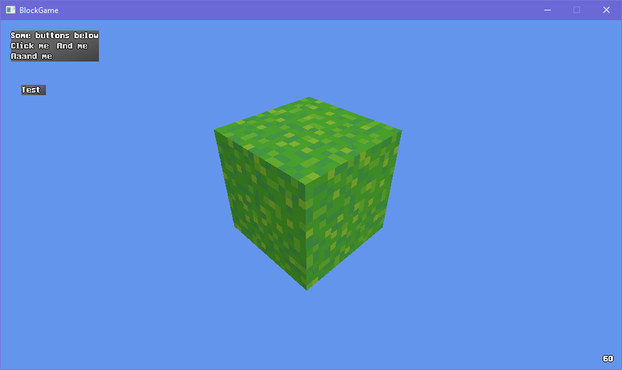
I dont know why but I couldn't stop having -Z be forward so in the end I had to flip the Z axis for any translation and I probably fucked something up somewhere but I couldn't figure it out and i ran out of patience 🙃
Ok I guess I was assuming XNA and DirectX used the same handedness but apparently XNA is right handed even though DirectX is left handed and I'd like to take this opportunity to ask *what the fuck*
So if I want +Z to be forward I have to flip the axis in the renderer? That's obnoxious. But better than -Z being forward in world space since that would confuse the shit out of players
ok one more before i head to bed just to show that it can do more interesting things than just large rectangles made up of smaller cubes
so @Farbs said something about beveling the edges in my block game and that got me thinking and looking at some old 2D terrain art i did
i'm thinking i may stray from minecraft's aesthetics a bit and use this as a sort of style guide
okay so this may seem a little unorthodox but bear with me here
what if
shell texturing in block game
Can't decide if using shell texturing is a great idea or a stupid idea
i feel like i could soften the terrain significantly through no more than normals along the edges of blocks so i made this mockup in photoshop and i think this could actually work?
corners would still look kinda pointy but ¯\_(ツ)_/¯
if i kind of artfully place the camera to cut out the cornflower blue void surrounding this tiny chunk of terrain on all sides its almost starting to look like a real game :D
trying to add a faux edge bevel through normals and actual lighting equations is proving extremely challenging and i'm starting to give serious thought to manually baking the lighting into the textures
after endless futzing about and tweaking i think i have something that may just be workable for this faux bevel effect i want
(note that there's a "bevel" between adjacent blocks cause i haven't made the effect dependent on the block's neighbors yet)
I dunno I'm just not feeling the actual lighting model. Its not like minecraft exactly has realistic lighting anyway: blocks are lit from two opposite sides!
But the problem with baked lighting is if you have non symmetrical blocks you have to make 4 versions of each face to get all the lighting. Not that that's super onerous
Also if I made something like a lectern that would be a lot of work to do manually for each orientation
On the other hand when I made isometric games I'd have to make two of everything to get the lighting right and I didn't mind that so much so maybe I'm overthinking it
ok i figured out a reasonable way to fudge the normals so i won't have to manually bake lighting. basically what i do is set the normals of the edges so that they point towards where the adjacent faces are pointing (90 degree bend) and then i lerp from the face's lighting factor to the neighbor's lighting factor
that gives me the result on the left. i tried just having regular, actual normals, but it creates artifacts like on the right (its accurate that it shades it like that but it looks bad)
i was worried the corners would look too sharp without modification but honestly the smooth gradient does a great job without blunting the corners
took all day but i've optimized the vertex format for blocks *and* implemented auto-bevelled terrain. shown without textures to make the bevelling clearer
doing a side by side with my style guide i think i'm getting there. i'll probably wanna do some fancier color grading on the lighting though, and i want outlines, but the soft rounded feel of the terrain is definitely there now even though its still all cubes
i've brought back the grass, which is actually an obj model
see i made an engine before and appropriated it for this project. it could load obj models (with normal maps) so at first the blocks in my world were actually loaded from obj models
that's why i had to redo a buncha stuff to add the bevelling, since i had to generate the faces myself
I should probably start linking up chunks before I do much else so I don't wind up having to deal with a ton of "this block's neighbor is in another chunk" situations later
had a silly idea for block outlines using the bevel system. i take the dot product of the vector from the camera to the world position with the normal to determine if the bevel normal is pointing away from the camera, then add an outline based on that. there's some outlines where they don't belong but i can get easily rid of those
... i don't hate it? 🤔
lol the outlining has more than doubled the code in my fragment shader
texturing, lighting, and bevelling: 12 lines of code
just doing outlines: 19 lines of code
Not to pat myself on the back too hard but it's really nice how good this is turning out, like, aesthetically. It's not exactly trivial to make graphics look good when you only have a single 16x16 texture >_>
On the other hand I guess it would be fair to say these graphics are looking a little...... muddy
Eh? Eh? Eh? :D
i'm commander shepherd and this is my favorite spot on the citadel
(seriously i cannot get enough of looking at this particular subsection of a screenshot i took of the outlines in my voxel engine)


 Why Not Zoidberg? 🦑
@eniko it's very voxely.
(Seriously: I totally get satisfaction with your own work)
@WhyNotZoidberg i don't get to feel like this very often anymore >_>
 Cassandrich
 Stygian Abyss Pie Factory
@psilocervine t...try the veal?
 四
四@eniko The blocks need to touch grass :)
 Wortex17
@eniko *very strained, profoundly deep sigh
 Katie 🏳️🌈🏳️⚧️
@eniko Are you making a MUD? :0
@eniko Oh wait I hadn't seen the rest of the thread
Block Game by Eniko is good too!
@347Online oh lol XD
 orva
orva@eniko That adds a nice subtle (ish) cell shading vibe, I dig it.
 SlippiHUD
@eniko
I love the outlines, makes the terrain visually clear. That's very nice.
I love the outlines, makes the terrain visually clear. That's very nice.
 Lunar 🛸 ♾
@eniko Really nice!
 Doofus Canadensis
@eniko It's so FLUFFY!
@doofus_canadensis that's a very nice thing to hear given that all the blocks are made up of only 2 triangles per face :D
@eniko well, excellent work, then. I think it looks very good
 thomastc | frozenfractal
 alina cyborg mouse
@eniko one aspect that I find slightly disorienting is that while the corners face on look nice and smooth and rounded due to your normals magic, the corners facing away now get highlighted as sharp and pointy by the outlines
@0 yes, it's a bit unfortunate, but there's not a ton i can easily do about that :/
 D. Moonfire
@eniko Those look awesome.
 olive
olive@eniko this is looking absolutely amazing 🤩 I've been trying to get my blockgame looking naturalistic+outlined too but haven't been able to get anything half as good as this
 Lexy Plt
 Efi (nap pet) 🦊💤
@eniko close to good
 Gwen the Loitering Fox
@eniko this looks really nice! very helpful to read what the heights are doing when the textures blend into each other!
 Chagrins
@eniko it does create a unique style. Somewhat toon shading.
 KarakSindru (He/Him)
@eniko definitely highlights the edges. Gives it a bit of an animated/ illustrated look the way many drawings she outlined. Neither good nor bad, just stylistic.
 Olivier
@eniko I'm not sure... I'd tone down the contrast for sure. Those black lines are a bit jarring to me.
Could it be something that happens naturally when certain side textures are side by side? If you're using the same texture for all sides then it's not very practical.
@dacmot i'd do more passes to refine it. not sure what you mean by your question though
@eniko I'm just speculating because I don't know much about this.
I was wondering if it was possible to define different textures for each sides, you may be able draw the textures in such a way to enhance the edges when, for example, the front of a cube meets the side of another to form a concave shape.
 Richard Hendricks
@eniko would be nice for those of us with low vision. 🤓
 j_bertolotti
@eniko Personal opinion/matter of taste: I would add a (thinnier) black line to all the visible edges
@j_bertolotti i mean this is the quick prototype, i'm going to refine it further
@eniko promising! you could do some cool shenanigans like have the vertical ones taper towards the ground based on their proximity to a perpendicular surface that exists in the direction of the edge normal ... or something like that, I'm a design girl, not a 3d code girl
 Gregly
@eniko I don't have anything constructive, but it's really fun following this progress and seeing things develop.
@karaksindru that's very motivating to hear and thus constructive in its own way 😊
 gkrnours
@eniko remind me of final fantasy tactics advance
@eniko simple change, big effect; im impressed
@efi yeah tbh i was worried it wouldn't be noticeable but its honestly pretty dramatic
 EVHaste
@eniko wow, that makes a big difference to the eye