Goal: Get some #letsencrypt certificate obtained with #uacme deployed on some #Windows box

Step 1: Ok, this probably works best with #Powershell (which I don't really like ...)

Step 2: There's no #FreeBSD port ... but hey, there's now a FreeBSD port of #dotnet, let's try to "just" build Powershell using that.

Step 3: Hell why does it fail to build. Oh, System.Security.Cryptography.Native doesn't play well with #LibreSSL

Patch and retry, I guess I'll take some sleep now first. Bah!

(there's some irony in running into OpenSSL/LibreSSL issues when trying to deploy TLS certificates ...)
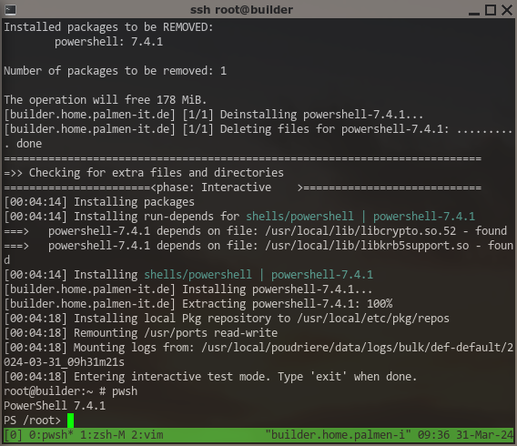
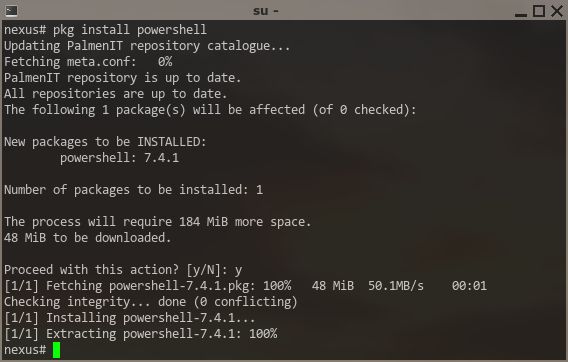
I guess that's progress ... some #PowerShell on #FreeBSD at least starting up. Creating a #port out of this will be a lot of work šŸ˜ž had to patch quite some code, e.g. completely disable the "login shell" functionality, the implementations only work on either #Linux or #MacOS....

And the whole build system fails completely if not built from within a #git working copy ... WTF? This will be another challenge for porting.

Ah, this messy version is probably a result of the mess in the upstream repo, a tag v7.4.1 exists, but refers to a commit that is gone.

Oh what did I expect ... šŸ˜‚

This will be though.

Well, I can certainly build #PowerShell for #FreeBSD now. I might be able to just "fake" a #git working copy for its stupid build system. This still doesn't fully solve the version issue, it insists on appending the git hash -> TODO.

The "login shell" feature can be added, an exercise left for later, the code will look pretty similar to the existing MacOS-X implementation. Maybe upstream would even accept it šŸ˜Ž

For a #port, it should probably be "published" as "#ReadyToRun" (I hope this has no negative impact), otherwise lang/dotnet would become a hard run dependency ... This works now as well, but requires changes in lang/dotnet ... requires some platform-specific #NuGet packages that don't exist on MS servers for FreeBSD. They are created during build of dotnet itself, but not installed anywhere by default ... I'll suggest an "on by default" port option to bundle these with lang/dotnet.

[…]

The biggest issue will probably be to find some at least somewhat sane way to download the required #NuGet packages during #port fetch phase, so they can be used "offline" during build later. Of course if ever possible with correct checksumming in distinfo.

This is always the same annoying crap with all these languages and frameworks inventing their own package management. Sucks.

For #NuGet, I tought the commandline client could maybe help with the task. Well if anyone can tell me how to even build that thing ... I guess I'll give up and look for other ideas. Should be possible to somehow automate the process to get the correct uris for package downloads? And then maybe patch the build files of #PowerShell to exclusively use a local directory as the "package source" ... we will see.

A working #FreeBSD #port of #Microsoft #PowerShell is certainly getting closer šŸ˜‰

And now, "staging" and packaging for #FreeBSD works as well šŸ˜Ž

But this is just the "base" #Powershell with no bundled modules. Next step, find out how to build and bundle some "essential" Modules, e.g. #PSResourceGet and/or #PowerShellGet (for Install-Module), and #PSReadLine (for sane commandline editing and stuff) ... any more that absolutely NEED to be bundled? šŸ¤”

Next "milestone", bundling #PowerShell modules with the #FreeBSD package (using the nupkg files available from powershellgallery) works! 🄳

One little thing missing, some of these are auto-imported, others are not ... why? šŸ¤”

Edit: They are auto-imported as soon as you invoke a commandlet ... nice! šŸ˜Ž

Ok, time to commit to my local branch of #FreeBSD ports. Can't go to main yet because building still requires some patches to lang/dotnet ...

In case you want to test #PowerShell on #FreeBSD *NOW* ... here's a patch for #ports:
https://people.freebsd.org/~zirias/patches/0001-shells-powershell-Add-new-port.patch

It currently requires at least these patches applied before:
https://reviews.freebsd.org/D44560
https://reviews.freebsd.org/D44561

Note they will probably change, the maintainer of lang/dotnet is looking for better options to solve these issues.

Porting PowerShell to FreeBSD, first working poc

Well, I wanted to test #FreeBSD #PowerShell for my usecase (which I *guess* I have, still not entirely sure), but ... I thought now that the port works, let's first rebase #ports (on main).

BAAAD idea. Not only did some change force my #poudriere to rebuild more or less *everything*, I also had fallout to fix from new #LibreSSL incompatibilities and some strange build error with #llvm-17.

Right now STILL waiting for the build of #chromium to finish.

Ok, testing PowerShell: tomorrow. šŸ™„

Testing #PowerShell on #FreeBSD can finally start!

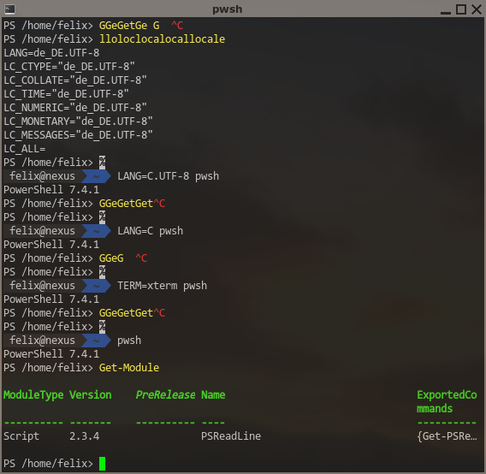
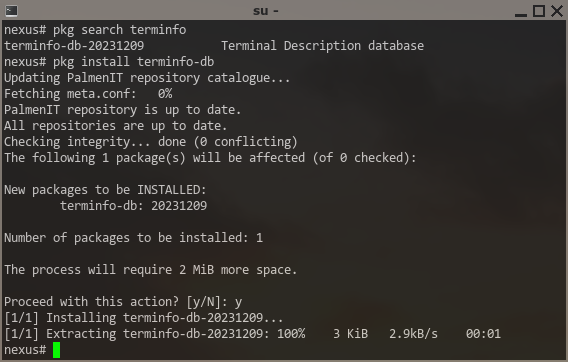
Already found the first issue ... it seems #PSReadline needs terminfo-db from ports installed to work correctly šŸ™„ -- port will be updated!

Getting the #Microsoft #Windows experience once again.

So, as a first step for the #PowerShell "remoting" I intend to test from #FreeBSD for my usecase, I activated #OpenSSH on that Windows server as documented by Microsoft.

Yep, sshd is running and allows logins with local accounts. Trying to use a domain account just results in "Connection reset" (before even asking for a password), and so far, I wasn't able to find any useful information to even start analyzing the cause. šŸ˜ž

@zirias easiest thing to do is run sshd.exe manually on the Windows server then test your connection

Stop-Service sshd
sshd.exe -ddd
# Test connection
Start-Service sshd

You’ll most likely need to run as SYSTEM (through psexec is the easiest) as pub key auth requires a privilege that normal admins don’t have. You can also enable event logs by editing the sshd_config file as per https://github.com/PowerShell/Win32-OpenSSH/wiki/Logging-Facilities

Logging Facilities

Win32 port of OpenSSH. Contribute to PowerShell/Win32-OpenSSH development by creating an account on GitHub.

GitHub

@zirias

I wonder how much more this has to happen before some momentum gains behind an effort to switch #FreeBSD to #terminfo. (I vaguely remember that there's an open issue that has been languishing for years.)

@JdeBP AFAIK, base #curses in #FreeBSD 14 already uses #terminfo (instead of the bundled #termcap) *if* it is installed (as a package). But sure, having it directly in base and getting rid of termcap would be much nicer.
@zirias @JdeBP Wait, #termcap is still a thing in base?
@JdeBP @zirias #FreeBSD is using #terminfo instead of #termcap as of 2024.
@mpts @JdeBP Is this true for the 13.x line as well? Because then I wonder why I still need to e.g. extend TERMCAP to get curses to use xterm's blink capability ... or like here, install terminfo-db to make PowerShell's PSReadline work correctly ;)
@zirias @JdeBP Hmmm, it does look like there are some rough edges there, e.g., https://lists.freebsd.org/archives/freebsd-current/2023-November/004922.html.
Re: Freebsd 14+ -- tcsh incompatible with terminfo

@mpts @JdeBP

"The fact that tcsh does not play nicely with terminfo, is nother problem."

Seriously? šŸ˜‰ Giving me one *more* reason to avoid the C shell ...

@mpts @zirias

No. #FreeBSD provides only #termcap as standard right now. #terminfo is only available as a port.

It's possibly the only mainstream operating system where this is still the case. NetBSD and OpenBSD both provide terminfo. I haven't checked Illumos.

https://github.com/freebsd/freebsd-src/tree/main/share/termcap

freebsd-src/share/termcap at main Ā· freebsd/freebsd-src

The FreeBSD src tree publish-only repository. Experimenting with 'simple' pull requests.... - freebsd/freebsd-src

GitHub
@JdeBP @mpts Available as a port, but used by base #curses when available, would still be acceptable IMHO, and again, AFAIK #FreeBSD is doing that since 14.x.
@zirias @JdeBP @mpts FYI: Here's the upstream discussion. The consensus was that .NET on FreeBSD should depend on the terminfo-db port.
FreeBSD: System.Console is not working right Ā· Issue #23653 Ā· dotnet/runtime

This is because terminfo database is missing in default installation. I tried to add ncurses package from ports. That only creates /usr/local/share/misc/terminfo.db And the terminal information is ...

GitHub
@david_chisnall @JdeBP @mpts Thanks. Maybe I should then add it as a run dependency for PowerShell even when NOT bundling PSReadLine ... šŸ¤”

@zirias @david_chisnall @mpts

It might be worth checking how well Write-Progress and its ilk work with only #termcap. And colourization of the error stream and suchlike.

#PowerShell #FreeBSD

@JdeBP @david_chisnall @mpts There's nothing to check, PSReadLine requires terminfo-db installed to work at all, so I added that as a dependency to the port now.
@zirias @JdeBP @mpts If your PowerShell build is using AoT mode, it's worth checking the run and library dependencies of the dotnet port. It depends on sys/terminfo-db. It also depends on node.js, not sure what that's about.

@david_chisnall @JdeBP @mpts AoT didn't work for some reason, currently it's using "--sc -p:PublishReadyToRun=true"

https://github.com/Zirias/zfbsd-ports/blob/local/shells/powershell/Makefile

zfbsd-ports/shells/powershell/Makefile at local Ā· Zirias/zfbsd-ports

Zirias' FreeBSD ports tree. Contribute to Zirias/zfbsd-ports development by creating an account on GitHub.

GitHub
@david_chisnall @JdeBP @mpts I really hoped the node-stuff was just needed for some AspNetCore features. So far, it seems #PowerShell works fine without it.

@zirias @JdeBP @mpts If I understand correctly, Ready To Run embeds the JIT in the binary, which probably means you need several of the same dependencies as the dotnet port. You almost certainly need libunwind. Are you building with Poudriere? It should tell you about missing library dependencies, but it may not if they're dynamically opened.

EDIT: I was misreading the port, looks like you're already depending on the right libraries.

@david_chisnall @JdeBP @mpts Sure, libunwind and libinotify, they're already in LIB_DEPENDS. Of course this is all tested in poudriere. My biggest concern about the port now is how to handle the nuget stuff. But I can't push it anyways yet as it needs changes to the dotnet port first, reviews ongoing šŸ˜‰

See also:
https://lists.freebsd.org/archives/freebsd-ports/2024-April/005839.html

Porting PowerShell to FreeBSD, first working poc

@zirias @mpts

That's not enough. There are plenty of things that use #termcap/#terminfo directly without using (n)curses. And as you've seen there are cases where the two aren't exactly the same.

There is a persistent very slow trickle of instances where people come along with something new, which works with terminfo (or its termcap compatibility shims) on every other operating system, and true termcap turns out to be a gotcha in some subtle way. Because no-one targets it any more.

#FreeBSD

@JdeBP @mpts "Using termcap/terminfo directly" nowadays means using curses. All the libraries needed for that are provided by curses (and nothing else).

@zirias @mpts

Wrong. There are libraries around that don't use (n)curses and access #terminfo directly. I remember this pain with NeoVIM and FreeBSD some years back. #NeoVIM used one of these non-curses libraries that provided direct access to terminfo.

(n)curses isn't the one-and-only abstraction that everyone uses.

@JdeBP @mpts It's the only that's present in #FreeBSD base. There's a libtinfo and libtcap, but those are provided by curses. I see no reason why any FreeBSD port should ever be linked against anything else for termcap/terminfo support.

@zirias @mpts

You haven't experienced nearly enough softwares. (-:

There have been alternatives to those, that are binary compatible with the #terminfo database files, but that are otherwise designed from scratch, for years now. As I said, #NeoVIM used one.

I have this vague memory that go goes its own way on this, too, but I might be mis-remembering. I've definitely seen over the years several ground-up implementations outwith C and C++ development.

#FreeBSD

@JdeBP @zirias @mpts the alternative are nothing like binary compatible https://github.com/neovim/unibilium another implementation which iirc is api compatible (not abi) with ncurses libterminfo is libtinfo from netbsd.
GitHub - neovim/unibilium: https://github.com/neovim/neovim/wiki/Deps#forks

https://github.com/neovim/neovim/wiki/Deps#forks. Contribute to neovim/unibilium development by creating an account on GitHub.

GitHub

@JdeBP @mpts I never said there was no software using #terminfo databases directly, I just don't follow your argument this was a problem on #FreeBSD. These files are provided from a port/package, just install it (when "porting", add a run-dependency) šŸ¤·ā€ā™‚ļø

I certainly see the need why people come up with something like this. The "classic" implementations force you to add silly "singleton" stuff like this:
https://github.com/Zirias/dos2ansi/blob/c606482c1723273dfd1251acd0d466f69a0ae58e/src/bin/dos2ansi/ticolorwriter.c#L51
... which wasn't a problem here, but as soon as you'd go multithreaded, you'd have to properly lock-guard this, and even worse, say you'd want some service serving different clients with different terminals simultaneously, you'd have to spawn a child process for each and every client šŸ™„

dos2ansi/src/bin/dos2ansi/ticolorwriter.c at c606482c1723273dfd1251acd0d466f69a0ae58e Ā· Zirias/dos2ansi

Converter for old MS-DOS/ANSI.SYS text files. Contribute to Zirias/dos2ansi development by creating an account on GitHub.

GitHub
@zirias HI, your patch for Powershell is broken
@zirias Do you plan to commit this to the ports collection?
@hnygd Sure. But only if I get it to a "minimal functional" state (at least this "readline" stuff, like completion with tab and browsing history with arrow keys should work, as well as whatever is needed to fetch/install powershell modules). I'm not sure yet whether I will succeed here. So far, trying to build/bundle PSResourceGet wasn't successful.
@zirias Keeping my fingers crossed, thanks a lot for all your great work!
@zirias Microsoft.PowerShell.Utility is a big one for the web cmdlets in particular. https://learn.microsoft.com/en-us/powershell/module/microsoft.powershell.utility/?view=powershell-7.4
Microsoft.PowerShell.Utility Module - PowerShell

This section contains the help topics for the cmdlets that are installed with the Microsoft.PowerShell.Utility module. This module contains cmdlets that manage the basic features of PowerShell.

@rmbolger Thanks, this one seems to be even bundled in the source repo (so, my wip port already installs it), together with Microsoft.PowerShell.Host, Microsoft.PowerShell.Management and Microsoft.PowerShell.Security

As I had no luck at all trying to build Microsoft.PowerShell.PWResourceGet so far, I'm trying a different approach: Download the pre-built nupkg and bundle its content. Should be fine as long as there's no platform-specific code involved.... šŸ¤”

@zirias you should (be able to) do all your #package tasks with the #dotnet CLI instead, I think.

#nuget itself is still a "Framework" app which requires #Mono...

My current practice for PowerShell projects that need nuget packages is something like...
1. Make a dependencies.csproj file with nothing in it (specify your target platforms)
2. `dotnet add` your dependencies to that.
3. `dotnet publish`
4. delete the dependencies.* files and the rest are your actual dependencies...

@jaykul Well that certainly explains why it tries to restore framework packages even when you force it to target "net8.0" and once you patch that, you get compiler errors about string handling and locales šŸ™„

Unfortunately, I don't even know yet exactly what I will need, it will be something that neither nuget nor dotnet is designed for. This is about #packaging software (here #PowerShell for #FreeBSD), and at least FreeBSD's ports (quite some other package build systems as well) strictly separate the "fetch" phase from the "build" phase (with some checksumming in-between and no network access allowed any more to prevent tampering). This is always a major PITA with any language/framework "package managers" like nuget.

A separate "dotnet restore" looks like a start, but requires the source to be already extracted, and even then, integrating with checksumming won't be easy šŸ˜ž

@zirias I'm confused. Are you trying to get the certs on Windows or FreeBSD? If PowerShell on Windows, why not use a PowerShell native client like Posh-ACME? If uacme on FreeBSD, why build PowerShell there?
https://poshac.me/docs/v4/
Home

Documentation for the Posh-ACME PowerShell module

@rmbolger Because I have a central certificate distribution where I have setup everything (including DNS challenges) and I don't want to allow the Windows machine to do DNS updates at all.
@zirias I think I understand. So the PowerShell on FreeBSD is merely to aid in the deployment of the uacme obtained cert?

@rmbolger The idea is to use "#powershell remoting" (which I have to really understand first) with #OpenSSH to remotely add the cert to the store, delete the old one, and do whatever service configurations (e.g. for the #RDP connector) are necessary.

For other hosts (#FreeBSD and #Linux), I just do such things with plain SSH and restricted SSH keys only allowed to execute what is necessary on the target machine. I'll have to find out how to do something similar with Powershell. But then, I'll first need Powershell šŸ˜‰

@zirias Fair warning, whatever account you end up using to connect to the Windows machine will likely need local admin privs on that box in order to update the cert for system level services such as RDP. PowerShell remoting is the way to go though assuming you can get the bits working from the FreeBSD box.

@rmbolger Yes .... with plain SSH, I can configure restrictions on the key used for authentication, so although privileges are needed on the target boxes, it's only possible to do whatever is needed to replace the cert. Guess it won't be that easy with powershell šŸ˜ž

But so far, I'm still fighting with its build system anyways. First horror: it refuses to work without git.

@zirias @rmbolger

Maybe I’m misunderstanding but would enabling SSH server on the Windows host help?

https://learn.microsoft.com/en-us/windows-server/administration/openssh/openssh_install_firstuse?tabs=gui

Get started with OpenSSH Server for Windows

Learn how to install and connect to remote machines using the OpenSSH Client and Server for Windows.

@zirias @rmbolger don't want to allow Windows to change DNS, do you mean register themselves to the local network?
@sassdawe @rmbolger No, I mean for adding the stuff a DNS challenge with letsencrypt would need (which is my preferred challenge method, I don't want to setup some webserver for every subdomain/host that needs a certificate).