Делаем PowerShell более удобным: настройка PsReadLine

Привет, Хабр! Часто ли Вам приходится в сотый раз нажимать стрелку вверх в PowerShell для поиска нужной команды? Или, может быть, не замечать случайные опечатки в длинном пути? Сегодня мы превратим стандартную консоль в удобный инструмент с автодополнением и поиском по истории с помощью модуля PsReadLine, а главное - добавим нормальные функции Copy/Paste . Я поделюсь с Вами готовым конфигом, который сделает ежедневную работу в консоли быстрее и приятнее.

https://habr.com/ru/articles/964840/

#PowerShell #PsReadLine #Windows #Терминал #Модуль_для_PowerShell

Делаем PowerShell более удобным: настройка PsReadLine

Привет, Хабр! Часто ли Вам приходится в сотый раз нажимать стрелку вверх в PowerShell для поиска нужной команды? Или, может быть, не замечать случайные опечатки в длинном пути? Сегодня мы превратим...

Хабр

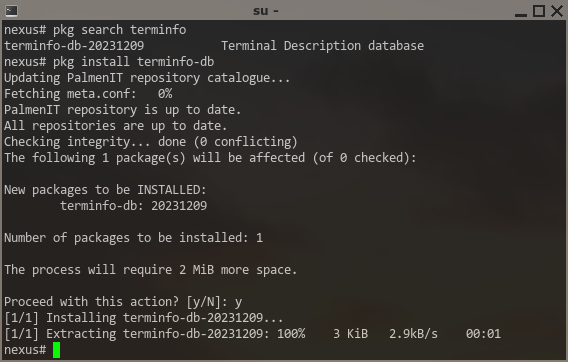
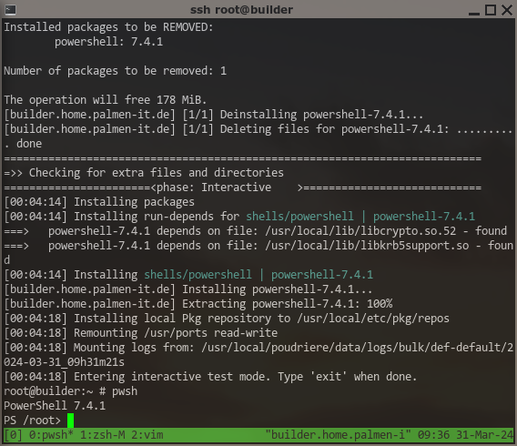
Testing #PowerShell on #FreeBSD can finally start!

Already found the first issue ... it seems #PSReadline needs terminfo-db from ports installed to work correctly 🙄 -- port will be updated!

And now, "staging" and packaging for #FreeBSD works as well 😎

But this is just the "base" #Powershell with no bundled modules. Next step, find out how to build and bundle some "essential" Modules, e.g. #PSResourceGet and/or #PowerShellGet (for Install-Module), and #PSReadLine (for sane commandline editing and stuff) ... any more that absolutely NEED to be bundled? 🤔

What if your #readline shipped with Copilot?

I'm still not sure if this is something I need or not, but I got Microsoft's CodexCLI working (again), just so I could show it off.

This is how I want github #copilot CLI to integrate.

I *do* like the explanations the current Copilot CLI gives, but I want this in the readline because I want to be able to edit the command I get back.

#PowerShell #Bash #Zsh #PSReadline

https://i.imgur.com/8vbkF48.gif

P.S. My working fork is at https://github.com/Jaykul/ReadlineAI

@nobodyinperson
* history sharing is usually provided by the shell - I think #pwsh does this by default, as do most non-cmd.exe shells.
* Again, this is a shell-provided feature. I know #psreadline does this for #PowerShell, and I know fish does. I think #zsh can too.
* Like, all shells let you configure the prompt. #fish is pretty "batteries included", but #ohmyposh and #ohmyzsh are great.
* That's presumably totally up to your distro on what the default $PATH is.

Master your command line with shortcuts I use daily. These are game-changers for efficiency, speed, and productivity.

👉 https://youtu.be/KBbvPlPKPW0

#CommandLine #Productivity #Shortcuts #TechTips #WindowsTerminal #PSReadLine #codingskills #programming #coding #bash #powershell

Mastering Command Line: Boost your productivity with indispensable shortcuts

YouTube

@jamie @otterkring for what it's worth, I did convert it into something that worked for me.

So I now have a function you can use in #PowerShell to syntax highlight arbitrary code roughly the way #PSReadLine does it:

https://github.com/Jaykul/EzTheme/commit/58c5883514f787e42e0cd4aaef864c299542cc2d

Add Show-Code · Jaykul/EzTheme@58c5883

An extensible module for PowerShell color themes. Contribute to Jaykul/EzTheme development by creating an account on GitHub.

GitHub
6/ #PSReadLine, #PoshGit, & #ohmyposh, as nice as they are, leave a lot to be desired when it comes to autocompletion / tab completion. Sure, I could manually reimplement all the niceties of #ohmyzsh, but that’s significantly more work than I’m interested in doing. #moa
dots/Microsoft.PowerShell_profile.ps1 at main · genebean/dots

My dot files and a tool to deploy them to various OS's - dots/Microsoft.PowerShell_profile.ps1 at main · genebean/dots

GitHub