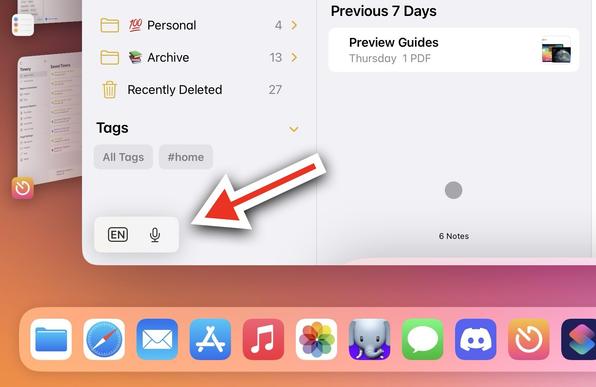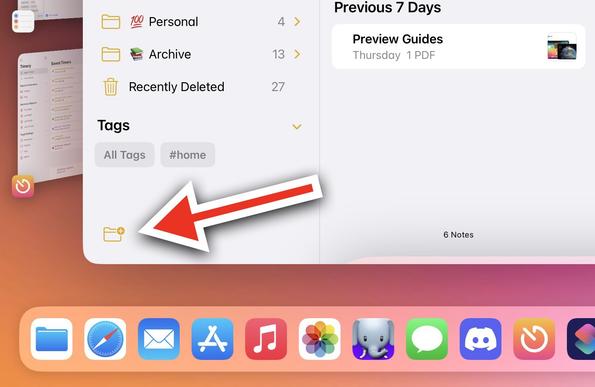
My personal crusade against the "minimized keyboard accessory" control for iPadOS continues.

Today's example: I wanted to create a new folder in the Notes app, but I couldn't because that thing was covering the button. 😡

( friends: FB12451439)

"Just move it to the other side of the screen"

I did. And guess what: the minimized control just covered the Send button for the Messages composer.

This UI element needs to go. It's a bad idea, badly realized for the past year. Surely Apple can come up with something better than this.

One year later. New iPadOS. This thing is still here. 🫠
@viticci Apple just hates the iPad at this point

@viticci

You know, I was really hoping for ipadOS to get some meaningful systemic improvementents; even if nothing like a ‘Mac Mode’.

Now I feel like charlie brown and the football.

@viticci On the other hand, the floating suggestion window in VisionOS when using an external keyboard that was always in the way in VisionOS 1 now behaves properly in VisionOS 2.
@viticci “come back next year with our powerful M5 chip and wait for iPadOS19 to disappoint again🫠”
@viticci I am really frustrated about that button. I looked for ways to disable it in iPadOS 17, but have had no luck. Guess it’s not possible, or hidden away in a developer flag at best.
@viticci Or minimize to a smaller element. I understand them not wanting to kill it off entirely. Possibly make it smarter to avoid any CTAs underneath it too?

@viticci Woah, it took me a second to realize this was an iPadOS-in-Stage-Manager screenshot, not a macOS screenshot!

Interesting how this UI isn’t needed on the Mac, though, where even if you do turn it on, it’s hidden in the Menu Bar.

@viticci And there are no QuickType suggestions! In the early 16 betas, there was a floating QuickType bar in the center of an app window. Way more useful and it didn’t get in the way of anything, I can’t understand why they removed it
@viticci A sibling to Fitts Law is Farts Law where a floater will perpetually cover UI in 50% of applications 100% of the time
@viticci I know there’s keyboard shortcuts for dictation. Is there keyboard shortcut for changing the keyboard language?
@ChrisLawley @viticci You can configure caps lock to do this.
@ChrisLawley @viticci Ctrl+Space changes the language.
@ChrisLawley @viticci
Yes, if I understand your question correctly; the globe key. I type in in two languages and that is how I make the switch.

@viticci Same happens to me when in LinkedIn app and want to message. The Send button is covered, and I always forced to fiddle with that element to figure out a way of hitting the send button when trying to send a msg over LinkedIn.

Surely Apple must come up with something better!

@viticci The number of people using an iPad/KB *and* that care about this is probably not huge. I never thought about the issue, and I'm a heavy iPad/KB user. Not saying it's right, just maybe not a priority for finite engineering resources.
@viticci Ugh, yeah. I hate this thing too, super annoying.
@viticci In my experience moving it also randomly breaks the layout in some apps, requiring a restart. Incredibly frustrating. Happened for ages in Discord, but I think it was recently fixed.

@viticci Oh yeah... I don't really understand what was wrong with previous „touchbar-like" full width keyboard bar? yeah, it took a little bit of vertical space, but it was SOLID.

If they could improve keyboards on iPads, I would also enlarge small "floating" keyboard - why is it so small while we have so much space on the iPad? It could use „iPhone Plus" layout… 🤔

@viticci Yeap, this is something I run into every day. It’s a baffling UX decision, especially on devices that are expected to use attached keyboards, like iPads Pro.
@viticci It’s irritating. Have you tried moving it as a workaround for taking the screenshot?
@nayanvemula it never moves for me
@viticci @nayanvemula you can move it, but it’s suuuuper finicky. I also filed a radar about it. FB12417394
@ellenich @viticci Yeah. It’s finicky if Stage Manager is on.
@viticci just expand the height of the Status Bar (unless on the Homescreen) and give us a menubar already! It would solve *so* many discoverability issues with gestures etc as well as giving people one place to find all of the functions
@viticci @robspodcastmug That’s the beta, right? I don’t get the same issue over here.
@viticci Can't believe this has been an issue for over a year now 😭

@viticci There should be a third icon on that thing that simply shift it to the top of the app out of the way.

Then if it’s in the way at the top, tap it again to move it back. Or maybe each press pushes it to a new corner.

It’s not an elegant solution but it’s at least something.

@viticci I’ve hated this thing forever, thank you for increasing visibility! 😝

@viticci Sign me up! I’ll me a lieutenant in that army.

I’ve never have need that control. It should just be completely removed.

@ChrisLawley @viticci I'll join as well. Super annoying. Haha
@viticci That seems to be a bug in Notes, as the button should respect the safe area bounds.
@viticci I I don't understand why you can't move it. I just tap and hold and—whee!
@viticci if only there was space outside of the application windows for it…
@viticci I guess I’m the minority that actually uses that feature. I have my iPad connected to a Bluetooth keyboard case and when it’s dark and I can’t see what I’m typing I’ll expand the keyboard on screen so I can still search
@viticci yes and moving it doesn’t really work most of the time.
@viticci yes! So much this!!!
I am using Mona for Mastodon and I have the “send” button on the bottom right corner.
On the iPad it is impossible to use :-/
@marcolodola @viticci you can move it. Just press and move it to the other lower-side corner. Still a pain, but you can get it out of the way.
@marcolodola @viticci you can move that send button to the top
@exchgr @viticci Thank you so much! From my iPad :-)
@viticci I regularly wrestle with this in Ulysses, where it is expanded with extra icons. It often floats in the middle of the screen, but slightly resizing the (stage manager) window puts it down into its favoured position at the bottom where it blocks even more of the UI.
@viticci I’ve been seeing it cover the send button in messages with Stage Manager.
@viticci I hate that floating box with a passion.
@viticci I hate it 🤬 I wish they’d give us an option to put that into the Dock with a context menu or something.
@viticci I find this thing useful, but I am also constantly trying to coax it either out of the way or into a useful mode. Definitely needs a lot of work.
@viticci move it to the other side of the screen
@viticci I just turn it off. Not the ideal solution, but it reduces more irritation than it causes
@viticci settings > general > keyboard > turn off "shortcuts"
@campbell Yeah, turning off just that doesn't do it for me. I have to turn off Predictive too, which I don't wanna do.