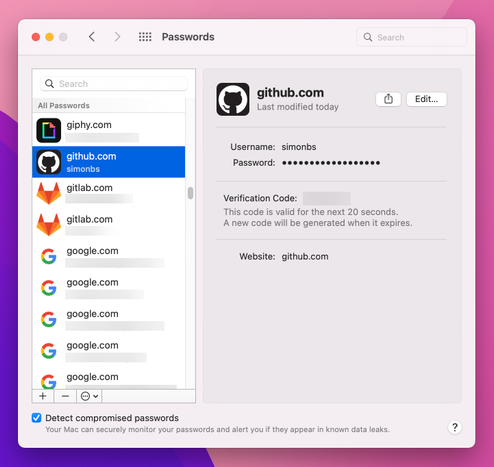
Yes, you heard that right! iOS 17 and macOS Sonoma add support for sharing passwords and passkeys in groups with friends and family.

- share passkeys, passwords, verification codes, and notes
- edits and updates seamlessly sync between group members
- end-to-end encrypted
- share with family, friends, and other close contacts
- the password manager that’s built in to iPhone, iPad, and Mac is free to use and easy to switch to :)

@rmondello Is the password manager a part of Settings?
@rmondello Nice. Can we also export and import passkeys?
@rmondello do we still need a shortcut to get into settings? Or is it standalone?

@rmondello that will be really useful for the “hey, in case I just die by surprise" file.

ASK ME HOW I KNOW

#old

@bynkii @rmondello You should probably use Digital Legacy for that
@nicolas17 @rmondello there’s a bit more to this kind of thing than that service provides. It’s not just passwords.
@rmondello I love everything about this – thank you! 🙌
@rmondello @siracusa any support in Windows? Chrome extension maybe?
How to use iCloud Keychain on Windows and how it differs from macOS and iOS | AppleInsider

Apple isn't limiting its Keychain password-storing features to the Mac, iPhone, and iPad. Here's how you can extend the iCloud Keychain, so you can use your stored passwords on a Windows PC.

AppleInsider
@rmondello @yertle @siracusa Hi @rmondello, have you tried Keychain on Windows? Although this article describes the main inconveniences, I feel it is a bit optimistic compared to what it is like to actually use it.
Regarding easy switch - impossible to import passwords on iOS and it is pretty clunky on a Mac (import CSV from other password manager in Chrome/Firefox, import from there to Safari).
https://www.igeeksblog.com/import-passwords-icloud-keychain-on-iphone-mac/
How to import passwords to iCloud Keychain on iPhone and Mac

To import passwords to iCloud Keychain o iPhone and Mac, 1. Manually import passwords to the iCloud Keychain 2. Import password to Safari from Chrome...

iGeeksBlog
@krushev @rmondello @siracusa thanks for the heads up. Is there any sort of API to make Windows apps to use the keychain? Or do we wait for Apple to potentially improve this? My current password manager is driving me crazy and I am motivated to switch
@yertle @rmondello @siracusa I doubt there is/will be an API. One can hope that one day Apple will improve the experience on Windows. Until then I’m using Dashlane. If you want to give it a try, this link gives you 6 months of premium features for free:
https://www.dashlane.com/en/im/3sGIxWN2e1AK
Claim your free Premium | Dashlane

Lucky you—someone referred you to Dashlane. Get started here and claim you 6 months of free Premium.

Dashlane
@rmondello would still love a separate app for easier access and Windows support…
@rmondello we just need a robust, easy to use migration tool to move from third party apps to the native password/passkey manager.
@rmondello 🙏🤌 I can switch now. 🥹
@rmondello Does it work with Firefox, and what about if I ever move from Mac to PC? Can we export them in some fashion to avoid lock-in in the future?
@prismon Apple’s password manager supports exporting passwords and verification codes to the pseudo-standard CSV format that password manager apps use.
@rmondello boom. You all are killing it with passkeys!!!!
@rmondello But it can’t be used on Windows or inside another browser, right?
How to use iCloud Keychain on Windows and how it differs from macOS and iOS | AppleInsider

Apple isn't limiting its Keychain password-storing features to the Mac, iPhone, and iPad. Here's how you can extend the iCloud Keychain, so you can use your stored passwords on a Windows PC.

AppleInsider
@rmondello The only thing I'm missing is the Edge/Chrome extension working on macOS.

@rmondello very excited to switch everyone.

I’ll ask my questions later in the cycle 😉

@rmondello does this require Family sharing? Or could I use it at work instead of LastPass?
@Jon889 It does not require family sharing.
@Jon889 @rmondello So that's the new GroupKit thing I spotted? 😉
@rmondello And Autofill verification codes received in Mail!! Yes!!!
@rmondello this was one of the best features! 🤩

@rmondello

"the password manager that’s built in to iPhone, iPad, and Mac is free to use and easy to switch to"

True, but that won't get you very far if a family member or other contact prefers to use Android or Windows or Linux.

For all of those, 1Password is still viable.

@cstross @rmondello For Windows it's actually not so bad, because they have a browser extension for it there. Now, they they don't allow said browser extension to work on Chrome-on-Mac is very product-cynicism-driven behavior...
@rmondello Just needs a chrome/firefox extension now for macOS. 🤞
@rmondello That is amazing. Thanks for all your hard work!
@rmondello I wish it were an app, but I’ll use your shortcut for another year.
@rmondello @siracusa Unfortunately the only thing missing is a standalone password app. A great step forward though.
@rmondello Firefox extension would be great!
@rmondello can you export from 1P into iCloud Keychain?
Moving from 1Password to iCloud Keychain

Here's how to easily move your passwords from 1Password to iCloud Keychain

Simon B. Støvring
@rmondello @chrisatzinger One bit that scares me to even ask…is there a path for importing passwords from a given vault into a give password group? My shared family vault has 273 items and my personal one has 380. That's a lot of passwords to move to a shared group one by one.
@rmondello 💯 this is awesome!!!! Thank you!
@rmondello Nice! One question: do they show up in the dedicated Keychain app on the Mac?

@rmondello So third-party password manager support is postponed to iOS 18? Will it ever be worked on?

Google at least adds it in Android 14 in September, already in beta (even though fragmentation sadly means it won't reach wide adoption before a while)

@tbroyer What exactly are you asking for? There are some very powerful enhancements to Credential Provider Extensions this year, including passkey integration, but I just haven't talked about them yet.

@rmondello Oh that's great news! (and sorry for the possibly snarky tone of my previous message)

(disclosure: I don't use or even develop for Apple devices, so I presume those extensions are what would allow 1Password, Bitwarden et al. to manage your passkeys in addition to your passwords? Do I understand that terminology right?)

@rmondello This is pretty awesome. Still wish passwords weren’t buried in settings. Sadly for me though, I’m this mixed OS family, I’ve gotta keep trucking on with 1Password.
@rmondello I struggle not to feel a bit cynical about this. As Apple keeps gobbling up categories of apps that have some kind of working business around it (journaling, passwords, …) all it does is making those alternatives more expensive for its users. In the end, everyone will have to use the same bland version that has to work for millions of users and alternatives get expensive and less secure.
@rmondello Thank you! This is so awesome.
@rmondello please make an app for passwords. Not blurried in settings
@rmondello Why would anybody want to do that?
@RodInBoise Let’s say you’re married and want both partners to be able to pay the bills for a shared family account.

@rmondello I think it’s pretty hard to switch to Apple password manger. I don’t think there is a way to do a large import.

Any tips?