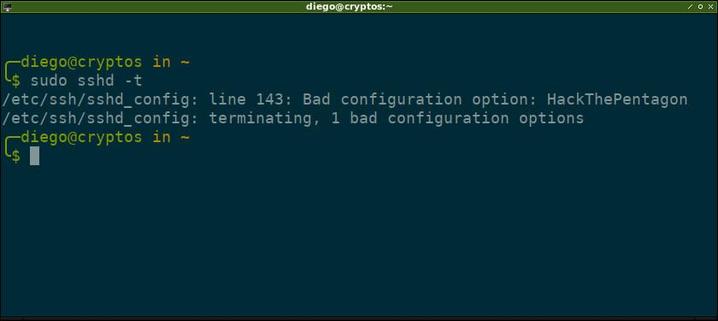
Claramente no todo se puede hacer con #SSH 😜

Acá probando "sudo sshd -t" para verificar la sintaxis del archivo de configuración del servidor.

Se viene nuevo contenido en #JuncoTIC, se nota? 😉

#gnu #linux #openssh #sshd #humor #lol

Once there was https://blog.stribik.technology/2015/01/04/secure-secure-shell.html, which was fine. Now there is https://infosec.mozilla.org/guidelines/openssh, which doesn't include a date of the last update* (except perhaps the copyright 2017).

Where can I find current recommended SSH settings, with post-quantum and stuff?

* Oh, how I loathe websites that don't add the dates of creation and/or last update!

#ssh #sshd #sshd_config

Secure Secure Shell

No ads, no tracking. Ever.<br/> <strong>blog.stribik.technology</strong> is completely static, without cookies or javascript.<br/> <strong>comments.stribik.technology</strong> uses javascript and local storage, it's loaded when you click

找了个时间优化了服务器便利性和“安全性”

1. Termius访问
Termius生成三个密钥分配给三台服务器
export到~/.ssh/authorized_keys
检查authorized_keys内容正确
测试密钥&无密码登录

2. 配置ufw
sudo ufw default deny incoming
sudo ufw default allow outgoing
sudo ufw allow http
sudo ufw allow https
sudo ufw allow 特殊端口/tcp
sudo ufw enable
sudo ufw status verbose

3. 配置fail2ban
sudo nano /etc/fail2ban/jail.local
[DEFAULT]
bantime = 1h
findtime = 10m
maxretry = 5
banaction = ufw
ignoreip = 127.0.0.1/8 ::1 X Y Z
[sshd]
enabled = true
port = 特殊端口
backend = systemd

sudo apt update && sudo apt install python3-systemd -y
sudo systemctl enable --now fail2ban
sudo systemctl restart fail2ban
sudo fail2ban-client status sshd

3. 配置sshd_config
sudo nano /etc/ssh/sshd_config
Port 特殊端口
PermitRootLogin no
PubkeyAuthentication yes
PasswordAuthentication no

sudo sshd -t
sudo systemctl restart ssh

4. 更改hostname
sudo hostnamectl set-hostname xxx
sudo nano /etc/hosts
修改127.0.1.1 后主机名为xxx
hostnamectl status

5. 配置互通
ssh-keygen -t ed25519 -C "from_$(hostname)" -N "" -f ~/.ssh/id_ed25519
cat id_ed25519.pub
nano ~/.ssh/authorized_keys
一共三行,Termius pub、其他两台服务器的pub

6. 配置Alias
nano ~/.bashrc
alias nc='ssh -p 特殊端口 jay@ipX'
alias cc='ssh -p 特殊端口 jay@ipY'
alias hd='ssh -p 特殊端口 jay@ipZ'
source ~/.bashrc
nc (netcup)
cc (clawcloud)
hd (hostdzire)
或者
nano ~/.ssh/config
Host nc
HostName X
Port 特殊端口
User jay
Host cc
HostName Y
Port 特殊端口
User jay
Host hd
HostName Z
Port 特殊端口
User jay
ssh nc
ssh cc
ssh hd
还可以加上“ProxyJump cc”连 xxx 之前先跳到 cc

#ssh #sshd #pub #alias #ProxyJump #authorized_keys #termius #ufw #fail2ban

As you can see the build process is smooth, the execution is blazingly fast. What more could I ask for?

https://smolbsd.org/

#programming #technology #BSD #netBSD #metaOS #microVM #networking #qemu #host #bmake #curl #sshd #Linux

The mighty world of BSD

Playing with again smolBSD, a fantastic metaOS system that I talked about a few weeks ago.
I'm a newbie, a greenhorn, when it comes to meta-operating systems built on top of NetBSD.

I am very eager to learn by doing, making mistakes in the process, correcting and feel the warmth of the BSD community, who is happy to correct, esp when I show that I read the docs after making the mistakes

The journey is fantastic, the learning process is fun. microVM's are amazing. I've registered 11ms boot times on this small machine with a few CPU cores (and 40GB RAM). The fun is endless

#programming #technology #BSD #netBSD #metaOS #microVM #networking #qemu #host #bmake #curl #sshd #Linux

https://smolbsd.org/

When configuring #sshd is there a security disadvantage of explicitly allowing pty if the command is restricted. Usecase: a restricted application for user interaction. Think TUI or git shell.

Monitoring my ssh connections on the SBC Pi5

the command used is this fuction

`function psgrep() { ps axuf | grep -v grep | grep "$@" -i --color=auto; }`

#networking #sshd #ssh #ps #grep #psgrep #OpenSource #POSIX

I've just had a nice experience playing with raspberry connect. Both ssh and vnc work smoothly

https://connect.raspberrypi.com/devices

#sshd #ssh #vnc #realvnc

#RaspberryPi #Pi5 #Debian #Linux #OpenSource #POSIX #micro #HDMI #Ventoy #ISO #manager #POST #microSD #ARM

Some how I am very envious of the 60MB RAM footprint while booting into a #linode #vps. The best I could get onto my #homelab is 300MB usage on a #Ubuntu cloud image. This is unfortunately the same as my desktop #ArchLinux with #KDE running.

The Ubuntu server image idled at 600MB RAM usage with #docker & #sshd. The culprits using most ram are #snapd & #multipathd.

This how a failed GEOM Gate device in a #zfs mirror looks like after a ungraceful shutdown. The load on my 15+ year old laptop was too high I guess. #sshd suddenly logged me out after like 2 seconds, I couldn’t even login directly in front of the laptop. Console messages along the lines “jid0 couldn’t reclaim memory”. Had 3 jails, 2 VMs and a deduped ZFS pool running. Let’s see if I can keep this running if the Win7 VM’s memory is halved. Perhaps it is worth having a look at rctl…